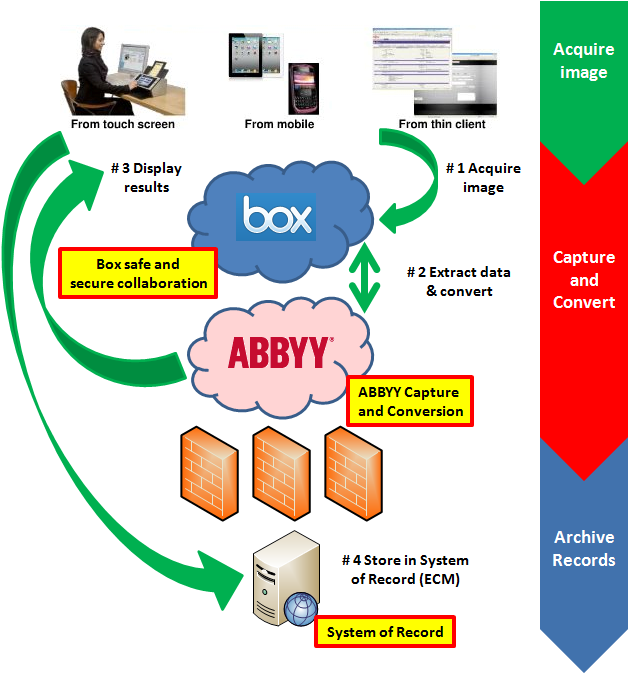
Use Case: Enterprise Content Management (ECM) systems, or probably a better description, Systems of Record have a long heritage of providing niche functionality that allows organizations to effective access via search, securely retain and destroy with retention schedules and enforce business policy with governance rules. Your organization desires to utilize all the benefits of the System of Record, yet you also want to encourage collaboration among your users because you know there are many business processes that involve sharing of information on a particular piece of content before it needs to officially enter the ECM as a “record” pharmacieviagra.com. The best solution to offer both a solid ECM solution as well as a highly collaborative environment is to use Box outside of your corporate firewall to enable users to efficiently share information, then once the content needs to enter the ECM you can either have the ECM system monitor a watched folder and bring it in, or you can have your users declare a record and push it immediately into the SOR.
Category: Cloud
The world’s largest scanning device event ever – Dreamforce 2012
If you had to select from the list below what the world’s largest gathering of scanning technology would be, what would be your guess?
- The AIIM conference
- The ARMA conference
- The CES tradeshow
- The Macworld conference
- None of the above
The answer is not as obvious as most of us would have guessed such as the AIIM conference. After all, AIIM is known as a leading organization in ‘image management’ so of course this would be the world’s largest collection of scanning devices ever. The correct answer is “None of the above”. I would strongly argue, and have plenty of evidence, that Salesforce.com’s recent Dreamforce 2012 conference in San Francisco was by far-and-away the largest collection of scanning technology to ever be assembled at one conference. Specifically I’m referring to the number of camera-enabled devices at this conference and creating images from smart phones instead of document feed paper scanners. There were 90,000 registered attendees and each attendee probably averaged two devices whether they were iPhone’s, Andriod’s, iPads, Galaxy’s or whatever. These devices were in abundance, that’s for sure!
Therefore, conservative estimates of around 180,000 camera-enabled mobile devices plus all the devices in the vendor’s booths themselves probably puts the number of “capture” devices at around 200,000! This is a remarkable opportunity to leverage the fact that most of the devices these days include high-quality cameras.
Of course I’m not talking about large production-type scanners typically seen at the annual AIIM conference where you would capture a stack of 100 or 500 pages at a single time, for example. I’m talking about ‘transactional’ capture where the use case is to capture one, or just a few, documents at a time.
Education and awareness – Old habits die hard
Even with all these devices readily available to all attendees, and all this revolutionary software on display I witnessed utter failure, not because any of these people or technologies were bad, but because people were not aware of the incredible advances in Mobile Data Capture. Let me clearly explain what I mean by utter failure with specific examples.
1. Mobile Data Capture Use Case # 1: Business Card with recognition on device
First, I had several people hand me their business cards. Why? Why not just take a picture of the card and automatically put in to Salesforce as a contact? Yes, the technology does exist!
2. Mobile Data Capture Use Case # 2: Marketing materials with recognition hosted
The next utter failure was when I was handed some marketing materials. What typically happens with these items? That’s right; they often get filed right into the circular file cabinet (a.k.a. trash bin) to never be found again. Why not just snap a photo with a smart phone and have the document made into a fully Searchable PDF image and then stored in some system? Then I can quickly, and easily, retrieve it in the future based on some keyword related to the material that I was looking for. This functionality is not only very useful for retrieval purposes but also general organizational purposes. For example, at a typical tradeshow you will meet many people and get introduced to new companies that you probably hadn’t known of before. In these cases you will most likely only remember something vague about the company, person and/or product but not the actual name of the person, company or product. Therefore, you can easily search for a term such as “consulting” to retrieve all the documents with that particular word contained in them.
3. Mobile Capture Use Case # 3: Batching and document collections
Then one of the last utter failures I would like to share is a personal story but it just goes to illustrate that capture from mobile devices is not top-of-mind like it should be because the technology is so new. Like most of us returning to our offices after a business trip, we will have acquired various documents during our travels such as meal receipts, contracts or just environmental photos to save and share with our fellow colleagues. While the types of documents themselves could be vastly different, the collection of these documents will most likely have something similar such as the location or name of the event. In my case the similarity between these documents was ‘Dreamforce 2012’. So what I did was whip out my handy iPhone and snapped several photos at once to create a collection of documents. This was a very different user experience that I was used to where I would take a picture of one image, and then uploaded. Then take a picture of a second image, then uploaded, and repeat the process until I was finished. This was simply a horrible experience and I would delay getting this information saved electronically because I dreaded the time wasted doing this activity. With the ability to capture many images at once, it allowed me to get these images uploaded quickly without much effort at all. Next, since the documents were different sizes, I used the auto crop feature to automatically resize the images to the proper size. Then, to make my stored images really smart I added ‘tags’ so that I can type a search term such as ‘biz card’ and find all the business cards stored on my phone. I then had the option to send to a wide variety of popular cloud storage destinations, send via e-mail or even print.
Capture several items at once instead of one at a time. Greatly saves time when gathering a collection of related images. |
Auto binarization, auto cropping, page rotation and other useful features to create excellent image quality. |
Easily add tags, or metadata, to each image to make them searchable or better organized. Custom tags can be added at anytime. |
Your smart phone can now be a simple version of a mobile document management system with the ability to save collections of images on the phone itself. |
So the question begs, with this great capture technology literally at people’s fingertips why is it that we seem so naïve about this amazing technology? I think there probably are several viable reasons including, but not limited, to the following:
- Awareness that this type of technology exists in the first place. More education is needed.
- As a society we are on “mobile application overload” so we have a difficult time weeding through all the available applications and try and find the most useful ones. There’s an app for that!
- We are still in the early days of mobile application development. Companies rush to get an application to market first, then will gradually add business productivity capability such as mobile data capture.
- Use case scenarios need to be clearly defined and return on investment needs to definitively articulated.
Therefore if, as an industry, if we can provide more overall education and bring awareness to this type of technology, then the greater likelihood there is that everyone can benefit from the tremendous potential of Mobile Capture. When we truly consider all the great possibilities of using mobile devices to contribute content, instead of just purely information consumption, then we can absolutely achieve the next major milestone in achieving the ultimate in business efficiency.
Governance Gone! Wild!
 While to some the acronym, ‘GGW’ might conjure up beautiful visions of fancy tour buses traveling the country capturing everything in sight on video for the whole world to see (as long as you pay the $9.99 per DVD, or opt for the $19.99 for full-DVD collection, or get their online subscription for $9.95 per month — or whatever it costs), I have just witnessed a different version of ‘GGW’ that is anything but beautiful. In fact, ‘Governance Gone! Wild!’ is down-right scary!
I just attended several days of the Dreamforce 2012 conference in San Francisco and, as always, I was impressed with the innovation, which is clearly evident at these events. I was impressed with the creativity of all the Software as a Service (SaaS) applications available built upon the Force.com, heroku and/or other Salesforce platform services. There were apps for this, and apps for that, and apps that work with other apps, and integrated apps. In fact I’m on “app-overload” right now and tonight, instead of sweet sugar plums dancing through my head, I will most likely have a nightmare about all the possible lack of governance issues that are not being addressed in this quickly-evolving ‘cloud’ environment. It’s truly like the Wild West!
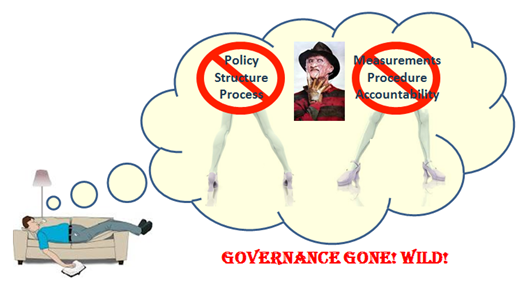

Yet, as I put myself in the shoes of the SaaS vendor the last thing I would want to do is possibly slow down the sales cycle by bringing up governance and organizational readiness topics such as policies, processes or people that wasn’t directly related to my particular technology. These topics are somewhat related to the technology but it’s more about the organizational readiness by the customers themselves. We must remember that these applications are promoting their solutions to enterprise organizations, not consumer. Therefore, I would like to give one specific example of what caused my “Governance Gone!” nightmare.
Wild!
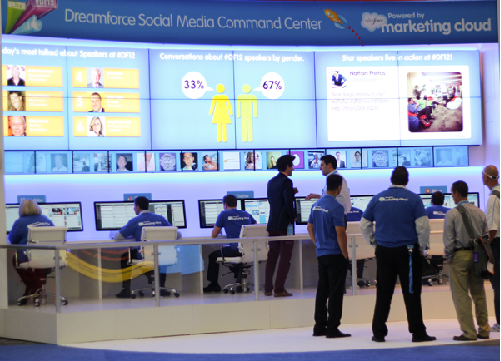
 As seen below in the photo below (not to the left), Salesforce.com introduced their new “marketing cloud”. At the Dreamforce conference they setup an example of the ‘Dreamforce Social Media Command Center’. They had a full-time agent at each of several work stations. Each of these work stations was monitoring a different social media feed. One each for Facebook, Chatter, Twitter, LinkedIn, YouTube and maybe even a few other social networks to provide an example of a Social Media Command Center and how this could be a reality within your particular organization. As I saw this incredible activity of feeds, tweets, #hashtags, likes, posts and other real-time social interaction – this is where it really struck me about Governance (or lack thereof in this scenario). It was Wild!
These are the types of things I was thinking to myself, not from a technology perspective itself, but rather ‘are these people considering the following types of items’ before going buck-wild to immediately implement this type of Command Center within their own organizations:
- People:
- Since these are mostly real-time conversations and, naturally, the business wants to represent themselves professionally, what type of special training will be required for this new type of social media command center operator?
- Policy:
- As we all know, social networks are filled with people that sometimes spew nasty, disgusting or plain hateful messages because they think they are completely anonymous to the world. In these cases what is the organizations policy about any responses, deletion of messages or any other action?
- Process:
- With this gluttony of electronic information overload from such a wide ranging variety of sources, in different formats and with such a diverse contextually meaning, what is the process to accurately analyze the data? After all, I would imagine that video-’gamers’ are quite active on these types of social networks and “rad”, “bad” or “bitchin’” don’t quite translate into the true meaning if you just consider the official dictionary definition of a word or phrase.
In summary, in our zeal to innovate and offer powerful, useful, as well as, truly remarkable technology, which is going to revolutionize the way we do business, we should not be in such a rush to not consider and overlook an organizations preparedness from a governance standpoint. Great technology is not always good enough. If your organization decides to not consider well-thought out governance plans then the “Governance Gone! Wild!” bus may be paying you a visit sooner than expected!

Capture … with Confidence
Prelude: I’ve included many screen prints in this post and there is a lot of detail that may be interesting to you. Click the thumbnail images for a larger view.
I wrote a story the other day about Frankie-the-Frustrated worker and his frustration dealing with the lack of automatic data entry in his daily work activities. In Frankie’s case I admittedly way over simplified the solution to illustrate the point that technology such as advanced data capture is a reality, yet can still be easy to use. In other words, we don’t have to sacrifice automation for a pleasant user experience or vice-versa. One of the nice AIIM commenter’s on the story rightfully pointed that Frankie would soon be known as Frankie-the-FUDer due to the fact without the all-important “data verification and/or validation” step in the process. Frankie would soon be Feared because of the Uncertainty, as well as, Doubted in the accuracy of data that he was contributing to his organizations business systems. This made me consider that maybe many of us haven’t seen advanced capture software capabilities in action or even know what sort of capabilities are possible with modern technology. Therefore, for this reason, I would like to provide a bit of a deeper drive into what makes Data Capture solutions highly effective and give you very specific details, with many screen prints, so that hopefully we can help Frankie to become Frankie-the-Fabulous worker that he desires to be.
There are several factors that contribute to a successful document capture solution. While each vendor’s exact terminology might vary a bit, the truth of the matter is that the ‘process’ of data capture is quite similar. If you carefully consider each step and how it can contribute to improving data accuracy and quality, you will recognize that there is quite a lot of moving parts to make this “magic” happen. The key point I would absolutely like to stress before this deeper drive into technology is this; so much of this process can be done automatically which is totally transparent to the user. I would like to detail a few techniques so that we can be aware of the technology available to make the user experience the best it can be. Once the system is configured for production then all the user has to do is basically capture images and verify data which translates directly into a very easy and simple experience for the users themselves.
The logic of Automatic Data Capture
The very first thing to do when considering designing an effective Data Capture solution has nothing to do with the technology itself. An absolute, must-do, critical step that you will hear from all the experienced professionals in the capture business is to gather as many document samples as you possibly can. Gather all the different types of documents you wish to capture such as invoices, agreements, surveys or whatever, but gather as much volume and as many varieties as you can. Also, do not just gather high quality original documents that someone might have just printed on a pristine piece of paper from the laser printer in the office. Gather the ones that that have been in filing cabinets for years and ones that have coffee stains with wrinkles. The idea is that you want documents that are going to represent a true production Data Capture environment.
Initial document analysis and index fields
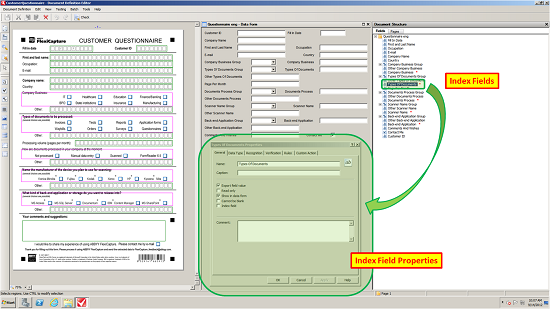
After gathering as many documents as you can then the first step in configuring the Data Capture solution is to import the sample documents. Scan them at 300 dots per inch (300 dpi) which is the optimal output resolution for automatic recognition accuracy. Next, you will want to run an initial document analysis on your documents. In this analysis the software will make its best guess on the structure of the documents. You should not expect that this analysis will be absolutely perfect but in many cases this step can do a good portion on settings up your solution that typically took a lot of time and effort. As seen in the screen print below (click the image to zoom) the software can automatically detect form fields such as “First and last name” and draws an extraction zone around this particular area. The software can also detect Groups such as the “Company Business” and automatically create index fields for all the available options in this group (i.e. “IT, Healthcare, Education”, etc.) So after the initial pass you will want to check each field and apply some logic to improve the accuracy of the data captured and there are many useful techniques as you will see below.
Useful tips and tricks to improve data capture accuracy

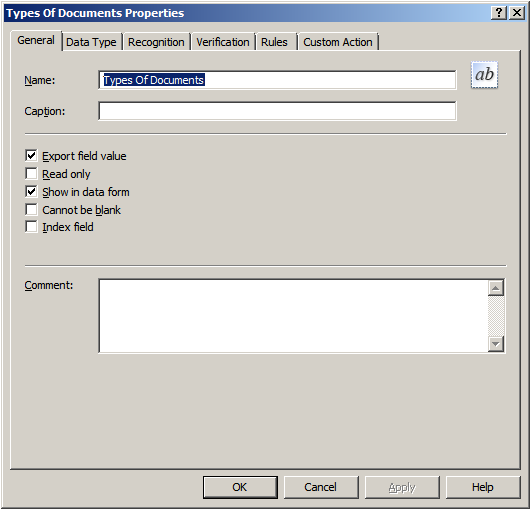 General General
From the General tab in your data capture application you can provide a useful field name for each individual field you wish to extract data. This configuration tab will allow you to decide such basic functionality such as if the field is Read Only or Cannot be blank. Also, you can decide whether to Export field value because sometimes you might wish to recognize some information such as a line item amount but do not wish to export the line item, just overall total amount. The most commonly used functionality is enabled by default. |
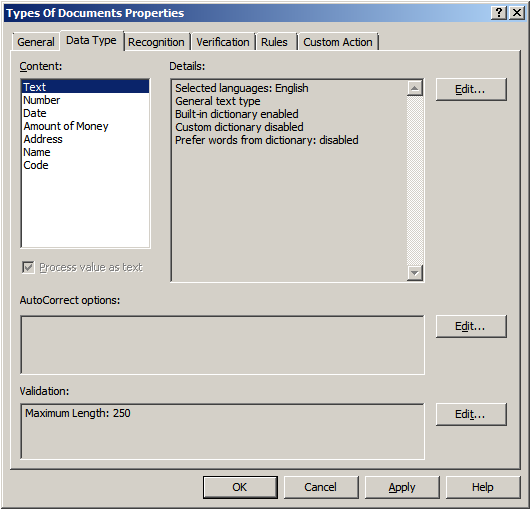 Data Type
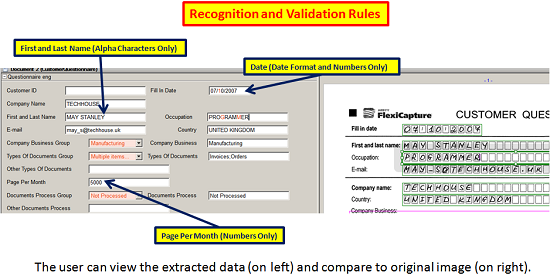
The Data Type configuration is an extremely valuable function to allow for field-level recognition accuracy. For example, if the field is a Number only field then you can enforce the recognition to only output numbers. Or if the field was an Amount of Money then you can enforce an output in the form of an amount. You can also add custom dictionaries and other useful validation rules
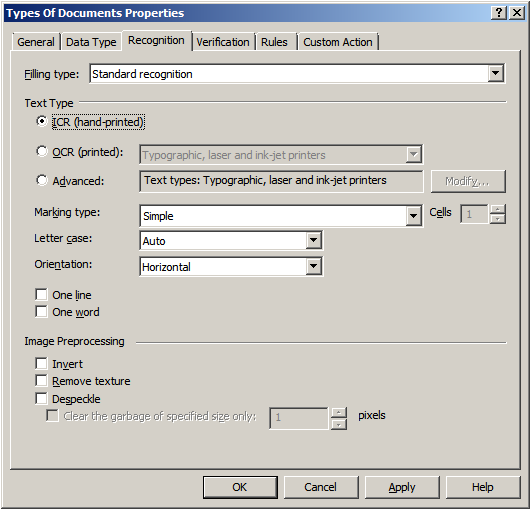 Recognition
This is the area were you would fine-tune character level accuracy. In the Recognition tab you can select which type of recognition you wish to perform on a certain field whether it might be Intelligent Character Recognition (ICR) for handwritten text, Optical Character Recognition (OCR) for machine printed text or even the font type. The more information that is known about your documents, and if you can apply that logic to your capture system, will make the overall accuracy much greater.
 Verification
While pure processing speed of getting images captured and recognized is important, the importance of uploading accurate data is often the most important consideration in a data capture solution. So, therefore in an effective data capture solution there is a “verification” step in the process where you can set certain character confidence thresholds. If these thresholds are not met then a human will view and/or correct the data, if needed.
 Rules
Rules
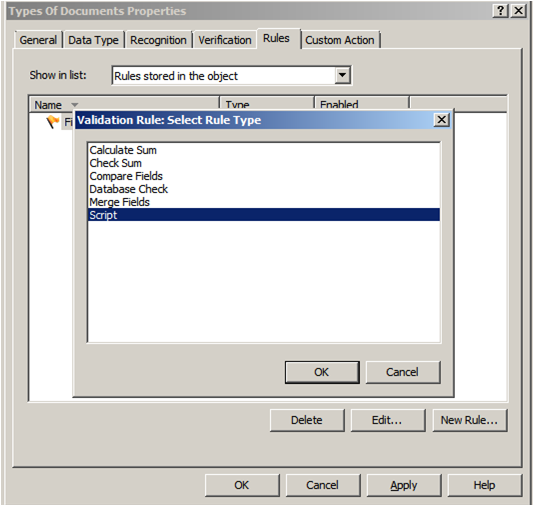
This is one of the most critical-steps in the data capture process. With Rules configuration options, this is where the Data Capture system starts to use logic, and lookups into other systems, to compare data fields for any contradictions in the data captured. For example, just imagine if a Social Security Number was captured incorrectly by one digit. The system can do a Database Check and look into a different system to check the SSN based on a different field such as Mailing Address. In this case if there was a mis-match then the user can easily and quickly correct the data before sending to the back-end repository. Another great example is to read line item amounts from an invoice and then use the Check Sum option to validate that the total amount is equal to all the line items combined. This is incredibly effective to catch any potential errors BEFORE they are committed to a system.
Custom Action
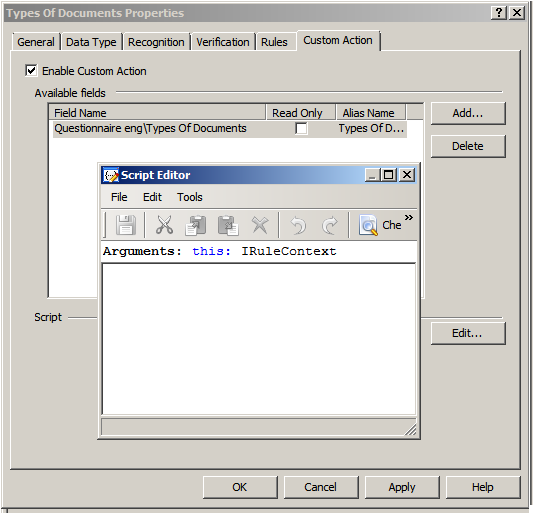
When standard capabilities or functions just aren’t enough, or if your business process dictates customization, there are options to incorporate custom scripts. User scripts are custom scripting rule triggered by the user when viewing a field during field verification or in the document editor. The script is triggered by clicking … to the right of the field value. To make the creation or modification of the scripts simple, there is a script editor available directly in the data capture configuration interface.
Putting it all together (Data Capture from the User Perspective)
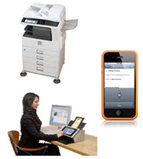 Now that we’ve taken a look at a few of the ways to improve the quality of data in your Data Capture solution, hopefully you can have a greater appreciation for how all the moving parts can make this type of system highly accurate. These configurations are typically setup by system administrators or persons with specialized training. However, what really drives adoption of a particular technology for mass appeal and high adoption rates is a pleasant user experience. So, therefore, what I would like to do is show, in a few screen prints, how simple all this advanced technology is to use from the User Perspective. Please note that the screen prints might vary depending for many factors including hardware capture device, processing/verification user interface design and/or the ultimate storage destination.
- Step # 1 – Capture images
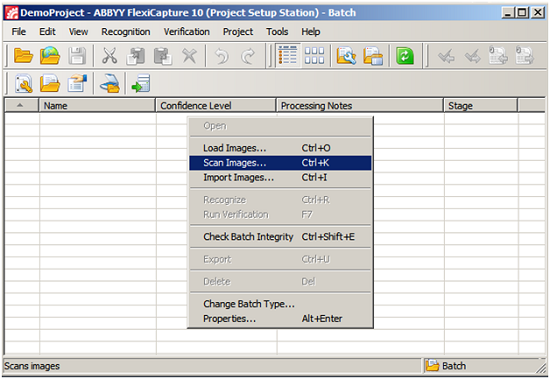
o This can be from a dedicated scanner, multifunction peripheral or even a mobile device with camera. In the screen print below this is the simple desktop capture interface. As you can see I can ‘Load Images’, ‘Scan Images’, ‘Import Images’ or the capture system can be configured to automatically process images from shared folders, FTP sites or other sources. So, you can just imagine that the Data Capture solution can be setup in a way that can process images from any device at any time. Again, making the user experience to contribute images very easy and accessible from anywhere.
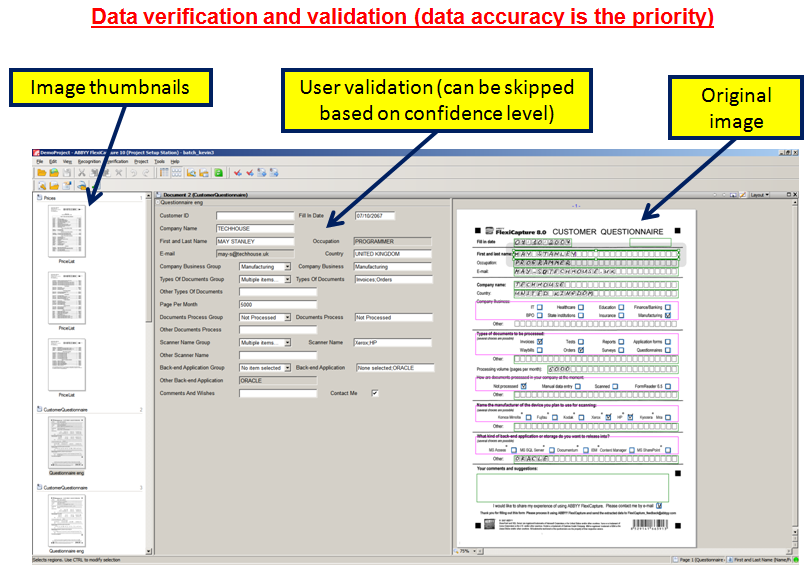
- Step # 2 – Verify data for accuracy
o After the first step of capturing the images themselves, the images are run through all the recognition rules, validation steps and/or database lookups to provide the highest quality of data possible on the first-pass. But, as I said earlier, it is not always possible to achieve absolute perfection for many reasons so you will want to have the user “verify” the results if the data did not meet a particular threshold of confidence or there was other exceptions. Please note that the user interface screen print below is from the desktop version of a verification station but you can imagine that this could just as easily have been optimized for other devices such as touch screen interfaces or even mobile devices.
- Step # 3 – Export to database
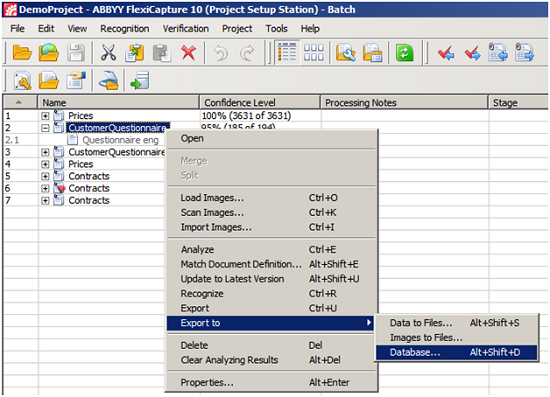
o Lastly, after the user has checked that all the extracted data is accurate then they can simply export the quality data to the database. Of course, these export results then can set off a whole series of workflow events based on what the back-end systems capabilities might be.
Confident data capture for everyone
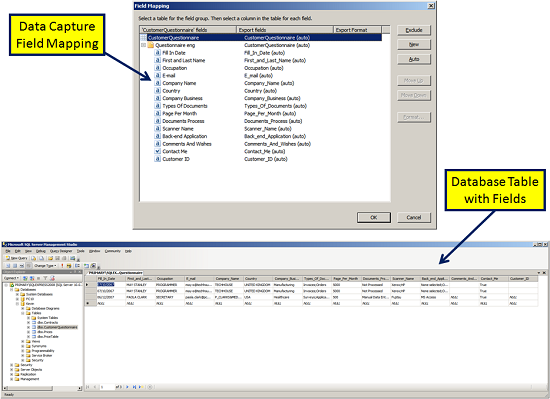
As I illustrated, Data Capture from the user perspective can be quite simple. There are many additional techniques and tricks that you can use but I wanted to cover some of the standard ways to achieve highly accurate Data Capture results. The end result is beautifully accurate, as well as useful, data in your database. This will give the organization a high level of confidence that adherence to business policy, enforcement of business rules, in addition to the users themselves trusting the system to be accurate when they are looking for information helps to create overall efficiency.
In summary, Data Capture has progressed to the point that it can nearly be totally automated but there are many variables involved that still make human “data verification and/or validation” necessary at certain times. The quality of data input it your system should be the priority, not the sheer volume. With a little planning and using modern tips and tricks to achieve highly accurate Data Capture results you can realize both benefits of accuracy and speed. Then Frankie-the-frustrated will truly be given the adequate tools to become Frankie-the-Fabulous to ‘Capture…with Confidence’.
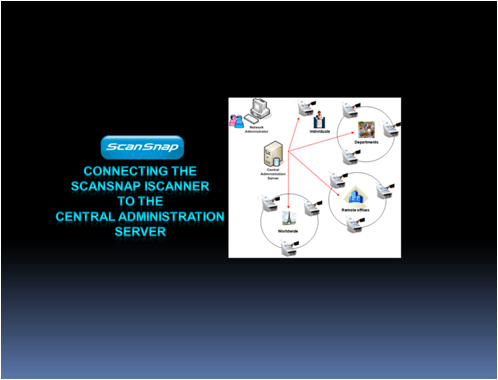
Central Administration Server software with the Fujitsu network-attached scanners
One of the really beneficial features of the Fujitsu network-attached scanners is the Central Administration Server (CAS) software that’s included with the devices. You can easily download the software from the scanners, install on a Windows server and have this great capability up and running in no time. Below is a hyperlink to a YouTube video that I scripted and narrated that highlights this handy feature. Enjoy!
Fujitsu network-attached scanner Central Administration Server software