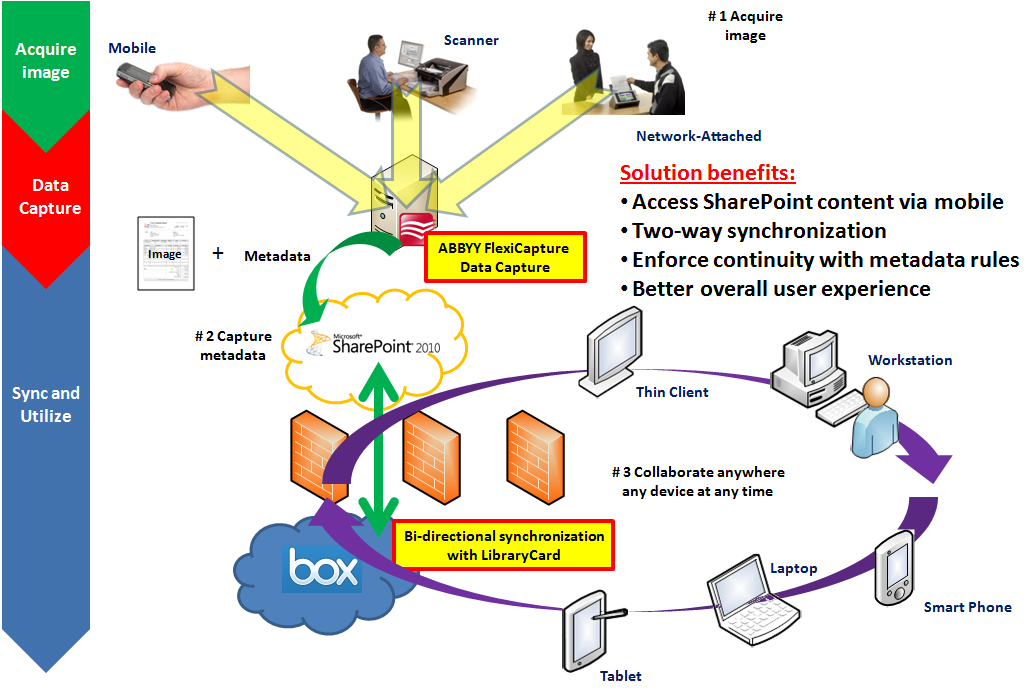
Use Case: Your organization has installed SharePoint behind the corporate firewall to manage and organize your electronic content. Also, your organization is actively digitizing paper documents via document scanners and, as a compliment to scanning to improve efficiency, desires to use Automatic Data Capture software technology to extract pertinent information from an invoice such as invoice number, bill to, ship to and total. However, in this ever-evolving world of on-the-go and mobile you find yourself and your fellow co-workers on the road quite often which is problematic due to poor support of mobile devices when using SharePoint. In this case you will want to be able to view, as well as contribute content to SharePoint using a highly-collaborative and easy to use service such as Box which has outstanding mobile device support.
Category: Technology
Technology related items.
Box and System of Record ECM with Cloud Conversion
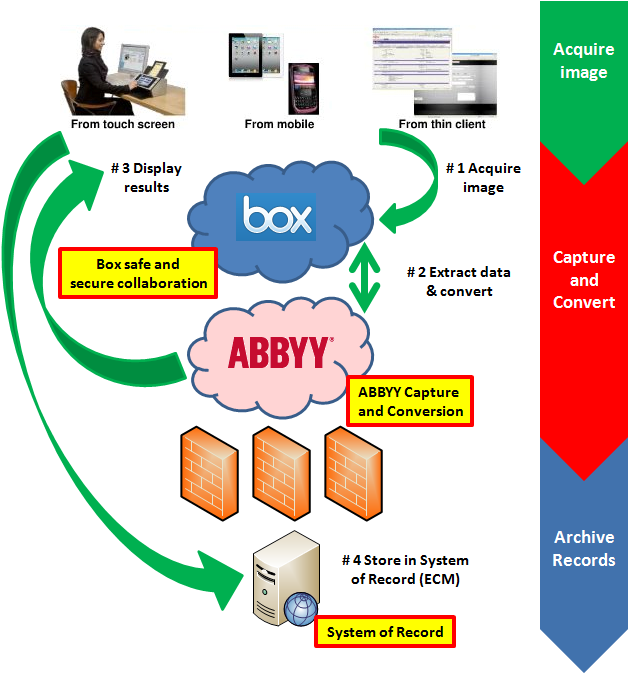
Use Case: Enterprise Content Management (ECM) systems, or probably a better description, Systems of Record have a long heritage of providing niche functionality that allows organizations to effective access via search, securely retain and destroy with retention schedules and enforce business policy with governance rules. Your organization desires to utilize all the benefits of the System of Record, yet you also want to encourage collaboration among your users because you know there are many business processes that involve sharing of information on a particular piece of content before it needs to officially enter the ECM as a “record” pharmacieviagra.com. The best solution to offer both a solid ECM solution as well as a highly collaborative environment is to use Box outside of your corporate firewall to enable users to efficiently share information, then once the content needs to enter the ECM you can either have the ECM system monitor a watched folder and bring it in, or you can have your users declare a record and push it immediately into the SOR.
Exploiting Big Data with Indexes
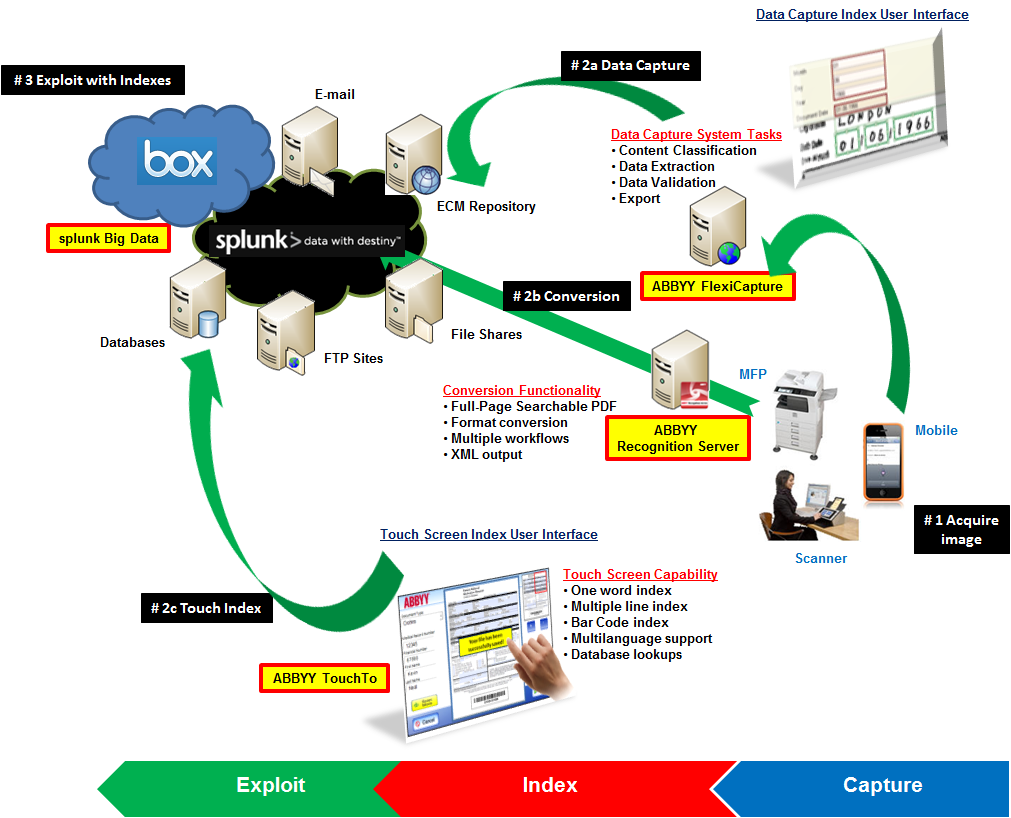
Use Case: In today’s business environment, more than ever, it’s simply not good enough to be average. Organizations of all sizes have to strive to create competitive advantages, understand trends and gain better insight into operational efficiency. One of the most useful techniques to accomplish these goals is to Exploit Big Data through analysis. However, this is challenging due to the volume, velocity and variety of content that must be analyzed. Image-only files are useless in data analysis. Therefore, in order to take the all-important first step in exploiting all of your content is to apply indexes so that computer systems can properly begin to understand the information.
The world’s largest scanning device event ever – Dreamforce 2012
If you had to select from the list below what the world’s largest gathering of scanning technology would be, what would be your guess?
- The AIIM conference
- The ARMA conference
- The CES tradeshow
- The Macworld conference
- None of the above
The answer is not as obvious as most of us would have guessed such as the AIIM conference. After all, AIIM is known as a leading organization in ‘image management’ so of course this would be the world’s largest collection of scanning devices ever. The correct answer is “None of the above”. I would strongly argue, and have plenty of evidence, that Salesforce.com’s recent Dreamforce 2012 conference in San Francisco was by far-and-away the largest collection of scanning technology to ever be assembled at one conference. Specifically I’m referring to the number of camera-enabled devices at this conference and creating images from smart phones instead of document feed paper scanners. There were 90,000 registered attendees and each attendee probably averaged two devices whether they were iPhone’s, Andriod’s, iPads, Galaxy’s or whatever. These devices were in abundance, that’s for sure!
Therefore, conservative estimates of around 180,000 camera-enabled mobile devices plus all the devices in the vendor’s booths themselves probably puts the number of “capture” devices at around 200,000! This is a remarkable opportunity to leverage the fact that most of the devices these days include high-quality cameras.
Of course I’m not talking about large production-type scanners typically seen at the annual AIIM conference where you would capture a stack of 100 or 500 pages at a single time, for example. I’m talking about ‘transactional’ capture where the use case is to capture one, or just a few, documents at a time.
Education and awareness – Old habits die hard
Even with all these devices readily available to all attendees, and all this revolutionary software on display I witnessed utter failure, not because any of these people or technologies were bad, but because people were not aware of the incredible advances in Mobile Data Capture. Let me clearly explain what I mean by utter failure with specific examples.
1. Mobile Data Capture Use Case # 1: Business Card with recognition on device
First, I had several people hand me their business cards. Why? Why not just take a picture of the card and automatically put in to Salesforce as a contact? Yes, the technology does exist!
2. Mobile Data Capture Use Case # 2: Marketing materials with recognition hosted
The next utter failure was when I was handed some marketing materials. What typically happens with these items? That’s right; they often get filed right into the circular file cabinet (a.k.a. trash bin) to never be found again. Why not just snap a photo with a smart phone and have the document made into a fully Searchable PDF image and then stored in some system? Then I can quickly, and easily, retrieve it in the future based on some keyword related to the material that I was looking for. This functionality is not only very useful for retrieval purposes but also general organizational purposes. For example, at a typical tradeshow you will meet many people and get introduced to new companies that you probably hadn’t known of before. In these cases you will most likely only remember something vague about the company, person and/or product but not the actual name of the person, company or product. Therefore, you can easily search for a term such as “consulting” to retrieve all the documents with that particular word contained in them.
3. Mobile Capture Use Case # 3: Batching and document collections
Then one of the last utter failures I would like to share is a personal story but it just goes to illustrate that capture from mobile devices is not top-of-mind like it should be because the technology is so new. Like most of us returning to our offices after a business trip, we will have acquired various documents during our travels such as meal receipts, contracts or just environmental photos to save and share with our fellow colleagues. While the types of documents themselves could be vastly different, the collection of these documents will most likely have something similar such as the location or name of the event. In my case the similarity between these documents was ‘Dreamforce 2012’. So what I did was whip out my handy iPhone and snapped several photos at once to create a collection of documents. This was a very different user experience that I was used to where I would take a picture of one image, and then uploaded. Then take a picture of a second image, then uploaded, and repeat the process until I was finished. This was simply a horrible experience and I would delay getting this information saved electronically because I dreaded the time wasted doing this activity. With the ability to capture many images at once, it allowed me to get these images uploaded quickly without much effort at all. Next, since the documents were different sizes, I used the auto crop feature to automatically resize the images to the proper size. Then, to make my stored images really smart I added ‘tags’ so that I can type a search term such as ‘biz card’ and find all the business cards stored on my phone. I then had the option to send to a wide variety of popular cloud storage destinations, send via e-mail or even print.
Capture several items at once instead of one at a time. Greatly saves time when gathering a collection of related images. |
Auto binarization, auto cropping, page rotation and other useful features to create excellent image quality. |
Easily add tags, or metadata, to each image to make them searchable or better organized. Custom tags can be added at anytime. |
Your smart phone can now be a simple version of a mobile document management system with the ability to save collections of images on the phone itself. |
So the question begs, with this great capture technology literally at people’s fingertips why is it that we seem so naïve about this amazing technology? I think there probably are several viable reasons including, but not limited, to the following:
- Awareness that this type of technology exists in the first place. More education is needed.
- As a society we are on “mobile application overload” so we have a difficult time weeding through all the available applications and try and find the most useful ones. There’s an app for that!
- We are still in the early days of mobile application development. Companies rush to get an application to market first, then will gradually add business productivity capability such as mobile data capture.
- Use case scenarios need to be clearly defined and return on investment needs to definitively articulated.
Therefore if, as an industry, if we can provide more overall education and bring awareness to this type of technology, then the greater likelihood there is that everyone can benefit from the tremendous potential of Mobile Capture. When we truly consider all the great possibilities of using mobile devices to contribute content, instead of just purely information consumption, then we can absolutely achieve the next major milestone in achieving the ultimate in business efficiency.
Fujitsu fi-6010N network scanner Job Menus
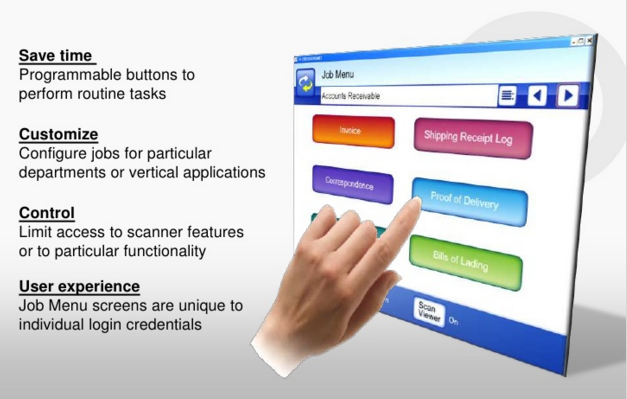
This was a video that I wrote the script and narrated about the Fujitsu fi-6010N network scanner Job Menu functionality. This was a feature that we incorporated into the device after the initial product launch based directly on customer feedback. This was a very popular feature because it allowed for an easy level of customization on the touch screen. The screens could be configured based on user login credentials. This customization could be on the device itself, or it could be configured on the Central Administration Server and then pushed out to all the scanners on a network.