The Opportunity of Network Scanning for resellers

A question and answer session on the topic of Network Scanning:

Q. Is network scanning currently taking any particular market “by storm” when compared to other scanning options?

A. Network scanning is being embraced and deployed in a range of vertical markets. While there seems to be a healthy balance of markets deploying network scanners, we’re noticing that the traditional markets that have invested more in scanning and enterprise content management, like Healthcare, Finance, Accounting, Legal and Transportation, are also quicker to the draw when it comes to implementing network scanning solutions. This is simply because of the network infrastructure they already have in place. However, we’re still seeing a strong adoption rate across many vertical markets to assist in business process management securely in a controlled environment and to achieve improved efficiency.

Q. What new features and functionalities (if any) are being added to network scanners that make it an appealing option?

A. Some of the key features of network scanning devices that are making them so appealing are based on the “user experience”. True adoption of a technology begins to gain momentum when the actual users of technology enjoy the experience of using a particular product. In the case of network scanners specifically, users overwhelming comment that a large touch screen display makes them comfortable with using a device. The learning-curve is minimal with a bright touch screen display which encourages either additional usage by a particular person or encourages usage by additional persons in a departmental environment because there is no training involved. The user-friendly touch screen is complimented by a full 101-keyboard for additional ease of use. Users can simply scan images then enter an e-mail address and type other information in the subject or body of the e-mail message. In addition, software integration with back-end Enterprise Content Management (ECM) and Line of Business (LOB) is certainly creating additional appeal for network scanners. Now, users and IT departments have the option to either use standard functionality such as Scan to Folder, Scan to Fax, Scan to Print or Scan to E-mail, but they also have the option to Scan, Index and Store directly to an ECM repository with the properly Add-In Module installed.

Q. Why would VARs want to offer network scanners as a part of a comprehensive ECM strategy? Please explain your answer.

A. VARs can absolutely capitalize on the explosive growth of the network scanner market. As part of an ECM strategy, a network scanner is just one piece of the solution, although a very important piece. The quality of the image is vital to other complimentary technical processes directly related to the electronic document. Capture techniques such as Bar Code Recognition, Searchable PDF creation or Optical Character Recognition (OCR) accuracy are either greatly enhanced or can possibly cause additional manual correction which is directly a cause and affect specific to image quality. Value-Added Resellers in the ECM market, in particular, understand the importance of the quality of a Dedicated Use Device such as a network scanner in comparison to other network scanning peripherals available in the market. Through a thorough understanding of the quality differences between dedicated scanning devices from other multifunction devices, a VAR in the ECM space has already set themselves apart from their competitors and they can leverage this expertise into the network scanner market. There are many appealing factors for VARs to offer network scanners as a part of a comprehensive ECM strategy. First, quality network scanners are easy to deploy. With a basic understanding of network concepts which involve things as straight-forward as knowing IP addresses or host names of servers, either the VAR or even end-customer themselves can have a network scanner up and running in literally minutes. Second, quality network scanners are easy to manage, maintain and update. Software utilities such as ‘Network Scanner Admin Tools’ allow authorized persons to access the network scanner remotely to view usage, update software or even change system configurations. With a traditional desktop scanning workstation this is not easily done or would require additional software of configuration. In short, network scanners are easy to deploy, simple to use and require very little maintenance.

Q. Is network scanning more suited to any particular market? Is it excluded from any particular market?

A. Anywhere paper exists is an opportunity for network scanning – there is no particular market that cannot benefit from this technology. Network scanning helps accelerate all the traditional benefits found in scanning and ECM solutions, including enhanced business processes by eliminating lost or misplaced documents, decreased costs by enabling quick business process because of minimal human labor involvement, increased revenue for certain vertical markets such as being able to take advantage of pre-pay discounts in an invoice processing application, improved environmental consciousness by eliminating paper and thus our reliance on trees.

Q. What are the specific advantages (and disadvantages) to selling network scanners?

A. Selling network scanners provides opportunities for VARs and System Integrators to engage their customers in a discussion about their business processes. Resellers should embrace this opportunity to work closely with the end-customer to identify areas to improve their overall business operation. By thoroughly evaluating and taking inventory of the customer’s existing network infrastructure it is very possible to find either missing components such as servers and server software that may be needed to enhance the system. In addition, there is a possibility to offer the customers either consulting or professional services in order to properly implement the right solution for their specific business. Selling network scanners should not be considered a “cut and run” business proposition. VARs that understand this will be extremely successful. One of the potential disadvantages involved is if your network scanner itself is difficult to configure then the labor costs of just getting the device communicating on the network could far outweigh the potential profit involved in a particular installation. Network scanners present a wide range of functionalities and options as compared to simple stand-alone scanners, therefore understanding the capabilities involves a well-rounded understanding of network concepts and not just document scanning and capture. Having a solid understanding of document capture as a foundation will serve those who wish to embrace network scanners

Q. What are some common pitfalls VARs run into when selling/implementing network scanners?

A. I think a common misconception among VARs is that since a network scanner is a complete solution there isn’t an opportunity for add-on sales. In other words, since a network scanning device includes embedded software with scanning functionality there is no computer to sell or capture software to install or configure. While this may sound like it’s limiting the VARs ability to maximize their sales opportunity, I think just the opposite is true if you approach opportunities the right way. A network scanner is typically being deployed as part of a solution these days. Although network scanners can be used in an ad-hoc fashion, most of these devices offer advanced scanning features and intelligent functionality from years of document scanning experience and are used for daily business activities. Therefore potential add-on sales could include an on-site service contract to ensure maximum uptime. Also, as an example, if the customers’ network currently lacks a network fax server or LDAP (Lightweight Directory Access Protocol) authentication server then this would require additional investments in hardware, software and configuration.

Q. What are the most recent innovations in network scanning that VARs should be aware of? (In other words, what is different in the hardware – or market – compared to 12-18 months ago?).

A. There have been some significant innovations in the network scanning market over the past 12-18 months. This includes hardware innovation as well as software innovation. For starters, as some of the traditional leading document scanner vendors are starting to enter the network scanner market, they are bringing the technology and innovation that helped establish themselves as leaders in the first place. To illustrate some of the special software differences, I’ve include the Automatic Page Rotation feature where the scanner can flip the page to the right-side up direction. This particular feature is found in intelligent network scanners and will likely be missing from other simple network peripherals. Other advanced features include automatic color detection, where the scanner intelligently knows to save a particular scanned document in a black & white format to decrease file size or in color and automatic blank page deletion and automatic deskew and cropping to handle mixed size documents efficiently. With regard to hardware, some of the more advanced network scanner devices include an Ultrasonic Double-Feed Detection sensor to detect whenever two pages might accidentally be pulled into the document feeder at the same time and stop the scanning process for immediate correction. If capturing each page accurately is of critical importance then you can imagine how important this feature can be. Also, some network scanning devices have the capability to scan plastic cards directly through the automatic document feeder. This is extremely useful in certain vertical applications such as Hospital Admissions where ideally you would want one device in a reception area to capture paper documents as well as plastic identification cards and plastic insurance cards through one device in a small physical footprint.

Q. Are there any trends about network scanning you would like to share?

A. As I’ve mentioned in a few of the above questions, these dedicated use devices are loaded with intelligent and advanced features innovated from years of document scanning experience. I suspect that this trend will continue and most likely accelerate as the adoption of network scanners becomes more mainstream. Connectivity to third-party software systems will be possible with Software Developer’s Kits (SDK’s) and ease of use and manageability of these devices is appealing.
The world’s largest scanning device event ever – Dreamforce 2012

If you had to select from the list below what the world’s largest gathering of scanning technology would be, what would be your guess?

    1. The AIIM conference
    2. The ARMA conference
    3. The CES tradeshow
    4. The Macworld conference
    5. None of the above

The answer is not as obvious as most of us would have guessed such as the AIIM conference.  After all, AIIM is known as a leading organization in ‘image management’ so of course this would be the world’s largest collection of scanning devices ever.  The correct answer is “None of the above”.  I would strongly argue, and have plenty of evidence, that Salesforce.com’s recent Dreamforce 2012 conference in San Francisco was by far-and-away the largest collection of scanning technology to ever be assembled at one conference.  Specifically I’m referring to the number of camera-enabled devices at this conference and creating images from smart phones instead of document feed paper scanners.  There were 90,000 registered attendees and each attendee probably averaged two devices whether they were iPhone’s, Andriod’s, iPads, Galaxy’s or whatever.  These devices were in abundance, that’s for sure!

Therefore, conservative estimates of around 180,000 camera-enabled mobile devices plus all the devices in the vendor’s booths themselves probably puts the number of “capture” devices at around 200,000!  This is a remarkable opportunity to leverage the fact that most of the devices these days include high-quality cameras.


 Of course I’m not talking about large production-type scanners typically seen at the annual AIIM conference where you would capture a stack of 100 or 500 pages at a single time, for example.  I’m talking about ‘transactional’ capture where the use case is to capture one, or just a few, documents at a time.


Education and awareness – Old habits die hard

Even with all these devices readily available to all attendees, and all this revolutionary software on display I witnessed utter failure, not because any of these people or technologies were bad, but because people were not aware of the incredible advances in Mobile Data Capture.  Let me clearly explain what I mean by utter failure with specific examples.


1.  Mobile Data Capture Use Case # 1:  Business Card with recognition on device

First, I had several people hand me their business cards.  Why?  Why not just take a picture of the card and automatically put in to Salesforce as a contact?  Yes, the technology does exist!


2.  Mobile Data Capture Use Case # 2:  Marketing materials with recognition hosted

The next utter failure was when I was handed some marketing materials.  What typically happens with these items?  That’s right; they often get filed right into the circular file cabinet (a.k.a. trash bin) to never be found again.  Why not just snap a photo with a smart phone and have the document made into a fully Searchable PDF image and then stored in some system?  Then I can quickly, and easily, retrieve it in the future based on some keyword related to the material that I was looking for.  This functionality is not only very useful for retrieval purposes but also general organizational purposes.  For example, at a typical tradeshow you will meet many people and get introduced to new companies that you probably hadn’t known of before.  In these cases you will most likely only remember something vague about the company, person and/or product but not the actual name of the person, company or product.  Therefore, you can easily search for a term such as “consulting” to retrieve all the documents with that particular word contained in them.


3.  Mobile Capture Use Case # 3:  Batching and document collections

Then one of the last utter failures I would like to share is a personal story but it just goes to illustrate that capture from mobile devices is not top-of-mind like it should be because the technology is so new.  Like most of us returning to our offices after a business trip, we will have acquired various documents during our travels such as meal receipts, contracts or just environmental photos to save and share with our fellow colleagues.  While the types of documents themselves could be vastly different, the collection of these documents will most likely have something similar such as the location or name of the event.  In my case the similarity between these documents was ‘Dreamforce 2012’.  So what I did was whip out my handy iPhone and snapped several photos at once to create a collection of documents.  This was a very different user experience that I was used to where I would take a picture of one image, and then uploaded.  Then take a picture of a second image, then uploaded, and repeat the process until I was finished.  This was simply a horrible experience and I would delay getting this information saved electronically because I dreaded the time wasted doing this activity.  With the ability to capture many images at once, it allowed me to get these images uploaded quickly without much effort at all.  Next, since the documents were different sizes, I used the auto crop feature to automatically resize the images to the proper size.  Then, to make my stored images really smart I added ‘tags’ so that I can type a search term such as ‘biz card’ and find all the business cards stored on my phone.  I then had the option to send to a wide variety of popular cloud storage destinations, send via e-mail or even print.


Batch capture

Capture several items at once instead of one at a time.  Greatly saves time when gathering a collection of related images.

Enhance Image

Auto binarization, auto cropping, page rotation and other useful features to create excellent image quality.

Tags

Easily add tags, or metadata, to each image to make them searchable or better organized.  Custom tags can be added at anytime.

Batch Collections

Your smart phone can now be a simple version of a mobile document management system with the ability to save collections of images on the phone itself.


So the question begs, with this great capture technology literally at people’s fingertips why is it that we seem so naïve about this amazing technology?  I think there probably are several viable reasons including, but not limited, to the following:

    • Awareness that this type of technology exists in the first place.  More education is needed.
    • As a society we are on “mobile application overload” so we have a difficult time weeding through all the available applications and try and find the most useful ones.  There’s an app for that!
    • We are still in the early days of mobile application development.  Companies rush to get an application to market first, then will gradually add business productivity capability such as mobile data capture.
    • Use case scenarios need to be clearly defined and return on investment needs to definitively articulated.


Therefore if, as an industry, if we can provide more overall education and bring awareness to this type of technology, then the greater likelihood there is that everyone can benefit from the tremendous potential of Mobile Capture.  When we truly consider all the great possibilities of using mobile devices to contribute content, instead of just purely information consumption, then we can absolutely achieve the next major milestone in achieving the ultimate in business efficiency.

Fujitsu fi-6010N network scanner Job Menus

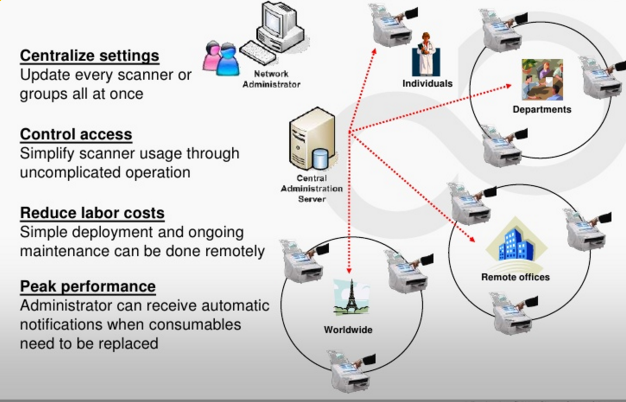
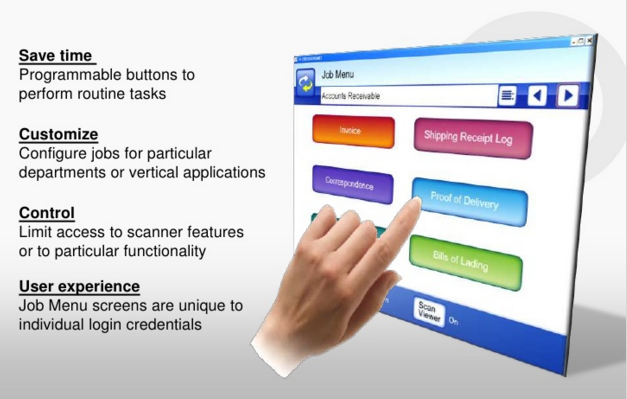
This was a video that I wrote the script and narrated about the Fujitsu fi-6010N network scanner Job Menu functionality.  This was a feature that we incorporated into the device after the initial product launch based directly on customer feedback.  This was a very popular feature because it allowed for an easy level of customization on the touch screen.  The screens could be configured based on user login credentials.  This customization could be on the device itself, or it could be configured on the Central Administration Server and then pushed out to all the scanners on a network.

Capture … with Confidence

Prelude:  I’ve included many screen prints in this post and there is a lot of detail that may be interesting to you.  Click the thumbnail images for a larger view.

I wrote a story the other day about Frankie-the-Frustrated worker and his frustration dealing with the lack of automatic data entry in his daily work activities.  In Frankie’s case I admittedly way over simplified the solution to illustrate the point that technology such as advanced data capture is a reality, yet can still be easy to use.  In other words, we don’t have to sacrifice automation for a pleasant user experience or vice-versa.  One of the nice AIIM commenter’s on the story rightfully pointed that Frankie would soon be known as Frankie-the-FUDer due to the fact without the all-important “data verification and/or validation” step in the process.  Frankie would soon be Feared because of the Uncertainty, as well as, Doubted in the accuracy of data that he was contributing to his organizations business systems.  This made me consider that maybe many of us haven’t seen advanced capture software capabilities in action or even know what sort of capabilities are possible with modern technology.  Therefore, for this reason, I would like to provide a bit of a deeper drive into what makes Data Capture solutions highly effective and give you very specific details, with many screen prints, so that hopefully we can help Frankie to become Frankie-the-Fabulous worker that he desires to be.

There are several factors that contribute to a successful document capture solution.   While each vendor’s exact terminology might vary a bit, the truth of the matter is that the ‘process’ of data capture is quite similar.  If you carefully consider each step and how it can contribute to improving data accuracy and quality, you will recognize that there is quite a lot of moving parts to make this “magic” happen.  The key point I would absolutely like to stress before this deeper drive into technology is this; so much of this process can be done automatically which is totally transparent to the user.  I would like to detail a few techniques so that we can be aware of the technology available to make the user experience the best it can be.  Once the system is configured for production then all the user has to do is basically capture images and verify data which translates directly into a very easy and simple experience for the users themselves.


The logic of Automatic Data Capture

The very first thing to do when considering designing an effective Data Capture solution has nothing to do with the technology itself.  An absolute, must-do, critical step that you will hear from all the experienced professionals in the capture business is to gather as many document samples as you possibly can.  Gather all the different types of documents you wish to capture such as invoices, agreements, surveys or whatever, but gather as much volume and as many varieties as you can.  Also, do not just gather high quality original documents that someone might have just printed on a pristine piece of paper from the laser printer in the office.  Gather the ones that that have been in filing cabinets for years and ones that have coffee stains with wrinkles.  The idea is that you want documents that are going to represent a true production Data Capture environment.


Initial document analysis and index fields

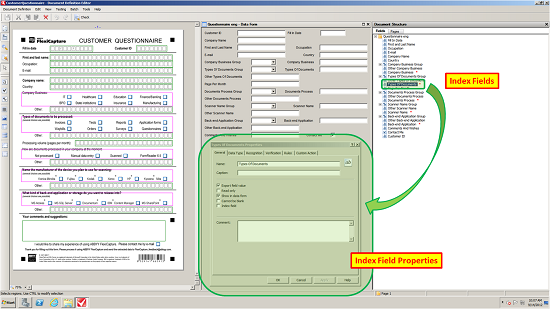
After gathering as many documents as you can then the first step in configuring the Data Capture solution is to import the sample documents.  Scan them at 300 dots per inch (300 dpi) which is the optimal output resolution for automatic recognition accuracy.  Next, you will want to run an initial document analysis on your documents.  In this analysis the software will make its best guess on the structure of the documents.  You should not expect that this analysis will be absolutely perfect but in many cases this step can do a good portion on settings up your solution that typically took a lot of time and effort.  As seen in the screen print below (click the image to zoom) the software can automatically detect form fields such as “First and last name” and draws an extraction zone around this particular area.  The software can also detect Groups such as the “Company Business” and automatically create index fields for all the available options in this group (i.e. “IT, Healthcare, Education”, etc.)  So after the initial pass you will want to check each field and apply some logic to improve the accuracy of the data captured and there are many useful techniques as you will see below.

1_index fields_small

Useful tips and tricks to improve data capture accuracy

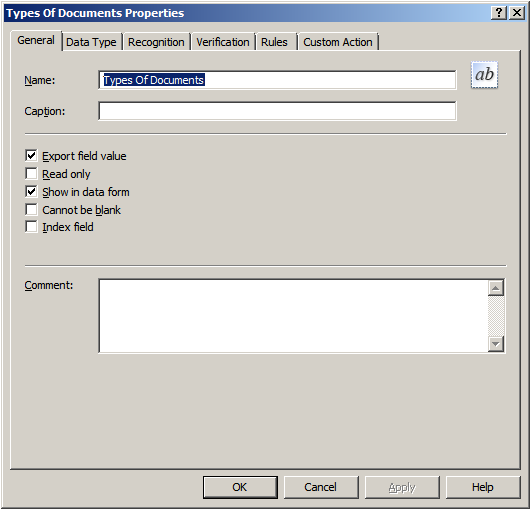
2_types of documents properties

3_generalGeneral

From the General tab in your data capture application you can provide a useful field name for each individual field you wish to extract data. This configuration tab will allow you to decide such basic functionality such as if the field is Read Only or Cannot be blank.  Also, you can decide whether to Export field value because sometimes you might wish to recognize some information such as a line item amount but do not wish to export the line item, just overall total amount.  The most commonly used functionality is enabled by default.

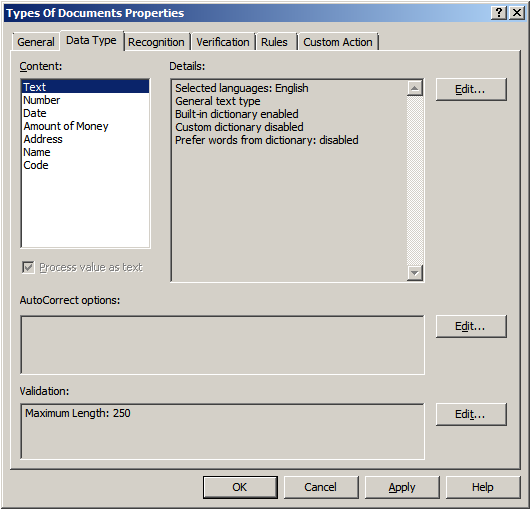
4_data typeData Type

The Data Type configuration is an extremely valuable function to allow for field-level recognition accuracy.  For example, if the field is a Number only field then you can enforce the recognition to only output numbers.  Or if the field was an Amount of Money then you can enforce an output in the form of an amount.  You can also add custom dictionaries and other useful validation rules


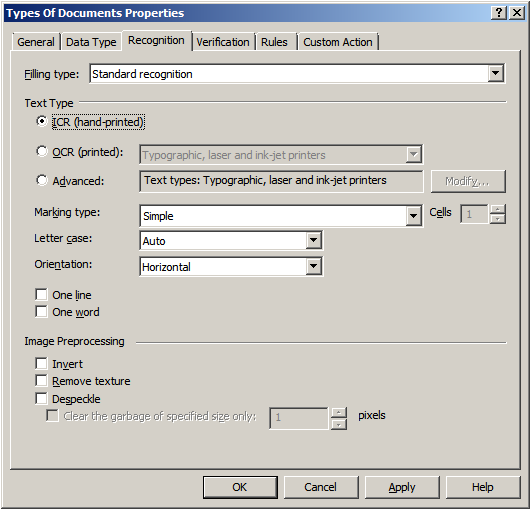
5_recognitionRecognition

This is the area were you would fine-tune character level accuracy.  In the Recognition tab you can select which type of recognition you wish to perform on a certain field whether it might be Intelligent Character Recognition (ICR) for handwritten text, Optical Character Recognition (OCR) for machine printed text or even the font type.  The more information that is known about your documents, and if you can apply that logic to your capture system, will make the overall accuracy much greater.

6_verificationVerification

While pure processing speed of getting images captured and recognized is important, the importance of uploading accurate data is often the most important consideration in a data capture solution.  So, therefore in an effective data capture solution there is a “verification” step in the process where you can set certain character confidence thresholds.  If these thresholds are not met then a human will view and/or correct the data, if needed.

7_rulesRules

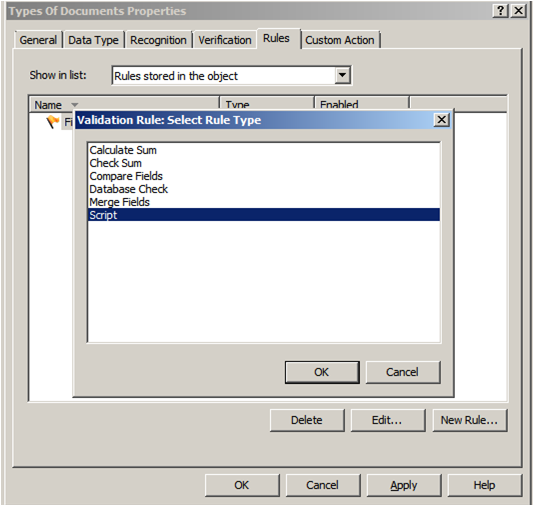
This is one of the most critical-steps in the data capture process.  With Rules configuration options, this is where the Data Capture system starts to use logic, and lookups into other systems, to compare data fields for any contradictions in the data captured.  For example, just imagine if a Social Security Number was captured incorrectly by one digit.  The system can do a Database Check and look into a different system to check the SSN based on a different field such as Mailing Address.  In this case if there was a mis-match then the user can easily and quickly correct the data before sending to the back-end repository.  Another great example is to read line item amounts from an invoice and then use the Check Sum option to validate that the total amount is equal to all the line items combined.  This is incredibly effective to catch any potential errors BEFORE they are committed to a system.

8_custom action

Custom Action

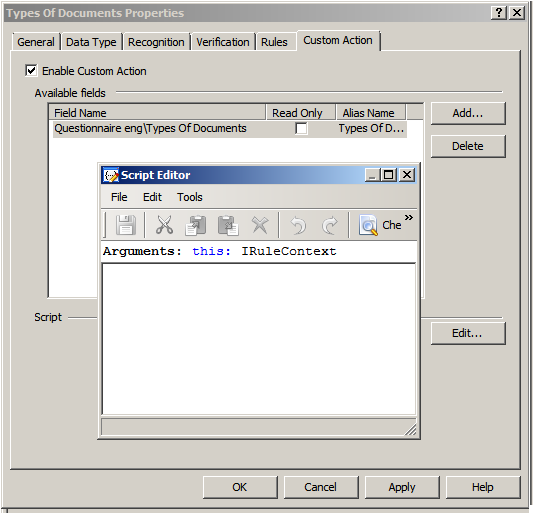
When standard capabilities or functions just aren’t enough, or if your business process dictates customization, there are options to incorporate custom scripts.  User scripts are custom scripting rule triggered by the user when viewing a field during field verification or in the document editor. The script is triggered by clicking  to the right of the field value.  To make the creation or modification of the scripts simple, there is a script editor available directly in the data capture configuration interface.


Putting it all together (Data Capture from the User Perspective)

9_acquire imageNow that we’ve taken a look at a few of the ways to improve the quality of data in your Data Capture solution, hopefully you can have a greater appreciation for how all the moving parts can make this type of system highly accurate.  These configurations are typically setup by system administrators or persons with specialized training.  However, what really drives adoption of a particular technology for mass appeal and high adoption rates is a pleasant user experience.  So, therefore, what I would like to do is show, in a few screen prints, how simple all this advanced technology is to use from the User Perspective.  Please note that the screen prints might vary depending for many factors including hardware capture deviceprocessing/verification user interface design and/or the ultimate storage destination.

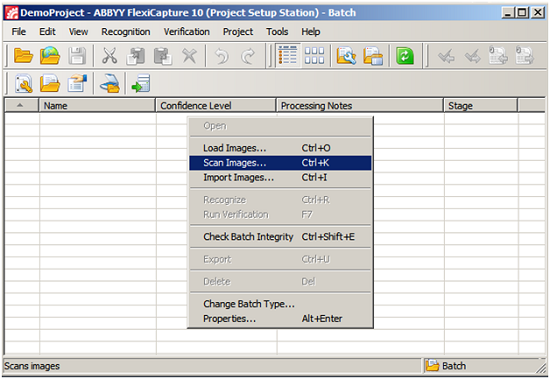
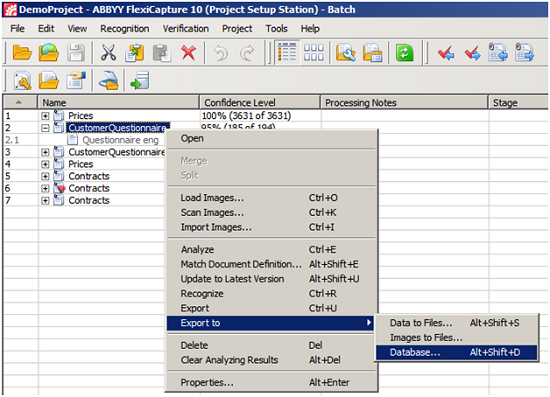
  • Step # 1 – Capture images

o   This can be from a dedicated scanner, multifunction peripheral or even a mobile device with camera.  In the screen print below this is the simple desktop capture interface.  As you can see I can ‘Load Images’, ‘Scan Images’, ‘Import Images’ or the capture system can be configured to automatically process images from shared folders, FTP sites or other sources.  So, you can just imagine that the Data Capture solution can be setup in a way that can process images from any device at any time.  Again, making the user experience to contribute images very easy and accessible from anywhere.

10_scan image_small


  • Step # 2 – Verify data for accuracy

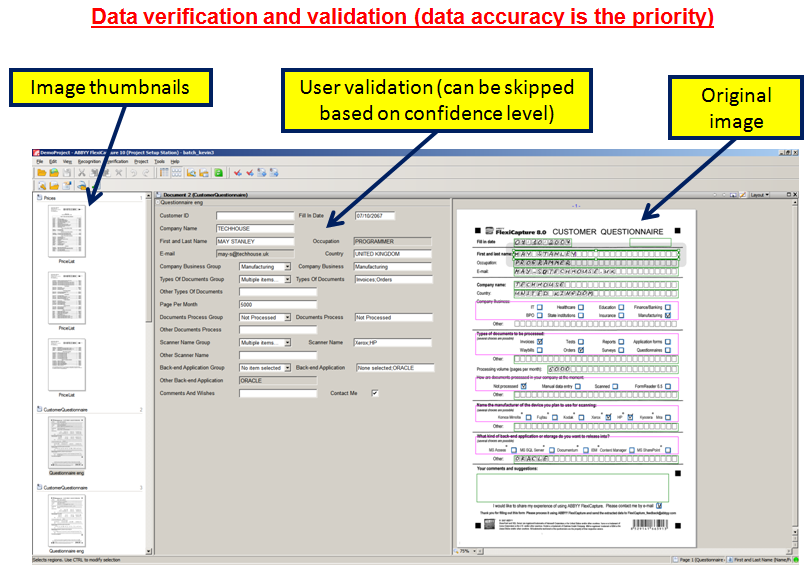
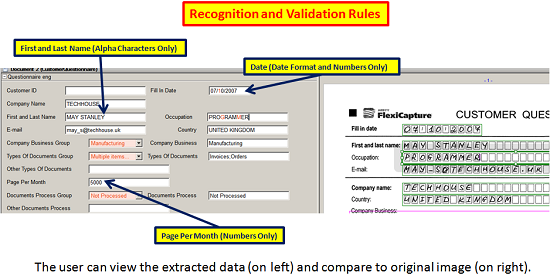
o   After the first step of capturing the images themselves, the images are run through all the recognition rules, validation steps and/or database lookups to provide the highest quality of data possible on the first-pass.  But, as I said earlier, it is not always possible to achieve absolute perfection for many reasons so you will want to have the user “verify” the results if the data did not meet a particular threshold of confidence or there was other exceptions.  Please note that the user interface screen print below is from the desktop version of a verification station but you can imagine that this could just as easily have been optimized for other devices such as touch screen interfaces or even mobile devices.

11_recognition and validation rules_small


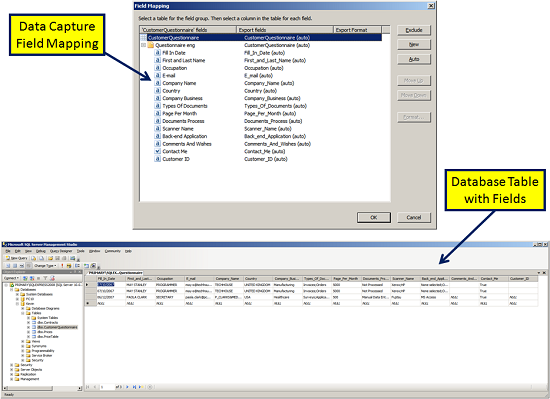
  • Step # 3 – Export to database

o   Lastly, after the user has checked that all the extracted data is accurate then they can simply export the quality data to the database.  Of course, these export results then can set off a whole series of workflow events based on what the back-end systems capabilities might be.

12_export to database_small


Confident data capture for everyone

As I illustrated, Data Capture from the user perspective can be quite simple.  There are many additional techniques and tricks that you can use but I wanted to cover some of the standard ways to achieve highly accurate Data Capture results.  The end result is beautifully accurate, as well as useful, data in your database.  This will give the organization a high level of confidence that adherence to business policy, enforcement of business rules, in addition to the users themselves trusting the system to be accurate when they are looking for information helps to create overall efficiency.

13_field mapping_small

In summary, Data Capture has progressed to the point that it can nearly be totally automated but there are many variables involved that still make human “data verification and/or validation” necessary at certain times.  The quality of data input it your system should be the priority, not the sheer volume.  With a little planning and using modern tips and tricks to achieve highly accurate Data Capture results you can realize both benefits of accuracy and speed.  Then Frankie-the-frustrated will truly be given the adequate tools to become Frankie-the-Fabulous to ‘Capture…with Confidence’.

Easy setup with the Fujitsu ScanSnap fi-6010N network scanner

This was a video script I wrote and narrated to show how simple and easy it was to literally unbox and configure the Fujitsu fi-6010N network scanner on a network.  It just took some basic networking knowledge to configure the device.  Our engineers did a great job to make it as painless as could be.  Believe me, I’ve had experience with other devices and there were not nearly as simple!