Building an effective capture solution – Part 3 of 3 (Storage/Business Policy/Workflow)

Building an effective capture solution – Part 3 of 3 (Storage/Business Policy/Workflow)


The real value of capture is realized when the information extracted from images is used within a business process whether this information is used, for example, to kick-off an approval process for expense reports, or this information is a Social Security Number used to retrieve your medical records.  The ‘index values’, ‘metadata’, or ‘tags’ (whatever) you would like to call these extracted keywords help create the workflow that helps make processes more efficient.  After all, an image itself without recognized characters, numbers or words is useless to a computer for knowledge of what information is contained on the document.  It’s the information on the document that is of most importance, not just the image.

These days there are many great storage options for images and metadata captured but not all are created equal.  Below are a few considerations for storage as it directly relates to document capture.

Storage considerations for document capture applications:

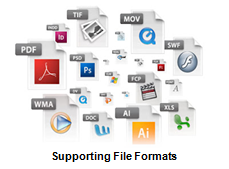
  • Does your storage, and image viewer, support well known document formats such as TIFF, PDF, PJEG, DOC, XLS and others as well as emerging formats such as PDF/A or XML?  A universal viewer that supports a wide range of formats is preferable because you never know how requirements might change in the future.  Also, you might want to consider a viewer that allows for annotation, or markup, of images with items such as sticky notes, highlighting or shapes if your process requirements dictate these needs.
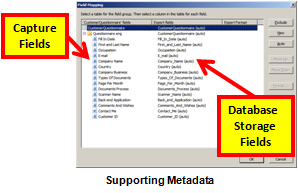
  • The capture process is all about extracting metadata from images so, therefore, does your storage provide a metadata framework in which you can store this information to enhance search and retrieval?  Basically this means does the storage provider offer a method to map captured index fields to database storage fields.
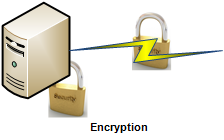
  • Security.  Of course security should be a major concern if your information is not intended for public consumption.  While it’s an important issue, in general, if you ensure three simple features of your solution then you will address 80% of potential problems:  (1) Secure disk-wiping of temporarily image files, (2) Encrypt data in motion and (3) Encrypt data at rest.  Of course these are not the only three items to consider but start with these and research other security techniques based on the sensitivity of your information.
supporting_file_formats supporting_metadata encryption

Now that we have covered two of three basic components of ‘Building an effective capture solution’ which included User Experience and Processing and having just outlined some Storage considerations, we should focus on the main theme of these posts and this is the point that ‘Capture begins with process‘.  In other words, and as I stated in the prelude to this series of blog posts, before considering all the technology and architectural options you should careful consider the business process or process workflow first.  Capture does not begin with a scan of a paper or picture of an image from a smart phone, it begins with process.

Below are a few considerations of business applications providers as it relates to document capture specifically:

Business rule considerations for capture:

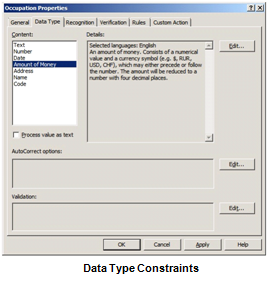
      • Data Type constraints.  If the field is a ‘Date’ field then restrict the data in this field to only date values.  Or if the field is a ‘Social Security Number’ or ‘Phone Number’, then, naturally, allow only number instead of letters.  Conversely, if the field is a ‘Name’ field then the data type should only allow for letters instead of numbers.
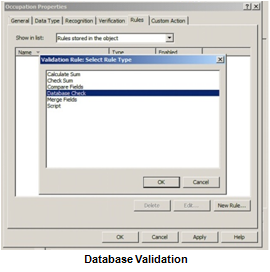
      • One of the greatest ways to ensure business continuity, as well as reduce errors in your document capture solution, is to perform database validation.  In other words, when a particular piece of information, such as a Phone Number, is extracted from a document then a database lookup is executed to match that the Address field corresponds with the Phone Number field.  If it doesn’t, or there are multiple matches, then the capture workflow can automatically send the information to a validation station where a human will verify the correct data.  This helps to achieve the highest level of accuracy.
      • Handling exceptions is a critical, yet often overlooked part of the overall capture strategy.  We all hope our system works 100 percent perfect but this is just not reality for many reasons.  After all, there are a lot of moving parts in these types of solutions:  People, process, hardware, software, client, server, etc.  Be prepared, and actually expect the fact that ‘things’ will happen.  Try and define the possibilities.  For example, if you are automatically classifying documents, expect that the system will have unrecognized documents and be prepared to send those to an exception queue for manual classification.  Consequently this is also a great opportunity to ‘tune’ the system by adding a classification technique to recognize this document type in the future.  It’s an opportunity to create a process to improve the system accuracy over time from an activity that might have been perceived as a negative had exceptions not been considered.
data_type_constraints database_validation

Now that we have discussed some of the high-level concepts of building an effective capture solution, I invite you to dig a bit deeper into specifics of each area of interest to you.  We have many educational articles to supplement each of these three components of a solution including some of the following:

Building an effective capture solution:

Part 1 of 3 (User Experience/Device/Interface):  Network scanningmobilemultistream/color dropout
Part 2 of 3 (Capture/Processing/Transformation):  High resolution scanningforms processingAs a Service
Part 3 of 3 (Storage/Business Policy/Workflow):  SharePointcloud computingtaxonomies/metadata

Finally, if I could leave you with one bit of advice, or wisdom, from my industry experience is that in order to build a highly effective capture solution you should reverse-engineer the solution starting from the process and, ultimately, the choice of device and other considerations should be fairly obvious.  Not device to process.  Start by defining the process then build accordingly.  This will ensure the highest level of success, efficiency and high user adoption.

capture begins with process_arrow

capture begins with process_network

capture_processing_transformation_arrow_leftfacing


Building an effective capture solution – Part 2 of 3 (Capture/Processing/Transformation)

Building an effective capture solution – Part 2 of 3 (Capture/Processing/Transformation)


Implementing capture software technology these days offers many new opportunities that simply were not available just a few short years ago.  Just like other ‘traditional’ on-premise software applications there are now many options to develop advanced technology, yet make the user experience extremely easy and efficient.  In the first of this three part series of blog posts we focused on (User Experience/Device/Interface) and how to properly select the most appropriate hardware capture device and also how to narrow user interface architecture based on the ‘User Experience’.  The point-being was to carefully consider how the technology will be used to make decisions on devices and interface instead of forcing a technology to be used in situations that might be less than optimal for the users themselves.

Disruptive technologies offer great promise

The convergence of mega internet bandwidth, cheaper CPU’s, inexpensive memory, virtualization, web services, mobile, social and cloud (to name a few) allow innovative technology providers, as well as savvy systems integrators to create enterprise class capture solutions without compromise.  Not only are these systems worthy of use within enterprise organizations but this advanced technology, typically previously available only to these large organizations, is now being made available to the masses in small and medium businesses with the Economies of scale:  Cloud processing.  Below is a high-level summary of three possible deployment methods for a capture solution:


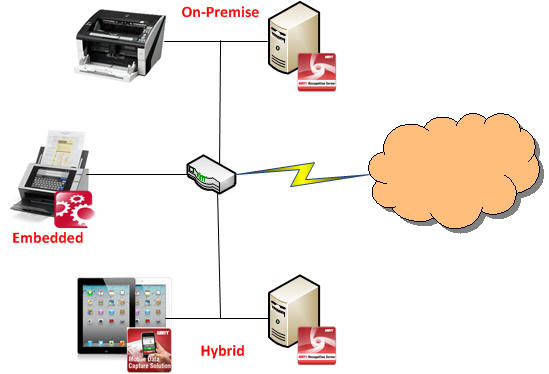
Deployment methods for capture:

  • On-premise deployment is the method which is most familiar.  This simply means that the capture technology is connected to a capture device usually via a USB cable.  The device could be a scanner, camera, fax machine or even image import.
  • On device capture means that the software capture technology is embedded or part of the overall capture solution.  Basically, the technology is ‘face-less’ and is integrated with some other software.
  • Hybrid is an emerging capture deployment method which is quickly gaining popularity with the emergence of mobile and cloud computing.  This method provides for maximum efficiency and typically the best performance.  Hybrid is a system architecture that is constructed where each component performs some function in the process.  Some of the interesting things that can be accomplished with a hybrid deployment method is that an application can, for example, take a picture of a document with a cell phone camera and perform image enhancement such as crop, deskew and auto-rotate on the phone itself.  Then, on the server-side, perform the rest of the capture process such as classification, data extraction and export.


One of the next steps in building an effective capture solution is to decide if your organization will utilize off-the-shelf software, create something custom or use capture as a service.  There are many decent off-the-shelf capture applications yet all will need some degree of configuration.  This type of application usage is typically for smaller, less demanding types of requirements.  When customization of a software application is desired, or required, then several capture software vendors offer Software Developer’s Kits, SDK’s or Software Engines.  SDK’s are software tools that allow for software development so these are certainly not an out-of-the-box type solution but it does allow the flexibility to really customize the software application to meet specific organizational requirements.  Last, but not least, is the “As a Service” option for document capture or conversion.  This means that an organize would ‘rent’ or ‘lease’ these services from a provider.  The ‘As a Service’ business model is similar to your internet service provider, cable/satellite TV provider or electricity to your home.  You don’t own any of those services, rather you pay for the services they provide.  Read more here:  Economies of scale:  Cloud processing.  Your choice of usage model for capture should be rather obvious but only after requirements are clearly documented and market research is done to find out what products/services are available.

Types of capture application usage:

  • Capture applications installed from local media has historically been the traditional way in which most organizations integrate capture into their organization.  They will download the software or install from a DVD typically and are generally more generic in their set of features.
  • Software Developer’s Kits (SDK’s) and recognition engines are for Independent Software Vendor’s (ISV’s), savvy Systems Integrators or even end-user organizations to take software tools provided by a vendor to create a new application.
  • Capture/Conversion as a Service is a relatively new concept where a users can upload images directly to a third-party hosted service for processing.  This is especially true in cloud computing scenarios.  In these cases the organization usually doesn’t not buy the software they are using.  Rather they ‘rent’ or ‘lease’ it from the vendor.  This is appealing for many reasons including less initial capital expenditure, reduced time to begin using and no technical staff required for the organization.


In summary, more than ever organizations are empowered to build highly effective capture solutions.  With more available options this creates a vendor competitive environment which will help drive innovation, decrease prices to organizations and make advanced technology available to everyone.  Legacy capture software vendors are being forced to innovate new products and services in order to remain relevant.  With internet bandwidth being more and more stable as well as less expensive, it is bringing a new dimension to what, honestly, had become a somewhat stale industry.  Then factor-in cloud applications which have enterprise class functionality available for organizations of all sizes to easily consume and you have a recipe to create Capture/Processing and Transformation to fit precise, not general, business requirements.


I invite you to re-visit the introductory post in this series of posts on “Building an effective capture solution” by reading this post on Capture Begins with Process.  Or, I invite you to continue on by reading Part 3 of 3 (Storage/Business Policy/Workflow)“.

Building an effective capture solution – Part 1 of 3 (User Experience/Device/Interface)

Building an effective capture solution – Part 1 of 3 (User Experience/Device/Interface)


In this three part series of blog posts I would like to walk you through building a highly-effective, yet extremely agile and surprisingly affordable document capture solution.  Not a piece-part of a solution, rather a complete solution from start-to-finish.

First, before any technology is ever considered the prudent thing to do is to clearly understand the use case for capture.  In other words, think of real world scenarios and carefully consider the user experience of capturing information.  The ultimate success, or failure, of the entire system can depend on whether users themselves feel comfortable with the capture experience.  If the experience is not easy, available at all times or effective then regardless of how fancy the back-end technology is, they will surely resist.

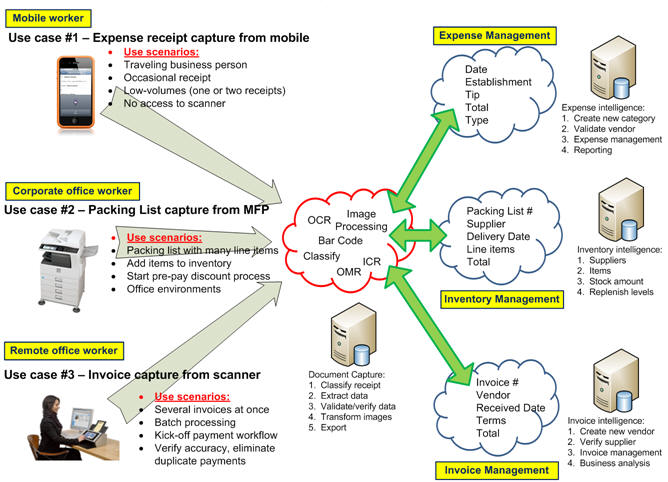
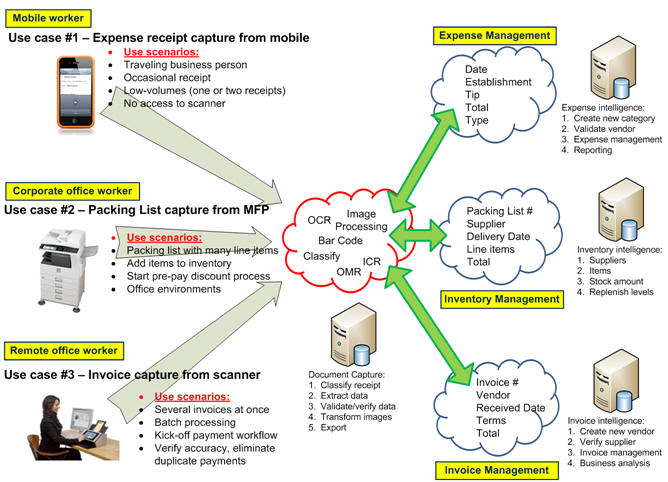
Let me give some examples of use cases and how understanding the user experience first, before considering back-end technology, will help define the proper hardware device for capture:

mobile_scanner_multifunction Use case will determine choice of capture hardware:

  • Imagine the user works in the sales department and receives various Price Lists often with many line items that they must enter into the company’s inventory management system.  In this case a dedicated document scanner is most likely a logical choice of capture device hardware because they are frequently scanning documents.
  • Next, consider the use case scenario of a traveling business person that needs to capture an image and details from an expense receipt.  In this case using a mobile device with a camera is much more convenient and practical because they only need to capture information every-so-often and, of course, a mobile device is portable.
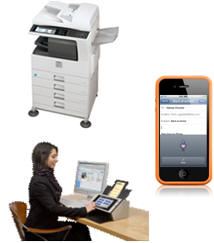
  • Finally, in typical shared office environments where groups of users need to occasionally capture information from business documents then a shared network scanner or multifunction scanning device might be most appropriate.  These devices have higher costs so it’s not practical to put them on everyone’s desk and the size is not reasonable for a desktop.


After you determine the proper hardware device based on user experience the next thing you must decide on is how information will be presented to users on the hardware device.  Or, in other words, the User Interface.  There are several options and whether you choose to design your own application or source an existing application a decision should be made wisely.  The implications are tremendous, and in particular when it comes to system maintenance and scalability.

User interface considerations for an effective capture application:

  • An application that is compiled and installed on a computer depending on the developers’ preference of operating system and development environment to create this application.  This is typically one of a few flavors including Microsoft Windows, Apple Macintosh or Linux.  This approach typically offers the most feature-rich user experience and historically been the most common method to deploy an application.
  • Web-based is a newer, popular method for creating capture applications due to the fact that web browsers are nearly ubiquitous across the various operating systems and devices; especially mobile.  Industry accepted standards such as HTML5 and XML are quite appealing for application development.  This makes supporting the widest variety of devices do-able and thus more attractive from a software development standpoint.
  • Another emerging popular option is to build a highly-effective, and extremely functional, user interface is using a Hybrid approach.  With the Hybrid user interface design this allows a developer to use both the native functions of a hardware device such as the camera on a smart phone or image processing of a scanner, yet still make the application itself open to the widest variety of devices because the application can be run in a web-browser via HTML5, for example.


html_xml_compiled

So, in summary, it’s critically important to take the user experience into account as an important first step in creating an effective capture solution.  Also, making the important decision early-on in your capture system architecture about user interface considerations will enable you to achieve the goals of providing efficient, cost effective tools with the ability to scale-up, or down, when necessary.

I invite you to re-visit the introductory post in this series of posts on “Building an effective capture solution” by reading my post on Capture Begins with Process.  Or, I invite you to continue on by reading Part 2 of 3 (Capture/Processing/Transformation)“.

capture_processing_transformation_arrow

Demystifying Forms Processing and Data Capture

Demystifying Forms Processing and Data Capture

Forms Processing is a proven technology that allows organizations of all sizes to benefit by improving efficiency and decreasing operational costs.  There are many case studies available online to support these facts.  When implemented properly the cost of a Forms Processing solution can easily be justified with a tangible 12-18 month return on investment.  With such overwhelming evidence of decreased operational costs and drastically improved efficiency then a logical question would be why wouldn’t every business in the world be using this wonderful technology?  Traditionally only large organizations with dedicated technical staff and humungous IT budgets could consider implementing a sophisticated Data Capture solution but times are changing.  No longer does it have to take years to realize the benefits of Forms Processing once only available to Fortune 1000 type companies.  In this blog post I hope to dispel the myth that this useful technology is only available to Enterprise organizations.

While the concept of automatically extracting information from a hard copy document is not new, what is new is a different method of implementation.  Specifically, the “cloud” offers an intriguing opportunity for Data Capture.  Why?  First, Data Capture is a very CPU intensive process and the cloud offers unmatched processing power within gigantic data centers.  Second, sharing resources and ‘renting’ a cloud service such as ‘Cloud Capture’ reduces the barrier to entry.  No longer is it the case where the upfront cost to implementing Data Capture should be an issue.  The cost of Data Capture can now be a Operating Expense versus a Capital Expenditure.

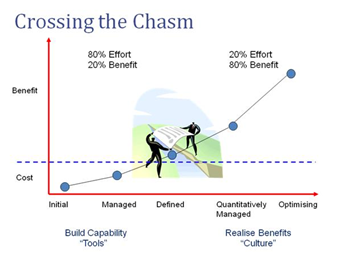
I have written previously about the “No Folder Zone” and in this blog post I will elaborate on the solution to avoid using Folders as a cop-out for a truly effective Information Capture solution.  In a traditional installation environment of on-premise software.  After the Forms Processing system is installed, tuned and tested then it is ready for deployment.  This is the point where the Document Capture system Crosses the Chasm and the organization can now truly benefit from the 80% investment and turn this effort into 80% benefit.

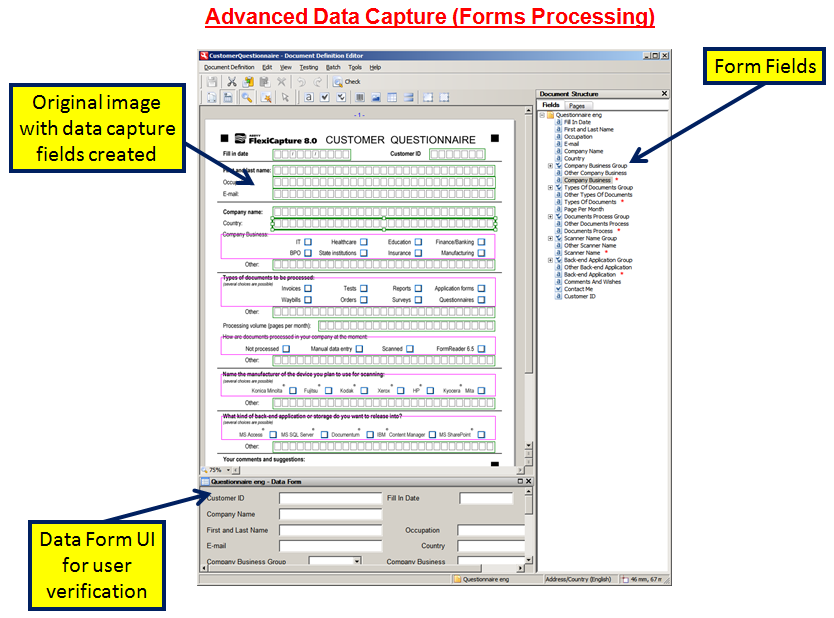
The basics of Forms Processing are quite simple and straight-forward.  The idea is to create a template overlay of the form for which you wish to extract information.  As seen in the photo to the left, you would basically draw zones over the image where you can capture typed text (Optical Character Recognition, or OCR), handwritten text (Intelligent Character Recognition, or ICR) or even check boxes (Optical Mark Recognition, or OMR).  After the template is created then the next time the system encounters this type of form then these fields will be automatically captured and eliminate manual data entry.

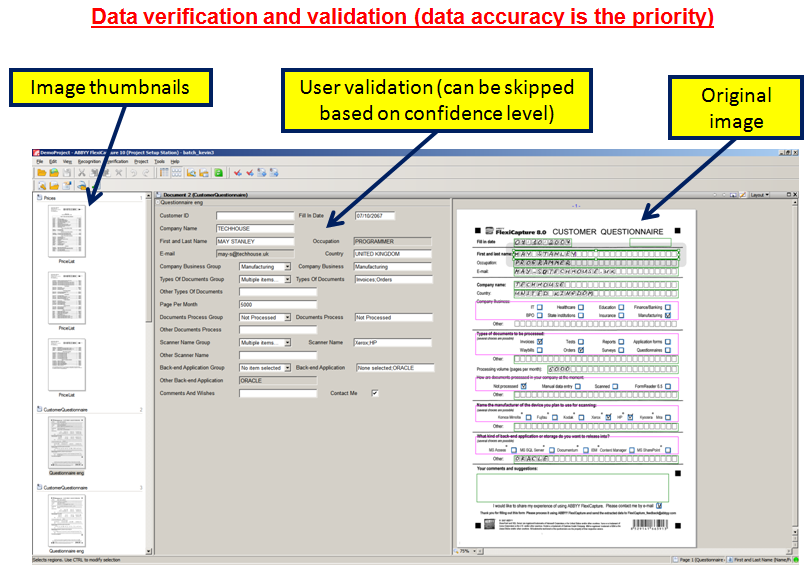
One of the most important objectives of any data capture system should be the quality of the information being captured versus just the pure speed of the system.  The accuracy of information captured is based on many factors including original document quality, image enhancement or scan resolution but a critical step is to validate, or verify, any questionable data BEFORE it enters your information system.  There are many effective methods to capturing highly accurate data including logic such as a Social Security Number field should contain only numbers instead of letters and, therefore, the number “5” would not be incorrectly recognizing as a letter “S”.  In a perfect world you would hope for no verification at all but this is simply not reasonable all the time.  A good rule of thumb is that 2% verification is acceptable which means 98% of work is done for you quickly and automatically.  This translates into major efficiency gains.

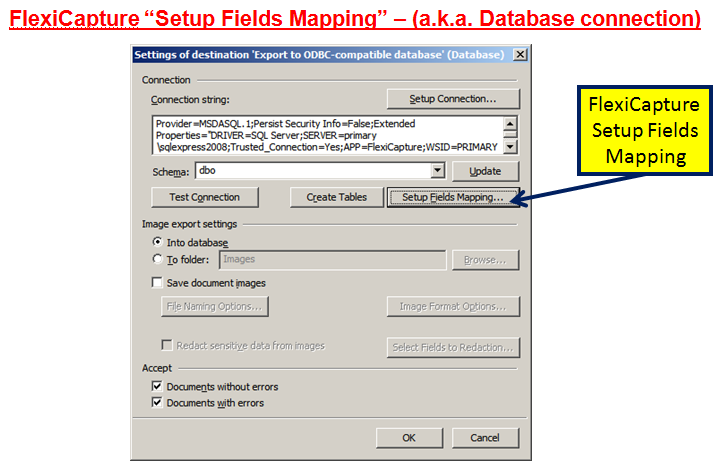
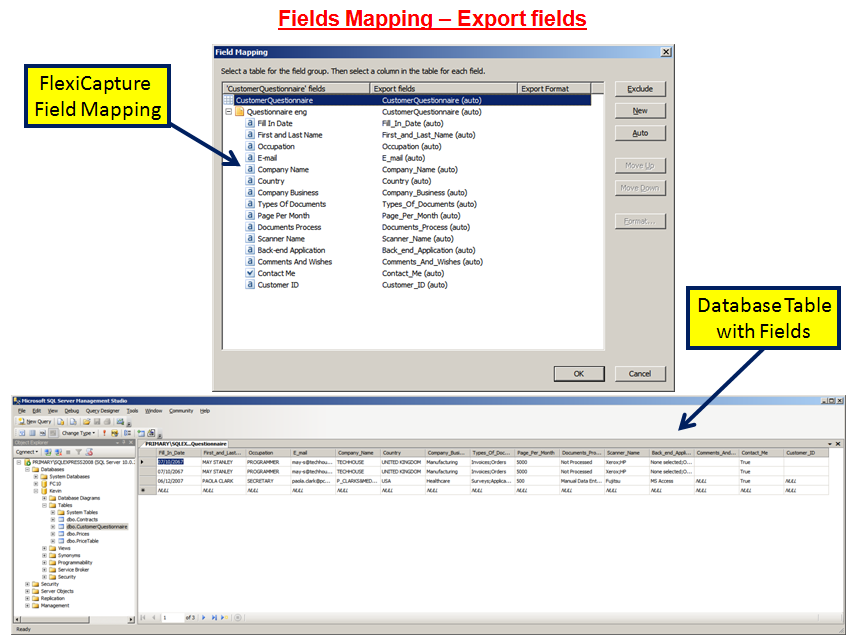
A key misconceptions about Data Capture, or Forms Processing, is that the integration into back-end systems needs to be complicated or costly.  While this could be true the fact of the matter is that all electronic information systems rely on some flavor of a database.  And basically a database is composed of a bunch of tables with fields.  In context of Forms Processing think about a table of Document Types.  Then in the Document Types table you have the various types of documents you wish to capture and the Fields are the index values you wish to extract from an image.  So the real magic is “matching” the extracted index values to the fields in the database.  I think the term “Field Mapping” most accurately describes this integration of Data Capture technology with Electronic Information Systems.  Fortunately, new trends in open connectivity such as Web Services and Content Management Interoperability Services (CMIS) is making the connectivity between Capture and Storage much more affordable and less time-consuming than ever.

As I mentioned earlier in this blog post, all applications have some flavor of a database to store information.  It’s just a fact of how things operate and if you really think about it all we have to do is match Data Capture fields with database fields to make a fully integrated Data Capture solution.  Often times we get wrapped-around the axel on the technical details but when we simply integration to it’s lowest common denominator then we can truly dispel the myth that Forms Processing is too complicated or expensive for everyone to utilize.

Now that I’ve covered the basics of Forms Processing and illustrated the fact that interoperability can be achieved rather easily in certain cases, I hope that we can move out of the stone ages of manual data entry and realize a truly efficient organization with Automatic Data Capture.

AIIM has just published a whole suite of educational videos on a collection of interesting topics including one on Information Capture (http://www.aiim.org/Training/Certification/Get-Trained/Videos/Capture-Manage).

Three significant trends we witnessed in the year 2010 that is changing the Document Capture landscape forever

The ‘No Folder Zone’

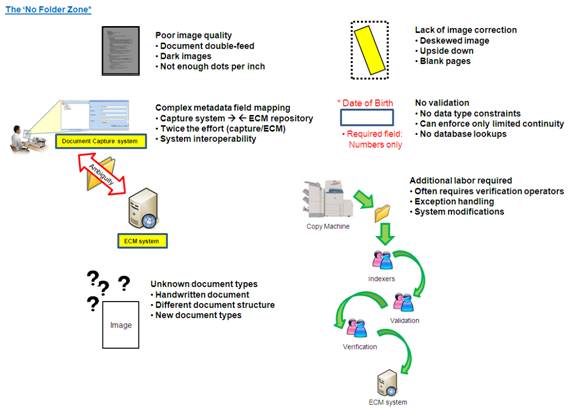
Despite tremendous improvements in document capture technology and ease of use becoming more prevalent, the fact of the matter is that document capture is not totally automated and often involves human intervention.  Therefore, careful considering the pro’s and con’s of your document capture strategy is imperative to ultimately create better operational efficiencies within your organization or, unfortunately, cause unnecessary burden within your business process.


Technologies such as Intelligent Document Recognition (IDR) or Automatic Forms Processing to automatically identify documents and extract information from scanned images are fairly amazing and perform highly automated functions if the system is designed with well-known document types.  In other words, the information on the pages such as a invoice number is in a fairly consistent part of the page (i.e. always in the upper-right hand corner of the page).  But when more and more document types are introduced to the capture system, the complexity of the system becomes exponentially more difficult and chances are that the automation accuracy will decrease.


The truth is that these capabilities are not complete magic (yet) and require system administrators to carefully develop capture strategies that assist the capture software in making intelligent decisions about documents.  If you are in the document capture or document scanning business you’ll often hear the phrase similar to, “Oh, I’ll just use my existing multifunction device to scan to a folder and let my capture software process the scanned images from the folder.”  While this approach of document capture is certainly an option that works, this road to document capture is littered with potential potholes, possible dead-ends and a lot of downstream work that should be carefully considered.


The idea of scanning images into a folder and then performing data extraction from these images is certainly not new.  In fact it is probably the most commonly used method to get images into document management systems, however there are certain considerations to take into account when using this capture technique.  Just because it’s simple to configure, cost effective and works, this does not mean that it is necessarily the most effective.  For some of the reasons I will elaborate below the year of 2010 saw a dramatic rise in The ‘No Folder Zone’.


A truly integrated document capture strategy has some of these qualities that scanning to folders may lack:

  • Reduce complexity of the capture system through centralized control
  • Enforce business continuity from the repository, not desktop
  • Eliminate the need for rescanning and ensure optimal image quality

While there are several methods to get an image into a document management system (including scanning to a folder), what is just as, if not more, important is getting the properly associated metadata or index values with that image into your repository for search and retrieval purposes.  Otherwise your document management system is nothing more than a glorified publicly shared folder on the network where retrieval of these images is done by memory or found by file name only.  Scanning to a folder is not necessarily a bad thing based on your organizations particular requirements, however when many people are contributing scanned documents into a system this creates honest mistakes such as lack of consistency, decreased efficiency and potential security or retention risks.

The “Twilight Zone” is defined as “the ambiguous region between 2 categories, states, or conditions (usually containing some features of both)”.  This is a also a good description of The ‘No Folder Zone’.  While scanning to a folder, then importing might give the appearance of an integrated solution, the truth is the region of connectivity (integration) is ambiguous between capture and ECM repository.  A solid document capture system will contain the following certain qualities:

  • Changes in the Enterprise Content Management (ECM) system should immediately be reflected in your document capture solution
  • Mapping of capture software index fields to ECM index fields is dynamic
  • Affords the system to be modified, changed or enhanced easily as organizational requirements change


My main point in writing this blog post about the ‘No Folder Zone’ is not to bash all that is wrong or point out potential pitfalls with scanning to folders.  In fact this is a great solution if this is truly what a particular organization requires.  However, far too often taking the simple approach of scanning to folders is the easy way to offer document scanning to users and many of the other issues this causes are not carefully considered.  As system administrators become more aware and truly understand some of the incredible advanced in document capture technology then hopefully they can appreciate that a well-designed document capture system can drastically help reduce labor costs, improve quicker access to information and be a strategic business advantage, as well as, improve adherence to compliance or regulatory standards.

The ‘No Folder Zone’

As always I appreciate the time you’ve spent to read this posting about The ‘No Folder Zone’ and how this trend is influencing the Document Capture business.  I welcome comments, feedback and/or constructive criticism.  Please feel free to click ‘The SharePoint effect’ graphic below to read about the second trend witnessed in 2010 that changed the Document Capture landscape forever.

-Kevin