Building an effective capture solution – Part 1 of 3 (User Experience/Device/Interface)

Building an effective capture solution – Part 1 of 3 (User Experience/Device/Interface)


In this three part series of blog posts I would like to walk you through building a highly-effective, yet extremely agile and surprisingly affordable document capture solution.  Not a piece-part of a solution, rather a complete solution from start-to-finish.

First, before any technology is ever considered the prudent thing to do is to clearly understand the use case for capture.  In other words, think of real world scenarios and carefully consider the user experience of capturing information.  The ultimate success, or failure, of the entire system can depend on whether users themselves feel comfortable with the capture experience.  If the experience is not easy, available at all times or effective then regardless of how fancy the back-end technology is, they will surely resist.

Let me give some examples of use cases and how understanding the user experience first, before considering back-end technology, will help define the proper hardware device for capture:

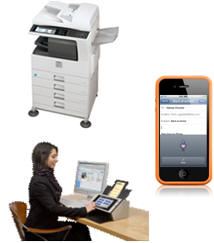
mobile_scanner_multifunction Use case will determine choice of capture hardware:

  • Imagine the user works in the sales department and receives various Price Lists often with many line items that they must enter into the company’s inventory management system.  In this case a dedicated document scanner is most likely a logical choice of capture device hardware because they are frequently scanning documents.
  • Next, consider the use case scenario of a traveling business person that needs to capture an image and details from an expense receipt.  In this case using a mobile device with a camera is much more convenient and practical because they only need to capture information every-so-often and, of course, a mobile device is portable.
  • Finally, in typical shared office environments where groups of users need to occasionally capture information from business documents then a shared network scanner or multifunction scanning device might be most appropriate.  These devices have higher costs so it’s not practical to put them on everyone’s desk and the size is not reasonable for a desktop.


After you determine the proper hardware device based on user experience the next thing you must decide on is how information will be presented to users on the hardware device.  Or, in other words, the User Interface.  There are several options and whether you choose to design your own application or source an existing application a decision should be made wisely.  The implications are tremendous, and in particular when it comes to system maintenance and scalability.

User interface considerations for an effective capture application:

  • An application that is compiled and installed on a computer depending on the developers’ preference of operating system and development environment to create this application.  This is typically one of a few flavors including Microsoft Windows, Apple Macintosh or Linux.  This approach typically offers the most feature-rich user experience and historically been the most common method to deploy an application.
  • Web-based is a newer, popular method for creating capture applications due to the fact that web browsers are nearly ubiquitous across the various operating systems and devices; especially mobile.  Industry accepted standards such as HTML5 and XML are quite appealing for application development.  This makes supporting the widest variety of devices do-able and thus more attractive from a software development standpoint.
  • Another emerging popular option is to build a highly-effective, and extremely functional, user interface is using a Hybrid approach.  With the Hybrid user interface design this allows a developer to use both the native functions of a hardware device such as the camera on a smart phone or image processing of a scanner, yet still make the application itself open to the widest variety of devices because the application can be run in a web-browser via HTML5, for example.


html_xml_compiled

So, in summary, it’s critically important to take the user experience into account as an important first step in creating an effective capture solution.  Also, making the important decision early-on in your capture system architecture about user interface considerations will enable you to achieve the goals of providing efficient, cost effective tools with the ability to scale-up, or down, when necessary.

I invite you to re-visit the introductory post in this series of posts on “Building an effective capture solution” by reading my post on “Capture Begins with Process“.  Or, I invite you to continue on by reading “Part 2 of 3 (Capture/Processing/Transformation)“.

capture_processing_transformation_arrow

My first trip to Moscow

I made my first business trip to Moscow a few weeks ago.  It was a remarkable experience and it’s always very interesting for me to indulge in different countries and cultures.

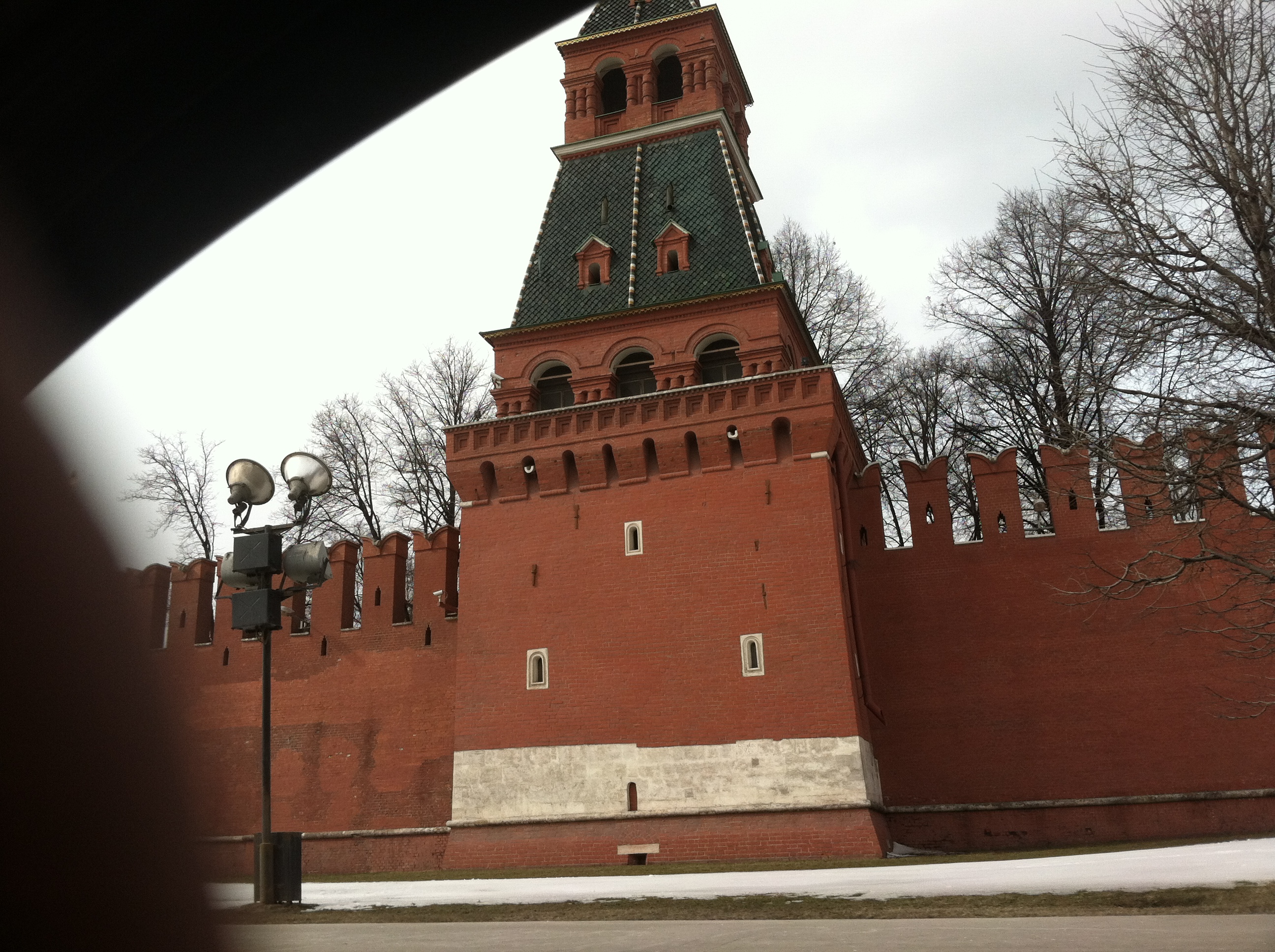
Traveling internationally has a great way to put things into perspective.  The world is a very big place, but at the core “people are people”.  What people want is to live, work and be in peace.  We all have that in common for the most part.  One of our drivers was kind enough to take a slight detour and drive by infamous Red Square as seen in the photo below:


The Russian people aren’t so unlike American or Japanese people as you might imagine, in my opinion.  I have found obvious commonalities in each of these cultures are a ‘hard-working element’.  It’s inspirational to go to a foreign country/city and just witness the people and business go-about their daily routines.  True, living in the United States, I sometimes get jaded and frustrated with American laziness and gluttony but I feel, honestly, if I think about it in comparison to other societies, American business is quiet efficient.

Another commonality between Russian and Japanese society is their consideration for visitors.  I absolutely admire this quality about these two countries which are distinctly different in some ways, yet quite similar in other ways.  The Russian people went out-of-their-way to try and communicate in English at the airport, in the restaurant or in the hotel.  They really did their best to make me feel at home.

If you ever do visit Moscow, however, be prepared for traffic!  Wow – this was something I was surprised about.  Although we had drivers for our travels and didn’t have to rent a car it was crazy just simply being a passenger.  There is massive traffic in Moscow that you should know.  Give yourself plenty of time to get to your destination and know the back roads, if possible.  I would compare the level of traffic congestion to that of Manhattan, New York (US).  However, the drivers in Moscow are aggressive, just like in Manhattan, but they have amazing skill to weave and dodge obstacles and they lack the anger that overcomes American drivers.  In Moscow I did not witness one single driver either honk their horn and/or ‘flip-the-bird’.  It seems as though this traffic mess is just accepted as a condition for living in Moscow.

To compensate for the traffic congestion it seems that law enforcement is quite lenient.  A result of the massive traffic is that people have to park their cars somewhere and, believe me;  they park them wherever they can find space!  You park on the sidewalk, sideways or in other areas because you have to.  Maybe I can go into the Parking Garage business in Moscow?

Finally, again, I appreciate all the hospitality of the Russian people.  Stereotypes and history is something hard to overcome but it seems that the integrated approach of a world economy is truly a reality.  I’m humbled to see it, and to be a part of it.

Великие люди

偉大な人々

Great People,

Kevin

Capture: The ideal application for Cloud

Capture:  The ideal application for Cloud

As I was brainstorming on a topic to write for this blog, I was inspired by Bob Larrivee’s latest AIIM community blog entitled “It Came From The Cloud” (http://www.aiim.org/community/blogs/expert/It-Came-From-The-Cloud) where he asked some simple, yet thought-provoking questions.  So this begs the question why anyone would resist such obvious benefits of “cloud” (http://www.aiim.org/community/blogs/expert/A-cloudy-future-for-document-capture)?  I’m sure there are many legitimate concerns and issues but I would like to focus on the concern of security for the purpose of this blog post.

These days the term “cloud” as it relates to usage in corporate enterprise typically engenders strong feelings one way or the other.  Benefits such as quicker application deployment, reduced IT costs and the ability to offer a more feature-rich experience to workers is not often debated.  What is debated, and is a reasonable discussion, is the viability of “the cloud” from a security standpoint.

Security: Technology versus Trust

These concerns are well founded and should be addressed but we should definitely draw a major distinction between the technology itself and whether a provider is trusted with data.  Therefore, when we understand this distinction between technology and trust, the cloud should not be discounted as a legitimate option for enterprise simply due to fear alone from a technology perspective.

Below is a short list of various security items that should be considered when contemplating a cloud strategy.  This short list is not by any means an extensive list of security items to consider, however, please ask yourself this, for each one of these items is an individual business or a mass data center more equipped to handle capabilities?  For those who would really consider the question of whether on-premise or cloud is more secure then the conclusion to me is clear.

  • Private clouds – Dedicated servers and databases to only one organization
  • Physical access – Limit access to only those that might need to physically touch equipment
  • Data encryption – Encrypt data in motion and data at rest
  • Device authentication – Trust devices in addition to users
  • System updates and patches – Apply security updates as soon as possible
  • Secure disk wiping – Securely erase temporary data from disk drives
  • Network architecture – Databases beyond firewalls and web data on front-end servers
  • Logging – Track all activity to detect intrusions
  • Policy/Governance – Consistently review policies and procedures for improvement

Conservative cloud adoption by Enterprise

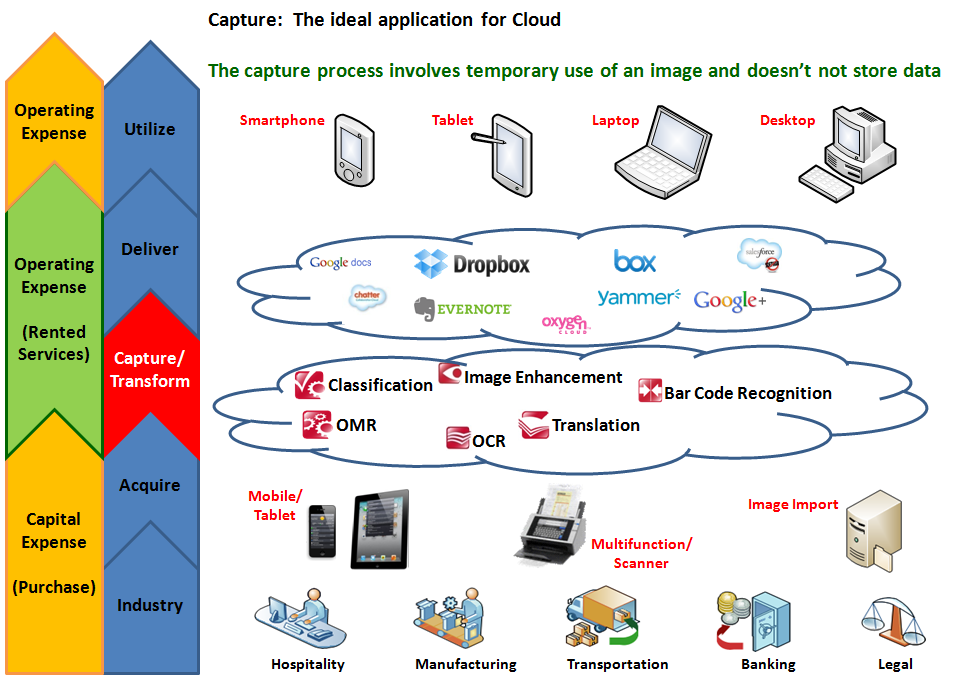
While I certainly would not expect major enterprise organizations to jump in head-first and move all their data and applications to the cloud, what does make logical sense is for them to move transactional applications (versus storage applications) to the cloud.  Specifically, moving “Capture” to the cloud makes complete sense.  Why?  Capture processes images only temporarily then stores the data wherever you’d like, including in the security-hardened ECM system.  In other words, the capture application does not store images or metadata in a database.  Capture is a processing activity, not storage and retrieval.

One other observations about Cloud for the Enterprise; I can absolutely see a trend towards building massive infrastructure now in preparation for delivering robust applications eventually.  Having attended Cloud Connect 2012 (Santa Clara)http://www.cloudconnectevent.com/santaclara/, it was remarkable to see the level of interest among major IT providers and well-known Enterprise organizations.  Without a doubt, the infrastructure is being implemented now for what will be an onslaught of cloud services in the not-too-distant future.

Major adoption by Small and Medium-Sized Businesses (SMB’s)

In contrary to Enterprise, Small and Medium-Sized Businesses (SMB’s) have to make a decision on how to improve efficiency with no or limited IT resources.  For SMB, the cloud offers opportunities like never seen before.  Why?  Because a shared resource makes sophisticated technology available to a greater audience.  Why?  Because costs to the vendors are decreased through mass-consumption by users and this allows vendors to make these advanced technologies available to the masses.  Also, and from a security perspective, using cloud storage and capture as a rented service from providers allows SMB organizations to focus on their businesses instead of burdened by maintaining technology.  When the choice is to not utilize any technology and continue to process paperwork manually, or to utilize cloud technology to capture, store and retrieve with a little, yet limited, risk, it’s clear that SMB’s have chosen limited risk with great efficiency improvements.

Like never seen before, SMB’s are empowered to create a mash-up of useful business applications without the high cost associated with doing-so.  Clearly there is an undeniable trend towards Cloud Storage from providers such as Box, Evernote, Catch, Google Docs, Dropbox, etc. and Cloud Capture is a logical complementary technology to further improve efficiencies and decrease operational costs.
 

Next steps: Being indecisive is inefficient

With such overwhelming evidence that adopting cloud services makes sense then the next logical question is “what now?”.  Clearly security is, and should be, a major concern for enterprise as well as SMB, but with enterprise the stakes are much greater.  SMB inherently has this element of risk/reward that drives them to make business decisions quicker.  The topic of “access vs. security” balance is often discussed within the ECM industry and the truth is that you have to find a balance of making information available to users, yet also making sure the data is protected in a responsible manner.  SMB that does not have dedicated IT resources can utilize “the cloud” to improve business efficiency at minimal costs and trust that security is taken care of by their storage provider.

There are many wonderful solutions available right now for businesses of all sizes to benefit from “the cloud”.  For example, for an organization to migrate e-mail, CRM, expense management, document management, corporate web site and an accounting system to 100% cloud today is do-able.  With known monthly operating expense costs and no IT burden.  Also, these cloud applications are not cheesy, cheap applications; these are robust, Enterprise-ready applications that are now made available to everyone which are easy to use and secure.

What do you think about “the cloud”?  Is it a fad?  Will it be embraced by Enterprise?  Is it secure?