| 1. What are the benefits of utilizing SharePoint for document imaging/ECM?
One of the main benefits of utilizing SharePoint for document imaging/ECM is the limited learning curve of both the users as well as systems administrators. With Microsoft operating systems and office applications being the primary graphic user interfaces most people are using in their organizations, it just makes sense the commonality between SharePoint and an application such as Outlook give the users a comfort level that typically does not involve complicated training. This decreased learning curve offers quicker adoption of the technology allowing organizations to focus on building out SharePoint sites for actual use which leads to tangible enhanced productivity. This is important because sometimes an organization can get burdened with months of installation, configuration and training before a system ever goes “live” which is not only time-consuming but is costly and leaves a bad impression on the ultimate success or failure of the system. Quickly demonstrating enhanced productivity through user adoption of a familiar graphical user interface within a departmental process such as invoice processing, for example, leads to a desire for stakeholders within organizations to sponsor additional departmental process improvement projects or even complete enterprise roll-outs of document imaging/ECM systems.
2. What is one of the most common misconceptions about scanning into SharePoint?
The idea that scanning into SharePoint is difficult or expensive seems to be a common misconception. There are more options than ever to scan a document into SharePoint and we think breaking down the high-level techniques for scanning and applying them to how organizations typically may scan into SharePoint is important.
There are three basic ways to get a scanned image with corresponding metadata, or search terms, into SharePoint. The first scanning option is Manual Indexing where users scan a document, then connect to SharePoint where a SharePoint Document Type has some associated metadata. The user types in the metadata for this particular scanned document then simply uploads the document directly into SharePoint. The second scanning option for SharePoint is Automatic Indexing. This is a more automated, but also more costly, option that is typically used to process higher volumes of documents. With the Automatic Indexing option, information from the scanned pages such as bar code values or printed characters such as invoice numbers, social security numbers or other data can be automatically extracted and sent directly into SharePoint. Lastly, a network scanning approach can involve either Manual Indexing or Automatic Indexing, however the important point about this method of scanning into SharePoint is the appeal from an ease of use standpoint for users and an effective device management perspective from network administrators. Network scanners typically are dedicated use devices where scanning into ECM systems such as SharePoint is their sole purpose; therefore, making scanning easy was a priority in their design. Features such as bright, colorful touch screens make image preview simple and easy. Integrated hardware keyboards make indexing documents quick and efficient as well. So, as we have illustrated, there are several high-level methods for scanning into SharePoint and the right method really depends of your organizational requirements.
3. How do you add ‘scanning to SharePoint’ functionality to a SharePoint
server? And, is it expensive?
Adding ‘Scan to SharePoint’ functionality is surprisingly simple. The wonderful thing about adding document scanning capabilities to SharePoint is that it involves no additional software installed on the server itself. There is optional third-party Imaging software that can be installed on the server to optimize performance, improve scalability and enhance search, but this is not a requirement to scan documents.
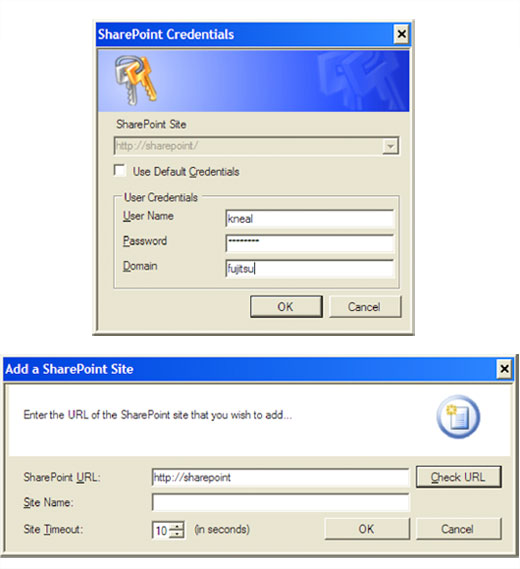
Simply install the Fujitsu scanning software application on a workstation. Then once the Document Libraries have been created in SharePoint with the corresponding metadata, or search terms, all that needs to be done is to connect to the SharePoint site and supply login credentials. After this simple configuration is completed users will never have to configure the software again. When new Document Types are added to SharePoint, or if metadata fields change, then the user will dynamically see these changes without ever having to change the scanning application.
The expense to add ‘scanning to SharePoint’ can literally be as inexpensive or expensive as an organization’s scanning volumes and/or requirements dictate. Many scanner hardware vendors provide some simple options for scanning to SharePoint in-the-box with the scanner so the expense is just the scanner itself and not additional software. However, if an organization requires a higher level of automation to do sophisticated data extraction such as automatic document recognition, document separation, then capture the data and automatically release to SharePoint, this could be a more expensive proposition. It’s important to remember that this expense can be easily justified with reduced human labor, examples of this could be the ability to take advantage of more pre-pay discounts on invoices or better customer service with immediate access to information.
Example of simply connecting to SharePoint once. Supply some basic information once then all SharePoint updates are instantly available dynamically and visible in your document scanning software application.
4. How important is document capture software compatibility with SharePoint?
It can be, but the truth is that the capabilities are limited. Also, it is important to note that no matter what version of SharePoint you have (Microsoft Windows SharePoint Services 3.0, Microsoft Office SharePoint Server 2007 or SharePoint 2010) the software must be configured before it is usable. Microsoft Windows SharePoint Services 3.0 is the free component of SharePoint that is included with Windows Server 2003 or it is a free download for customers who have Windows Server 2008.
Also, it is important to note that while SharePoint has its strengths, just like any other product, it also has its weaknesses. We have seen many situations where SharePoint is being used in conjunction with other complementary document management systems. The right solution truly depends on an organization’s business requirements and all options should be thoroughly investigated.
5. What capabilities are needed to help end users have a better ‘Scan to SharePoint’ experience?
There are a few capabilities that are needed to help end users have a better experience when scanning documents to SharePoint. First, image enhancement is an absolute must. Anyone that has ever scanned documents must have felt the pain of having to rescan documents for various reasons. Maybe the image quality was poor? Maybe the page was scanned upside down? Maybe only the front side was scanned on a double-sided document? These are just a few examples of situations where the user would have to stop their process to rescan these documents, which not only is a waste of time but also is costly in lost productivity terms. Image enhancement technology, which can dynamically adjust for perfect image quality and perform automatic tasks such as automatic page orientation, intelligent blank page removal, automatic color detection, automatic cropping and automatic deskew, is key to helping users have a pleasant experience. If scanning documents is a chore then users will resist using technology that is difficult to use.
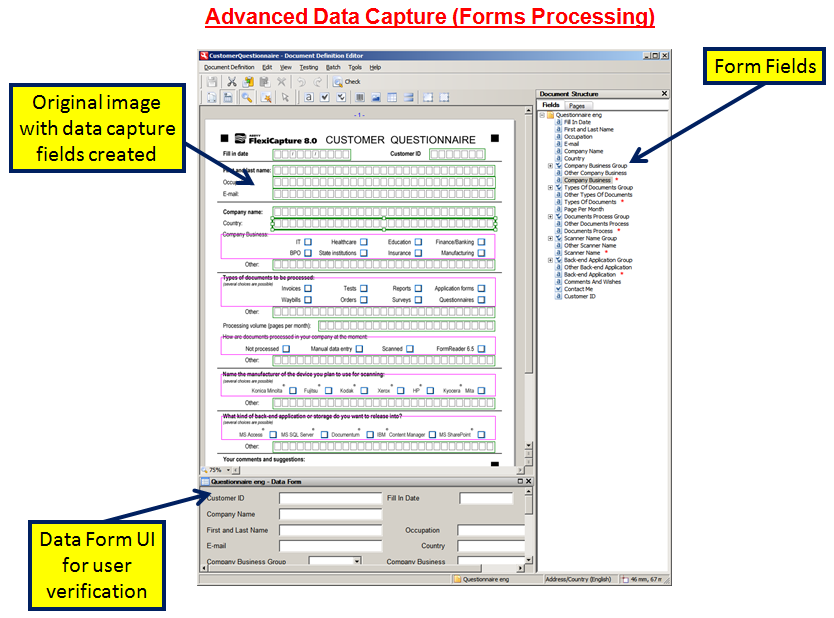
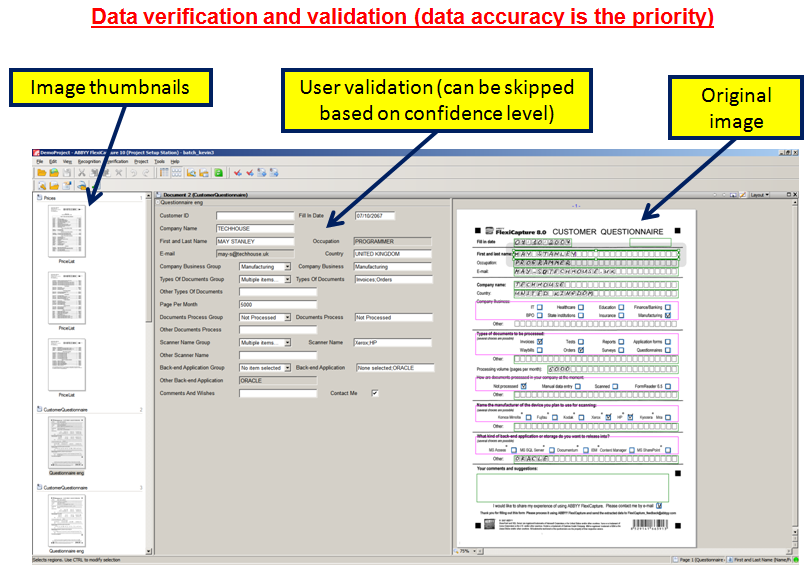
Secondly, the method of capture is another critical consideration. There are several methods for capturing documents into SharePoint. Some of the common approaches are manual indexing, automatic indexing and network scanning. Manual indexing is ideal for ah-hoc or low volume scanning. With manual indexing the scanning application captures an image, then the image is presented and the user types the metadata into the fields configured on the SharePoint Server. This approach is the most cost effective, yet still adds the important step of capturing important metadata to be associated with the scanned images. Alternatively, automatic indexing is ideal for large volumes and/or when the documents have some sort of fixed content structure. For example, the Census 2010 forms have fixed structure where a particular field such as Social Security Number is always in the same place of the document. It’s easy to design document scanning templates that can automatically and quickly extract this information and place both the scanned image as well as the associated metadata directly into SharePoint. Lastly, the network scanning approach is one of the newest methods of capturing scanned images into SharePoint. The benefits of network scanning are typically about the ease of use with simple touch screen operation for the user and the ease of deployment and on-going maintenance for the administrator. A network scanner can be configured to use either the manual indexing or automatic indexing approach as described above. So, as you can see, there are several methods for capturing scanned documents into SharePoint and the right approach, or combination of approaches, really depends on an organization’s requirements levitra over the counter.
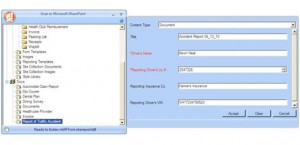
Example of Manual Indexing into SharePoint.
6. How are hardware vendors addressing the vigorous adoption of SharePoint?
Scanner hardware vendors are clearly trying to address the vigorous adoption of SharePoint by including some level of SharePoint integration in-the-box or even embedded into devices such as network scanners. Scanning to SharePoint has to be easy to setup and easy to use. Often times SharePoint is deployed as a document management system where this may be the system administrator’s first experience with this type of software. To help reduce the burden on system administrators, many scanner hardware vendors offer simple solutions for configuring and using the scanning software. Therefore allowing the the system administrator to focus their time learning the server-side functionalities such as creating Document Libraries, created Columns for metadata or establishing document workflow.
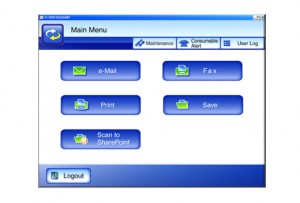
Example of embedded SharePoint connectivity using the Fujitsu network scanner.
7. What makes scanning to SharePoint different than scanning to any other content management repository or platform on the market today?
The user experience of scanning to SharePoint is not unlike other content management repositories or platforms available on the market today. Most scanning applications can connect directly to a repository and show index fields based on document types. Also, most scanning applications can utilize either the manual indexing or automatic indexing techniques described in question # 5 above. With SharePoint, the main appeal is the ability for the user’s to manage the overall SharePoint experience. SharePoint offers users the ability to create their own ‘sites’ without the involvement of the Information Systems department. This is basically the equivalent to your own web site where you can store all your electronic content including scanned images. Within these sites, users can create a custom page using different ‘web parts.’ For example, a user can have a news feed in the top-left portion of the page, a business intelligence chart of daily sales activity in the bottom-left, a spreadsheet of current stock prices in the top-right, and finally, a web part with point-and-click access directly to scanned images in the bottom-right. Some people might refer to this as a ‘dashboard’ specifically tailored to what information and what applications a user feels is most relevant to them.
8. What trends are hardware vendors and solutions providers seeing in terms of SharePoint customization?
There are several trends that hardware vendors and solution providers are seeing in terms of SharePoint customization. Both of these trends involve careful planning of the SharePoint system. We recommend that you do not rush to simply begin scanning and importing high volumes of documents into SharePoint without a well thought-out strategy. First, the ability to more effectively manage SharePoint is a big trend. Within some organizations that have migrated to SharePoint from simple shared network drives, they have found that while they achieved the intended reduction in paperwork, they have also found that now they have nothing more than another electronic mess of content. There are several SharePoint Solution Providers that are successful in helping organizations get a better handle on their SharePoint system even after it has been deployed. Secondly, and somewhat related to the manageability of SharePoint, is the importance of metadata and well thought-out document taxonomy. Metadata refers to the key search words used to retrieve documents stored in SharePoint. If an organization is not capturing the right, or accurate, metadata on associated documents then it could mean a complete failure to gain any meaningful benefit from a SharePoint system. A taxonomy provides a formal structure for information, based on the individual needs of a business. Categorization tools automate the placement of content (document images, email, text documents, i.e., all electronic content) for future retrieval based on the taxonomy. Users can also manually categorize documents. Categorization is a critical step to ensure that content is properly stored.
9. How does the implementation of SharePoint impact your current document management system?
Without a doubt, the implementation of SharePoint is going to drastically improve productivity or is going to become a burden to your organization. It will affect your organization either positively or negatively, but the SharePoint Effect will certainly be felt. Let me be specific.
Only a few short years ago, we think that many organizations were under the false impression that SharePoint Server contained all the same capabilities of traditional Enterprise Content Management (ECM) systems which was not the case. For example, auditing is a very important concept for ECM systems and up until SharePoint 2010, with the addition of full-featured auditing with the Compliance Details screen, Microsoft lacked this functionality that is pretty standard with most ECM systems. Additionally, another important ECM concept missing from previous generations of SharePoint was the idea of Managed Metadata (which is also a new feature of SharePoint 2010). Managed Metadata allows organizations to define a set of terms to be used in a consistent manner when applying searchable terms to scanned documents. Point-being that there were certain deficiencies within the suite of SharePoint capabilities that left organizations without adherence to compliance regulation due to the lack of auditing, for example, without the control over a consistent metadata strategy. These are a few examples where a SharePoint implementation might have been perceived to be a failure due to a lack of understanding critical ECM features organizations require.
Consequently, a solid understanding of SharePoint’s true capabilities helps organizations benefit greatly from the ability to leverage SharePoint’s core strengths. These core strengths have traditionally been focused around collaboration and portal – in other words, the sharing of electronic items such as Excel spreadsheets, Word documents, PowerPoint presentations and now, of course, scanned images. It should be noted that with some of the new features of SharePoint 2010, Microsoft is incorporating specific ECM capabilities to make SharePoint more appealing as a complete ECM solution. Many customers have shared with us that SharePoint in conjunction with other ECM software seems to be a solution that works well for them. To illustrate this point we will use a Records Management application as an example. Prior to SharePoint 2010, SharePoint lacked true Records Management capabilities such as ‘holds’ or ‘document retention periods’. Therefore, organizations could use SharePoint for their ‘active documents’ such as an Excel price list that needs updating by a team of people. These people could access the same document, check-out this document, edit it and then check it back into SharePoint for the next person to check-out and edit. However, once the spreadsheet is finalized and defined as a permanent final ‘record’ then this document would be committed into the traditional ECM Records Management system.
10. Can you scan to SharePoint without using another application?
No, Microsoft SharePoint does not offer any native support for document scanning. There are some creative ways to import images into SharePoint via e-mail or shared folders, however this is not ideal because there is no way to apply metadata, or search words, to those particular scanned documents. The true power of SharePoint, or any other Enterprise Content Management (ECM) system, is the ability to keep your information organized and searchable. Adding relevant metadata, and not simply a full-text OCR, to scanned images makes the system much more usable. For example, imagine you have a collection of one thousand images in your SharePoint repository and you had done full-text OCR on each document, then you search for the term ‘scanner documents.’ If you are in the scanner business then the likelihood of nearly each of those one thousand documents being presented as the potential actual document you were searching for is very high. However, if as a business rule or policy, your organization decided on a logical taxonomy to classify your documents and apply only relevant metadata then your search results would be much more pertinent to your query.
It is key to a successful ECM implementation to carefully consider the importance of applying metadata to scanned images. Otherwise you might simply replicate a current paper-based filing system with an electronic mess of disorganized and lost images.
11. Can SharePoint be a document management system for you, out of
the box?
It can be, but the truth is that the capabilities are limited. Also, it is important to note that no matter what version of SharePoint you have (Microsoft Windows SharePoint Services 3.0, Microsoft Office SharePoint Server 2007 or SharePoint 2010) the software must be configured before it is usable. Microsoft Windows SharePoint Services 3.0 is the free component of SharePoint that is included with Windows Server 2003 or it is a free download for customers who have Windows Server 2008.
Also, it is important to note that while SharePoint has its strengths, just like any other product, it also has its weaknesses. We have seen many situations where SharePoint is used in conjunction with other complimentary document management systems. The right solution truly depends on an organization’s business requirements and all options should be thoroughly investigated. |