Building an effective capture solution – Part 2 of 3 (Capture/Processing/Transformation)

Building an effective capture solution – Part 2 of 3 (Capture/Processing/Transformation)


Implementing capture software technology these days offers many new opportunities that simply were not available just a few short years ago.  Just like other ‘traditional’ on-premise software applications there are now many options to develop advanced technology, yet make the user experience extremely easy and efficient.  In the first of this three part series of blog posts we focused on (User Experience/Device/Interface) and how to properly select the most appropriate hardware capture device and also how to narrow user interface architecture based on the ‘User Experience’.  The point-being was to carefully consider how the technology will be used to make decisions on devices and interface instead of forcing a technology to be used in situations that might be less than optimal for the users themselves.

Disruptive technologies offer great promise

The convergence of mega internet bandwidth, cheaper CPU’s, inexpensive memory, virtualization, web services, mobile, social and cloud (to name a few) allow innovative technology providers, as well as savvy systems integrators to create enterprise class capture solutions without compromise.  Not only are these systems worthy of use within enterprise organizations but this advanced technology, typically previously available only to these large organizations, is now being made available to the masses in small and medium businesses with the Economies of scale:  Cloud processing.  Below is a high-level summary of three possible deployment methods for a capture solution:


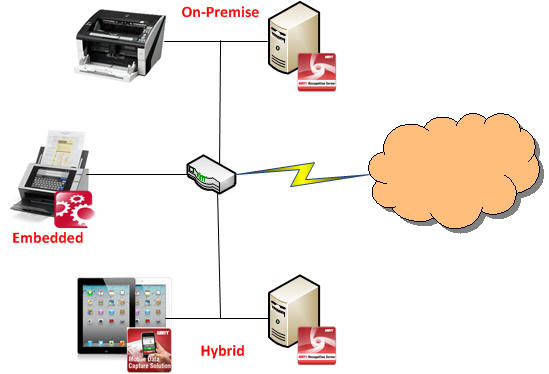
Deployment methods for capture:

  • On-premise deployment is the method which is most familiar.  This simply means that the capture technology is connected to a capture device usually via a USB cable.  The device could be a scanner, camera, fax machine or even image import.
  • On device capture means that the software capture technology is embedded or part of the overall capture solution.  Basically, the technology is ‘face-less’ and is integrated with some other software.
  • Hybrid is an emerging capture deployment method which is quickly gaining popularity with the emergence of mobile and cloud computing.  This method provides for maximum efficiency and typically the best performance.  Hybrid is a system architecture that is constructed where each component performs some function in the process.  Some of the interesting things that can be accomplished with a hybrid deployment method is that an application can, for example, take a picture of a document with a cell phone camera and perform image enhancement such as crop, deskew and auto-rotate on the phone itself.  Then, on the server-side, perform the rest of the capture process such as classification, data extraction and export.


One of the next steps in building an effective capture solution is to decide if your organization will utilize off-the-shelf software, create something custom or use capture as a service.  There are many decent off-the-shelf capture applications yet all will need some degree of configuration.  This type of application usage is typically for smaller, less demanding types of requirements.  When customization of a software application is desired, or required, then several capture software vendors offer Software Developer’s Kits, SDK’s or Software Engines.  SDK’s are software tools that allow for software development so these are certainly not an out-of-the-box type solution but it does allow the flexibility to really customize the software application to meet specific organizational requirements.  Last, but not least, is the “As a Service” option for document capture or conversion.  This means that an organize would ‘rent’ or ‘lease’ these services from a provider.  The ‘As a Service’ business model is similar to your internet service provider, cable/satellite TV provider or electricity to your home.  You don’t own any of those services, rather you pay for the services they provide.  Read more here:  Economies of scale:  Cloud processing.  Your choice of usage model for capture should be rather obvious but only after requirements are clearly documented and market research is done to find out what products/services are available.

Types of capture application usage:

  • Capture applications installed from local media has historically been the traditional way in which most organizations integrate capture into their organization.  They will download the software or install from a DVD typically and are generally more generic in their set of features.
  • Software Developer’s Kits (SDK’s) and recognition engines are for Independent Software Vendor’s (ISV’s), savvy Systems Integrators or even end-user organizations to take software tools provided by a vendor to create a new application.
  • Capture/Conversion as a Service is a relatively new concept where a users can upload images directly to a third-party hosted service for processing.  This is especially true in cloud computing scenarios.  In these cases the organization usually doesn’t not buy the software they are using.  Rather they ‘rent’ or ‘lease’ it from the vendor.  This is appealing for many reasons including less initial capital expenditure, reduced time to begin using and no technical staff required for the organization.


In summary, more than ever organizations are empowered to build highly effective capture solutions.  With more available options this creates a vendor competitive environment which will help drive innovation, decrease prices to organizations and make advanced technology available to everyone.  Legacy capture software vendors are being forced to innovate new products and services in order to remain relevant.  With internet bandwidth being more and more stable as well as less expensive, it is bringing a new dimension to what, honestly, had become a somewhat stale industry.  Then factor-in cloud applications which have enterprise class functionality available for organizations of all sizes to easily consume and you have a recipe to create Capture/Processing and Transformation to fit precise, not general, business requirements.


I invite you to re-visit the introductory post in this series of posts on “Building an effective capture solution” by reading this post on Capture Begins with Process.  Or, I invite you to continue on by reading Part 3 of 3 (Storage/Business Policy/Workflow)“.
Building an effective capture solution – Part 1 of 3 (User Experience/Device/Interface)

Building an effective capture solution – Part 1 of 3 (User Experience/Device/Interface)


In this three part series of blog posts I would like to walk you through building a highly-effective, yet extremely agile and surprisingly affordable document capture solution.  Not a piece-part of a solution, rather a complete solution from start-to-finish.

First, before any technology is ever considered the prudent thing to do is to clearly understand the use case for capture.  In other words, think of real world scenarios and carefully consider the user experience of capturing information.  The ultimate success, or failure, of the entire system can depend on whether users themselves feel comfortable with the capture experience.  If the experience is not easy, available at all times or effective then regardless of how fancy the back-end technology is, they will surely resist.

Let me give some examples of use cases and how understanding the user experience first, before considering back-end technology, will help define the proper hardware device for capture:

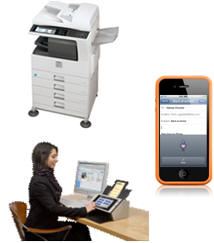
mobile_scanner_multifunction Use case will determine choice of capture hardware:

  • Imagine the user works in the sales department and receives various Price Lists often with many line items that they must enter into the company’s inventory management system.  In this case a dedicated document scanner is most likely a logical choice of capture device hardware because they are frequently scanning documents.
  • Next, consider the use case scenario of a traveling business person that needs to capture an image and details from an expense receipt.  In this case using a mobile device with a camera is much more convenient and practical because they only need to capture information every-so-often and, of course, a mobile device is portable.
  • Finally, in typical shared office environments where groups of users need to occasionally capture information from business documents then a shared network scanner or multifunction scanning device might be most appropriate.  These devices have higher costs so it’s not practical to put them on everyone’s desk and the size is not reasonable for a desktop.


After you determine the proper hardware device based on user experience the next thing you must decide on is how information will be presented to users on the hardware device.  Or, in other words, the User Interface.  There are several options and whether you choose to design your own application or source an existing application a decision should be made wisely.  The implications are tremendous, and in particular when it comes to system maintenance and scalability.

User interface considerations for an effective capture application:

  • An application that is compiled and installed on a computer depending on the developers’ preference of operating system and development environment to create this application.  This is typically one of a few flavors including Microsoft Windows, Apple Macintosh or Linux.  This approach typically offers the most feature-rich user experience and historically been the most common method to deploy an application.
  • Web-based is a newer, popular method for creating capture applications due to the fact that web browsers are nearly ubiquitous across the various operating systems and devices; especially mobile.  Industry accepted standards such as HTML5 and XML are quite appealing for application development.  This makes supporting the widest variety of devices do-able and thus more attractive from a software development standpoint.
  • Another emerging popular option is to build a highly-effective, and extremely functional, user interface is using a Hybrid approach.  With the Hybrid user interface design this allows a developer to use both the native functions of a hardware device such as the camera on a smart phone or image processing of a scanner, yet still make the application itself open to the widest variety of devices because the application can be run in a web-browser via HTML5, for example.


html_xml_compiled

So, in summary, it’s critically important to take the user experience into account as an important first step in creating an effective capture solution.  Also, making the important decision early-on in your capture system architecture about user interface considerations will enable you to achieve the goals of providing efficient, cost effective tools with the ability to scale-up, or down, when necessary.

I invite you to re-visit the introductory post in this series of posts on “Building an effective capture solution” by reading my post on Capture Begins with Process.  Or, I invite you to continue on by reading Part 2 of 3 (Capture/Processing/Transformation)“.

capture_processing_transformation_arrow

My first trip to Moscow

I made my first business trip to Moscow a few weeks ago.  It was a remarkable experience and it’s always very interesting for me to indulge in different countries and cultures.

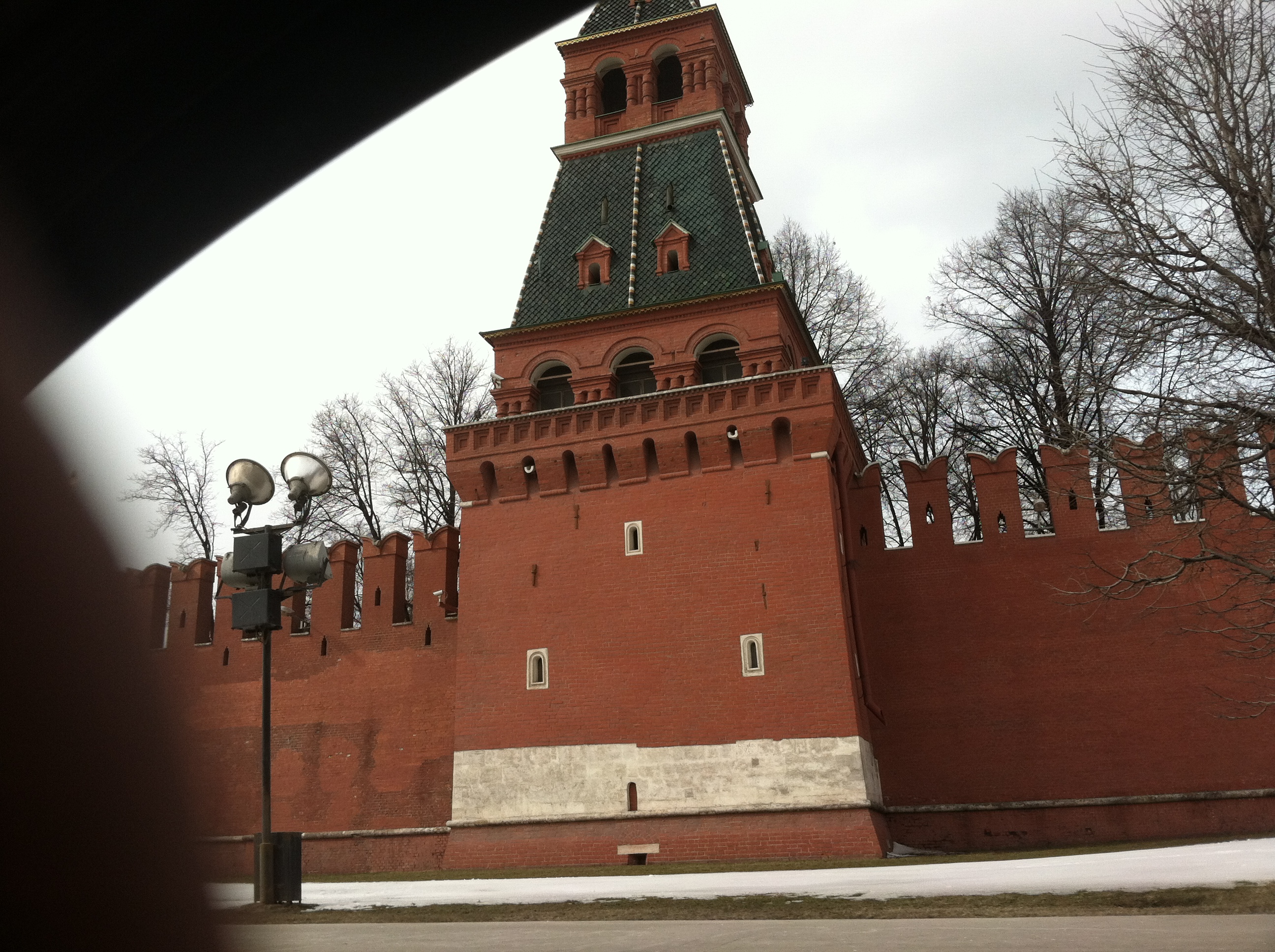
Traveling internationally has a great way to put things into perspective.  The world is a very big place, but at the core “people are people”.  What people want is to live, work and be in peace.  We all have that in common for the most part.  One of our drivers was kind enough to take a slight detour and drive by infamous Red Square as seen in the photo below:


The Russian people aren’t so unlike American or Japanese people as you might imagine, in my opinion.  I have found obvious commonalities in each of these cultures are a ‘hard-working element’.  It’s inspirational to go to a foreign country/city and just witness the people and business go-about their daily routines.  True, living in the United States, I sometimes get jaded and frustrated with American laziness and gluttony but I feel, honestly, if I think about it in comparison to other societies, American business is quiet efficient.

Another commonality between Russian and Japanese society is their consideration for visitors.  I absolutely admire this quality about these two countries which are distinctly different in some ways, yet quite similar in other ways.  The Russian people went out-of-their-way to try and communicate in English at the airport, in the restaurant or in the hotel.  They really did their best to make me feel at home.

If you ever do visit Moscow, however, be prepared for traffic!  Wow – this was something I was surprised about.  Although we had drivers for our travels and didn’t have to rent a car it was crazy just simply being a passenger.  There is massive traffic in Moscow that you should know.  Give yourself plenty of time to get to your destination and know the back roads, if possible.  I would compare the level of traffic congestion to that of Manhattan, New York (US).  However, the drivers in Moscow are aggressive, just like in Manhattan, but they have amazing skill to weave and dodge obstacles and they lack the anger that overcomes American drivers.  In Moscow I did not witness one single driver either honk their horn and/or ‘flip-the-bird’.  It seems as though this traffic mess is just accepted as a condition for living in Moscow.

To compensate for the traffic congestion it seems that law enforcement is quite lenient.  A result of the massive traffic is that people have to park their cars somewhere and, believe me;  they park them wherever they can find space!  You park on the sidewalk, sideways or in other areas because you have to.  Maybe I can go into the Parking Garage business in Moscow?

Finally, again, I appreciate all the hospitality of the Russian people.  Stereotypes and history is something hard to overcome but it seems that the integrated approach of a world economy is truly a reality.  I’m humbled to see it, and to be a part of it.

Великие люди

偉大な人々

Great People,

Kevin