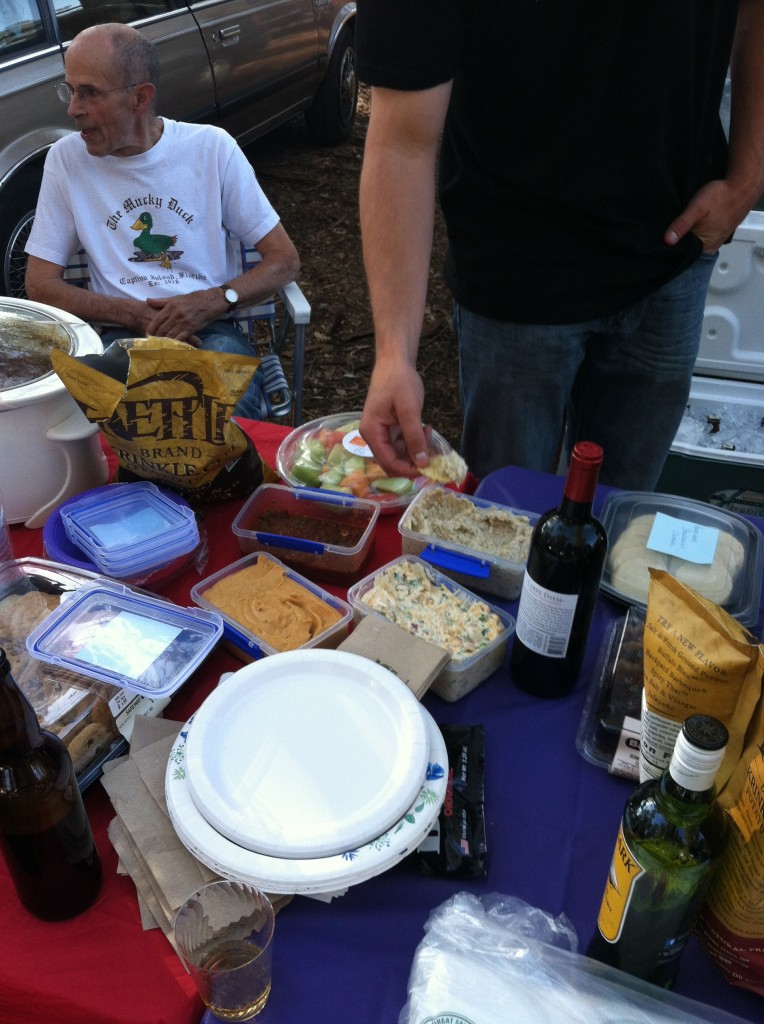
Coyote Lake Park camping (July 26-28, 2013)

This camping trip was a memorable collection of firsts. First, it was Jack’s inaugural experience to dip his feet in a mass body of water whether it was pond, ocean or lake.

IMG_6803It’s 7:10pm on Sunday afternoon and I’m feeling quite tired, yet incredibly refreshed.  Brandee, Jack and I just spent the weekend camping!

While I would have loved to grab our cat, Bella, and her new collection of fishie-family friends, The Hatfield’s and The Macoy’s, it just wasn’t practical to bring the 55-gallon fish tank and a finicky-feline with us camping.  So the three of us headed out to Coyote Lake Park in Gilroy, California which is only about a 30-45 minute drive from where we live for a few days of fun.

This was the first camping trip for both Brandee and Jack so there were a lot of potential issues that could have arisen.  You see, typically when I went camping previously I only have had to contend with my needs and not others.  Therefore, I packed limited supplies and was ill-prepared, quite-frankly.  This trip, however, was the kind of comfortable camping I had never experienced due to Brandee’s amazing (and slightly obsessive) planning.

Camping In Style

IMG_6806I must admit that I had concerns about Brandee’s natural instinct for planning the most meticulous details of events might conflict with the pure nature of camping, which in my experience, is ‘toughing it’ and ‘do without’ in dust, missing supplies and a generally a lack of comfortable living environment.  After all, that’s what camping is all about?

And although this camping trip still involved the traditional dusty ground there was absolutely no worries for supplies.  Brandee had done a wonderful job to consider so many possibilities that it made the trip extremely enjoyable.  Truth-is that I was slightly teasing her for over thinking her first time camping experience with food lists, equipment lists and a schedule of events however, in retrospect this was the way I ought to have been camping for years!  I regret not having on insisted that she join me on camping trips of the past.


IMG_6887The Great Outdoors

This camping trip was a memorable collection of firsts.  First, it was Jack’s inaugural experience to dip his feet in a mass body of water whether it was pond, ocean or lake.  In this case it was lake and it was exciting and scary for Brandee and myself.  While it’s a fact that most labrador dog’s enjoy the water, as a rescue-dog, Jack had never experienced the water with us before.  In fact what little exposure he had with the garden hose while we water the lawn, he would be scared and skittish, which led us to think he might have been abused with a water hose when he was a baby because that is just not natural for his breed.  Anyhow, we took him down to the shore of the lake and without any coercing he freely dipped his paws in the water like it was completely comfortable.  It was such a relief to me because I would like him to enjoy the water for his enjoyment in the future.  He was on a short leash at the time and couldn’t go deeper into the lake but I think his love for the water is clear if we can just expose him to more opportunities to swim.

Second, we had the opportunity to witness true wildlife in their element.  We saw blue jay birds galore!  They were quite friendly and probably the most abundant among the campsite.  These birds were fairly large and would swoop-in to get Jack’s dog food, sometimes the bread Brandee would feed them or sometimes simply to come visit and show off their great flying skills in the trees.  There was also deer, ground squirrels, cows, ducks, geese, crows, and other types of unknown birds, fish and then, of course, coyote that we witnessed.

IMG_6863One of the most humorous animals/events we did not see, yet clearly saw the evidence was a food raid on our campsite earlier in the morning of our first night there.  While we packed away all the human food into the tamper-proof bear food locker, we naively left Jack’s dog food bowel out with a minimal amount of food.  Little did we know that this was a major invitation for the critters of Coyote Lake Park to come visit us on this cold, Saturday morning.  We woke up to an empty dog food bowl but apparently clear, muddy raccoon size paw prints all over our outside food cooler.  Apparently these animals are very smart and savvy about getting into these.  The evidence of their paw-prints strategically placed around the cooler was hilarious in that they had a clear plan to raid our food.  Nice try guys but better luck next time – and we have your paws-prints on-file now!

We had two adjoining campsites and I have to say that although we camped In Style and in The Great Outdoors, my fondest memories will be spending time with the friends that joined us for this trip.  A majority of our time camping was spent socializing with them about everything from what is the best strategy in the Connect 4/Uno/Battleship games, tips/tricks/recipes for good BBQ cooking or interesting life events and experiences.

IMG_6876Coyote Lake cleanliness and kindness of staff

I cannot finish this blog post in good faith without acknowledging the overall cleanliness of the grounds/facilities and fantastic staff at Coyote Lake campground.  From the day we checked-in on Friday afternoon until we left Sunday morning they were great.  The maintenance staff was regularly cleaning the already clean restrooms often.  The ranger staff drove around the campsites during the day to offer fire wood bundles, which we quickly jumped on and appreciated.  Then, as we were packing up to leave, one of the rangers got out of his truck to ask Brandee a few follow-up questions and take a sincere interest in asking her about what she thought of the experience.  They really take care at Coyote Lake and want their visitors to have a good, safe and positive memorable experience.


Here are some supplementary photos of our camping trip:

IMG_6787 IMG_6805 IMG_6863 IMG_6889

Red (2008) – Movie Review


red_2008This was certainly a movie that brings you “full circle”.  And this is exactly what I like in a quality film.  It had a lot of emotion, several bits of anger and tons of good moral messaging throughout.

Red was an entertaining flick that pulled at your emotions, for better or for worse.  I have to say this was a rather simple storyline that I enjoyed tremendously.  This was a film about the good and bad in people.  The movie had some really believable characters where you wanted to hug the hero and punch the villain in the face.

Red is the name of the main characters, Avery’s, dog.  A group of young punks come upon Avery while he’s fishing and end up killing Red with a rifle/shotgun for no reason.  It was senseless and sad.

So, Avery, in his calm and collected manner didn’t go ballistic.  Rather he was set on a mission for the punks to apologize for the wrong they had done and change for the better.  Avery’s patience is admirable considering the fact that it was clear he loved Red immensely.

Avery continued to give the punks, as well as the shooters father plenty of chances to make-amends but these idiots were the stereotypical bullies that could not bring themselves to simply say sorry.  But Avery was determined because he loved Red so much.

In the end it’s a story about a lot of loss and little gain because stupid people do stupid things but if there is any opportunity to try and make things right, do it.  Don’t miss your opportunity.  As upset that clearly Avery was over the killing of his dog, he maintained his composure and genuinely hoped the punks would reform for the better.

The main point I took from this movie is to be a decent person in spite of bad life events.  And if you make a poor choice or decision be honorable enough to admit wrong.  Lastly, don’t be a punk in the first place.

I won’t spoil the end of this great movie so I will end with the point that I have seen hundreds of non-memorable, or awful, movies lately and Red is the only one which I will watch again today.

Red is worthy of 9 out of 10 Steeler Stars.


steeler_star_smallsteeler_star_smallsteeler_star_smallsteeler_star_smallsteeler_star_smallsteeler_star_smallsteeler_star_smallsteeler_star_smallsteeler_star_smallsteeler_star_small_silver

The Rise Of Networked Scanning

Business Solutions, September 2008

Written by: Vicki Amendola

The adoption of networked scanning is on the rise, and document imaging VARs should prepare to cash in on the opportunity.

Converting paper documents into digital data isn’t an earth-shattering phenomenon anymore. Instead, document imaging can finally claim a firm foothold as a proven strategy for VARs to use with customers struggling to improve operational efficiency and productivity, reduce administrative burdens and costs, and even achieve compliance with governmental regulations. The trend that continues to enfold the document scanner market is a migration that draws the technology from a centralized, backroom process to points much closer to document creation in distributed, or workgroup, scanning solutions.

Most analysts and research firms that cover the document imaging market agree that distributed scanning applications have become — and are predicted to remain — the dominating segment of the scanner market. Network scanners are a subcategory of this segment and, although not yet recognized as a stand-alone hardware segment, network scanning is showing significant growth year over year. A recent report from InfoTrends, a research firm that provides in-depth analysis of the document scanner market, supports the premise that network scanning is on the rise, making it fertile ground for imaging VARs. The group’s U.S. Document Imaging Scanner Survey Report: 2007 illustrates a 112% increase in network scanning use over the last three years, from a starting point of 16% in 2004 to 34% in 2007.

Now Is The Time To Sell Network-Enabled Hardware
Network scanning hardware has imaging specifications nearly identical to the dedicated scanner models found in the desktop or workgroup segments. However, the trend in imaging is bringing network connectivity into the mix, with additional network-capable scanner models being released each year. These scanners reside directly on a company’s network, rather than being attached to a dedicated PC. “Network scanning provides obvious advantages, such as those we’ve grown accustomed to with network-attached printers,” says Kevin Neal, product manager at Fujitsu.

Neal’s example of a networked printer highlights the ability for VARs to integrate a vital piece of productivity equipment directly into a customer’s network, enabling the device to be shared and accessed by multiple individuals as part of that network. Shared devices reduce the cost of the solution, a primary sales objection, by reducing the total number of devices needed. In addition, deploying fewer devices can lead to reduced maintenance requirements and can even help to land sales in cases where conserving valuable office space is a primary concern. “While networked printing has become commonplace and has become very beneficial as an efficient output device, this connectivity is now being leveraged to input information into a company’s computer systems via scanning/imaging technology,” says Neal.

For some companies, high-end digital copiers and MFPs (multifunction peripherals) have provided an introduction to the basic concept of network scanning. According to a recent IDC report, 1.54 million scan-enabled MFPs shipped in 2007. The trend has not gone unnoticed by the ISVs (independent software vendors) in the document imaging arena. Many ISVs have recognized these devices as another source of capture and, as the corporate office environment embraced the MFP, these ISVs developed solutions to capitalize on the opportunity.

Satisfy Ease Of Use And Security With Networked Scanners
Despite the applicability of the MFP as a networked scanner, it still can’t compete with a dedicated networked scanner in most cases where document imaging is the primary emphasis of a reseller’s solution. “Frequency, complexity, and larger scanning jobs tend to drive more dedicated scanning equipment for individuals or workgroups,” says John Capurso, VP of marketing at Visioneer. A dedicated network scanner eliminates the competition that can be experienced with an MFP-based solution, such as waiting for a large print job to finish before being able to scan a document to e-mail or file. In addition, despite all the advances being made on higher-end MFPs, a dedicated device can still be easier to use.

“Ease of use is a critical selling point for customers that have multiple users with different levels of technical expertise using the scanner,” says Jackie Horn, director of worldwide marketing at BÖWE BELL + HOWELL. “VARs are leveraging user-friendly touch screens and built-in features [such as one-button scanning] to make life easier for end users to simply walk up to the scanner and scan.” Many network scanners available today are incorporating much bigger touch screens than earlier models — some as large as 8 inches across — to promote ease of use. These larger screens provide a GUI (graphical user interface) on which the user can not only select scanning options, but also preview the scanned image and even enter basic indexing information.

Security is also a driving force behind the adoption of networked scanning, and it is occurring at both the device and document level. At the document creation level, network scanning is beginning to incorporate encryption capabilities to enable the creation of secure image files. For example, scanning to encrypted PDF can prevent unauthorized individuals from viewing the document. At the device level, user authentication can take many forms, including user password or even fingerprint and other biometric technologies. These options can satisfy access control by restricting device usage and can also provide audit trails by recording which authorized users have accessed the scanner and which company information was created or viewed on the device.

Networked Scanners Can Support ECM Solutions
Another trend in the network scanning market is the growing availability of SDKs (software development kits) that can be used to run customized document management systems right from the network scanner. “Although well-suited for ad hoc scanning, one-touch scan-to-job buttons on the network scanners enable VARs to establish dedicated buttons that can trigger specific workflow processes, delivering the combination of more scanning power and functionality with simpler operation,” says Michael Oliva, manager of product marketing, Canon USA. “Incorporating various connectors to third-party applications, such as SharePoint or RightFax, can simplify integration and enhance interface options between the network scanners and various document management systems.”

In some cases, network scanning has become a way for VARs to enhance existing document management systems or even form the nucleus of brand new ones. “VARs have the ability to bring the entire system architecture together: network scanner, connectivity, servers, ECM (enterprise content management) applications, workflow, access rights, and document life cycle,” says Visioneer’s Capurso. “And since every organization has different requirements, the opportunity is there to make all the components come together and function reliably.” Just as with distributed capture implementations, VARs should leverage network scanning to continue pushing the point of capture even closer to the point of document creation. Doing so will help customers realize the benefits of increased ease of use, increased information security, increased productivity and efficiency, and perhaps what is at the top of most customers’ minds today, reduced costs.

– See more at: http://www.bsminfo.com/doc/The-Rise-Of-Networked-Scanning-0001#sthash.z0GfvD3B.dpuf

Increase ECM Automation Processes With Higher Resolution Scanning

Source: Business Solutions Magazine

kevin_neal_for_web

Written by: Kevin Neal, product manager – production scanners, Fujitsu Computer Products of America

When we talk about software automation, it’s safe to say that we truly live in remarkable times. Automation, as it will be referred to in this article, can be defined as allowing a computer to accomplish tasks that traditionally took human intervention and/or action to complete.The rapid adoption of automation via software is driven by several basic technical factors, including high-powered, affordable CPUs (more cycles and lines of code executed per second), drastic increases in memory capacity in conjunction with reduced prices, as well as the ever-evolving intelligence within software packages. The computing resources behind all of the advancements are helping to reduce costs, improve efficiencies, and assist with compliance and regulation.

Software automation is becoming more pervasive among ECM (enterprise content management) and document scanning solutions. The virtue of implementing ECM solutions has historically been cost reduction, which could have meant decreased headcount or reallocating employee resources to other business units. It may even have been tangible costs such as reducing mailing and shipping charges, eliminating expensive fax transmissions, or increasing physical storage space too, by removing cabinets and file drawers.

Because of computing advancements, businesses and organizations are no longer asking the questions of whether ECM systems are truly viable. Instead, they are asking more pointed questions about how much the return on investment is and how quickly they will realize the ROI. In fact, according to Gartner, Inc. the worldwide ECM software market is expected to grow more than 12% per year through 2010, from $2.6 billion in 2006 to more than $4.2 billion in 2010. These days, it’s more about which hardware, software, and services best fit the needs rather than whether or not to put a solution in place.

With most of the pain points of the DIP (document image processing), DIM (document image management), and/or ECM solutions behind us, we now have an opportunity to do more remarkable automation tasks with software. But the success or failure of the entire system is closely tied to the ‘on-ramp’ of electronic document automation and your document scanner, in particular. In the next few paragraphs, I’ll examine several important software automation solutions from some of the premier forms processing and capture software companies in the industry.

High Resolution Maximizes Recognition Results (Contributed by ABBYY)
When scanning for OCR (optical character recognition) or data capture, start with an excellent quality original. This may be the single most important consideration to achieve optimal results for recognition and capture, as well as for the purposes of long-term preservation. In fact, using a high-quality image takes on increasing importance as more users depend on electronic documents to take the place of paper-based originals because of the searchability and cost savings. On the downside, once scanned, the paper document is often no longer available — so it is important to retain maximum quality from the outset.

Today, 300 dpi (dots per inch) color remains the gold standard for scanning. However, high-quality grayscale is an option when color is not achievable (since color scanning often results in 32-bit files). Whenever possible, maintain color images. Color provides additional depth, which enhances the ability of recognition software to gather additional information about the scanned document in order to maximize accuracy. In short, consider quality first when scanning for recognition and archiving.

Classification Of Forms (Contributed by ReadSoft)
Organizations are turning to one portal for all incoming documents — no matter if they arrive on paper or in electronic form. Technology is available to automatically sort incoming documents and classify them according to case. This enables the simple inputting of all incoming mail into a scanner (without any separator sheets) and lets the computer sort the documents. If documents arrive in electronic form, they are also easily incorporated into the flow. By digitizing paper documents through high resolution scanning, users can easily search and retrieve all incoming mail. What will this do for an organization? Efficiency increases when each and every document is distributed correctly. Fast access to status reports and audit trails gives users better control over information flow. In addition, a smooth integration with back end systems such as customer management applications, databases, and archives boosts the performance of IT systems. The overall result of high resolution scanning is automated classification and sorting — less need for document preparation, one portal for all incoming documents, (paper and electronic), electronic distribution to authorized staff, and control of information flows.

300 dpi — Friend Not Foe For Automated Document And Data Capture (contributed by AnyDoc Software, Inc.)
The idea that scanning documents at 300 dpi will create backlogs and bottlenecks within automated document and data capture solutions is an outdated myth. In fact, within many solutions, product settings default to 300 dpi to maximize character recognition with little or no adverse impact on processing or transmission speed or storage capabilities — and with a great positive impact on recognition accuracy. And, when processing healthcare forms such as explanation of benefits (EOB), Health Care Financing Administration (HCFA) and Uniform Bill (UB04s) — known for their notoriously small font and extremely high character density per page, proper resolution is critical. At a 300 dpi setting, recognition engines are optimized and file size is still very manageable. Because the average size of a 300 dpi 8.5” x 11” bi-tonal TIFF image is 40 KB, it means approximately 3,000,000 document images can be stored on a standard 120 GB hard drive.

In decades past, files competed for space that was limited and expensive, but no more. Now, a 40 KB file travels on today’s fast networks at what can be conversationally considered to be the speed of light. A lower scanning resolution can negatively impact data recognition, which is not offset by the saving of space — no longer the limited commodity it once was.

And, some of the better document processing packages will process at 300 dpi, but output at a lesser (i.e. 200) dpi, giving you the best of both worlds. Scanning at a higher resolution can dramatically improve data recognition, decrease the need for human intervention, and increase the efficiency of all downstream applications without negatively impacting electronic transmission or storage space.

More dots per inch (dot) for increased automation
So, maybe now you’re thinking — “Of course I want everything automated and I’ll scan everything at 300 dots per inch and/or color, or both.” Well, not so fast. First, we must consider the risks versus the rewards for this type of a decision as we addressed in an upcoming article entitled “Trends Towards Higher Resolution Scanning.”

To quote Gartner, “The quality, performance, and ease of use of software products will improve.” This will help drive adoption; however, an inefficient document capture solution, due to settling for anything but the most software automation, should be unacceptable these days considering the pros and cons of higher resolution scanning.

In a day and age where no two ECM solutions are built alike, and organizations have choices for software automation components, it’s important to implement the best-of-breed solutions that garner optimal automation results. Whether it is OCR, ICR (), forms processing, separation, classification, unstructured forms, bar code recognition, etc., each step in the automation process and the rest of the automation workflow is directly related to a prior event, and it all starts with document scanning. As more desktop scanners are deployed throughout organizations, there is certain to be an ever increasing demand for ease-of-use and automation. Give your ECM solution the best chance for automation success and don’t underestimate the trends towards higher resolution scanning.

For more information on topics covered in this article or more information in general please visit:

Fujitsu – http://us.fujitsu.com/fcpa

ABBYY – www.abbyyusa.com

AnyDoc Software – www.anydocsoftware.com

ReadSoft – www.readsoft.com

Kevin Neal, product manager – production scanners, with Fujitsu Computer Products of America has been involved in the document scanning/enterprise content management industry for over 18 years. He has held various customer service, sales and management positions for many hardware and software products during his career. In addition, he has years of experience installing, configuring, and troubleshooting networking components as a consultant and network administrator. Currently he handles product management responsibilities for Fujitsu’s complete line of production scanners.

– See more at: http://www.bsminfo.com/doc/Increase-ECM-Automation-Processes-With-Higher-0001#sthash.tUUIEbV9.dpuf

High-Volume Scanners Up Their Game

Business Solutions, July 2006

Written by: Ken Congdon

Once defined solely by speeds and feeds, today’s high-volume document scanners now incorporate new features that enhance image quality and transaction processing.

According to InfoTrends research, an expected 80% of the growth in the scanning market this year will come from the workgroup segment. This same research suggests that high-volume production scanners will have a flat sales year and may even lose ground in the years to follow. Despite this data, many scanning hardware vendors have quietly enhanced their high-volume devices with new features that move beyond increasing scanning speeds and duty cycles, but focus on enhancing image quality and reducing manual imaging processes. In addition, many high-volume scanners have become more affordable to consumers — a combination that many industry professionals believe will prove the InfoTrends research inaccurate.

“The increased affordability of many high-volume scanners has made them an attractive supplement or alternative to many distributed scanning applications,” says Kevin Neal, product manager for Fujitsu Computer Products of America. “For example, in a distributed deployment, a company may not only need to buy 10 scanners, they may also be required to buy 10 PCs, upgrades and updates to those PCs, and 10 scanning software licenses. Meanwhile, one high-volume production scanner may be able to deliver the same end result at a lower total cost of ownership over time. This scenario illustrates the opportunity for growth that remains in the high-volume segment. Contrary to the InfoTrends research, I believe high-volume scanner sales will gain ground at a modest 5% to 10% over the next few years.”

Image Quality Enhancements Improve Forms Processing
Improved affordability is just one side of the high-volume scanning coin. New features are also adding to the appeal of these devices. One feature that has become standard on most high-volume scanners is the ability of the device to be run at its full-rated speed at 300 dpi (dots per inch) resolution in monochrome, color, or grayscale. “High-volume scanners are primarily used for forms processing applications,” says Neal. “In these environments, image quality is often more important than speed. In the past, if an end user needed to scan a document at 300 dpi or higher to increase OCR [optical character recognition] and ICR [intelligent character recognition] accuracy, the scanner would slow down to a crawl. However, now users can get a high-resolution image without sacrificing speed.”

Other image enhancement features are also being brought onboard many high-volume scanning devices to improve forms processing. Features like autocolor dropout, despeckle, and line removal are all becoming fixtures on high-volume scanners, and all enhance forms processing accuracy. Autocolor dropout is particularly useful in eliminating the red table backgrounds that can often impede OCR read rates on HCFA (Healthcare Financial Administration) claim forms.

High-Volume Scanners Streamline Transaction Processing
Advanced image processing features are being added to high-volume scanners not only to improve forms processing accuracy, they are also helping to eliminate many manual document preparation activities. “Features like autocolor dropout not only improve OCR rates, they prevent the user from having to presort documents based on paper color and reduce the number of times the scanner settings must be adjusted during the imaging process,” says Eric Olsen, product marketing manager for Eastman Kodak Company. “Similarly, an autocolor detect feature automatically switches the scanner to color output mode when a preset level of color content is detected. This reduces the need for presorting and for making image processing changes while scanning.”

Other features that reduce document preparation labor include automatic page rotation and automatic blank page deletion. If the scanner can automatically rotate documents, it eliminates the need for the operator to place all the documents into the feeder in the proper orientation. Likewise, if a scanner can automatically delete blank pages, there is no need to separate single-sided documents from two-sided documents.

Some of today’s high-volume scanners are also incorporating new technologies that use the images they create to streamline transaction processing. “There is a demand for scanning to drive new incremental benefits into a transaction from its point of origination,” says Robert Sbrissa, executive VP of sales and marketing for Imaging Business Machines LLC. “In this case, a transaction is any item that needs further processing beyond archive. This capability demands more intelligence during in-line document processing and requires us to move deeper into the business applications beyond data capture.”

High-volume scanning technologies having an impact on the way a transaction is processed include using the image of the envelope that a document or set of documents was mailed in as a transaction separator. This technology saves customers time and money by eliminating the need to insert bar code separator sheets between batches or individual transactions. Furthermore, it ensures transaction integrity is maintained.

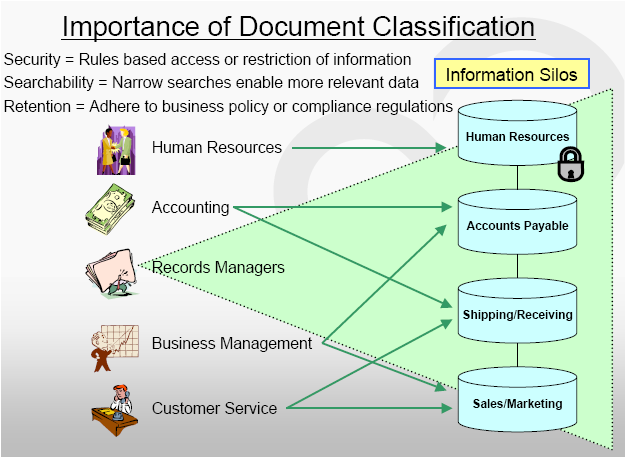
A select few vendors are actually incorporating a platform for document classification with the scanning hardware itself. This technology combines topographic image analysis with business rules to identify the document type (e.g. application, invoice, form). This eliminates the need for an operator to presort documents by type and streamlines transaction processing by accelerating each document through the appropriate workflow.

VARs Must Evolve With New Scanning Trends
With all the new capabilities today’s high-volume scanners provide, getting the appropriate training from your chosen scanner manufacturer is essential. “A VAR is required to master a number of different components to deliver a truly successful imaging solution,” says Neal. “For example, there are thousands of possible scanning hardware and ISIS driver configurations that a VAR can employ to enhance the image quality for its customers’ specific applications. Plus, you need to consider the operating system on the PC, the network, other software integrations, and a number of other variables. You should develop a good relationship with your vendor partners and take advantage of all the training they offer to ensure you have the latest product integration knowledge.”

Understanding the product is important, but perhaps more important is being able to decipher how the scanner addresses your customers’ pain points. “It’s unlikely that your customers are going to ask for most scanner features by name, much less understand why they are important — they will only know what they want the scanner to ultimately do,” says Olsen. “This makes it crucial that VARs effectively align their customers’ needs with the scanners that offer the best features to meet them.”

Finally, with the changing landscape of the scanning industry, VARs must ultimately alter the way they attack the market if they wish to continue to be successful. “Low-cost speeds and feeds are easy to get from a number of vendors,” says Sbrissa. “However, this makes it difficult for VARs or integrators to have a unique differentiator in their solution. Understanding the higher end of this market and moving into more of the transaction processing stream will ensure your solutions have appeal, resulting in higher margins and longer applicability in the market.”

– See more at: http://www.bsminfo.com/doc/High-Volume-Scanners-Up-Their-Game-0001#sthash.6FSgpX81.dpuf