The opportunity of Network Scanning

Network Scanning

By Kevin Neal

fi-6000ns_scan-searchableWe live in a connected world”.  It’s a simple phrase, but it means so much.

At the present time, most of us take for granted things like cell phones, blackberries, PDA’s,  Bluetooth, pagers, etcetera.  All these communication devices are examples of being “connected” all the time;  however this wasn’t always the case.  Not all too long ago we lived within a very disconnected world in comparison to the technology currently available in 2007.  With the dramatic adoption of the Internet over the past decade, more people  than ever are connected via their home computers with a Digital Subscriber Line (DSL), Cable modem or even broadband  wireless.  According to Gartner, the number of households with broadband connections will double between 2005 and 2010.  The rate of business connectivity is a great deal of the same, just on a grander scale with greater bandwidth and a higher level of service guarantees.

With this rapid growth of computers and servers connected with high speed networking, the likely next step was to connect peripherals.   One of the most prevalent examples of a connected peripheral in an office environment would be a laser printer.  There are many advantages to having a networked printer, including sharing among groups of users, because the volume of printing for each user did not dictate a dedicated printer.  Network printers are fairly common these days; however a new, emerging trend is to use network connectivity to INPUT information into computer systems via a scanner instead of OUTPUT via a printer.


Networking Scanning enters the connected world

Network Scanning is the concept of taking a scanner engineered specifically with mission critical scanning considerations.  This includes paper handling, image quality or advanced multi-feed technology, subsequently connecting them directly to a network without the need for a computer system to be physically connected to the scanner.

These advanced scanning solutions, on the other hand, should not be confused with digital copiers or multifunction devices, which most of us are familiar with. While these sorts of devices are handy for extremely low-volume  scanning requirements, the majority of these devices lack either the physical attributes or true integration desired to effectively utilize them in the connected business world.  As an example, when performing  automated forms processing with advanced data extraction techniques such as Optical Character Recognition, or OCR, good image quality and excellent paper handling provided by dedicated network scanners, could dramatically increase the automation process, thus, decrease human intervention.   This undoubtedly increases efficiency, reduces costs and improves customer service.


Concepts and Terminology of Networking Scanning

Basic  connectivity is the most rudimentary to direct network attach solutions used for a scanner.   This translates into a scanner, which can be used as a network device and the scanner appears as a local device on the network. Or, as I like to refer to it “extends network connectivity”.  This is the least expensive, yet most restrictive option.  It is ideal for ease of use and is cost effective however it is deficient on flexibility for true integration.

Biometric connectivity is the ability to attach a scanner directly to the network exactly as in the Basic connectivity scenario;  however, it incorporates much more intelligence into the scanning process.  For example, with a biometric scanning solution, users could merely walk  up to a supported scanner, position their documents in the scanner, place thumbprint on, or hover their palm over, a biometric device then initiate scanning of the documents based on pre-configured profiles, destinations and/or applications.

‘Push-Scanning’ refers to a scenario where the scanner operator walks up to a scanner, drops the documents into the automatic document feeder, or places them on the flatbed, then initiates the scanning process to send the images to the desired location on the computer network.   This could perhaps be a “watch folder” for high-volume OCR processing for example, or it could be a shared network drive of the scan operator’s personal computer.

‘Pull-Scanning’ is a term  characteristically used when a scanner  operator controls the scanner to connect to a device, scan images and transmit, or pull these images from the scanner to a certain location.   The ability to pull these images can be achieved in many different ways and one of the most common ways is to scan via a web browser.   In other words, the user would enter the name of the device and would have the ability to scan images as well as send them to the destination of their choice.

ECM Scanning.   Enterprise Content Management, or ECM, scanning takes one or more of the above Network Scanning concepts; however, it adds an additional powerful layer of functionality.   ECM scanning incorporates a network scanner directly into content management systems via software drivers and scanning software.   The document imaging industry has seen a dramatic focus on the importance of document capture, for example.   These are extremely focused software packages so as to assist in the ability to extract important business data from scanned documents.

ECM + Secure  Scanning  is the next logical step in the networked scanning connected world.  Now that the benefits of document imaging have been proven via return on investment, increased productivity or compliance reasons, more than ever mission critical business data or highly confidential information resides in a digital format and not on paper.  It’s crucial to secure this sensitive information during the entire lifecycle of the data.  From the instant the data is scanned, when it’s hosted on the network, until the time of its destruction, or the end of the retention period.


What could be the future of Network Scanning

Now that connecting persons and computer systems for personal and business uses is nearly common-place, emerging technologies are being introduced that will continue to stimulate connected systems.  One of these emerging methods being utilized by Information Technology (IT) departments is called “Service Orientated Architecture”, or (SOA).  SOA is a way to create new business applications by re-using or better utilizing current technical assets within the organization.  Connected systems played a major role in developing the SOA model with industry standards such as HTML, XML and Web Services.  In a nutshell, SOA is a way to add functionality and features to a computer networks without the disadvantage of closed or proprietary systems.

SOA plays an important role for Network Scanning in particular.   While the conceptual design of SOA may be applied in traditional scanning configurations with a dedicated computer controlling the scanners operation, there are a few important considerations making a Network Scanner quite appealing to network administrators, Chief Intelligence Officers and end users.  These  important considerations include system security, updates/patches and ease of use, just to name a few.

•  From a Network Administrators point of view, the SOA Network Scanner allows them to deploy network scanners in a controlled  method  making future firmware/software updates much easier.

 •  System Administrators could ship one integrated device, or a scanner plus a network connectivity device, directly to any location where they  would like to deploy scanning.  Once the physical hardware is received the user would simply plug the network cable into the hardware and one could, in theory, be scanning in minutes.   This eliminates the costly and time-consuming tasks such as updates operating systems with patches or installing new software when versions change.   In addition, the Network Administrator would be able to diagnose any technical issues or view usage reports easily from one intuitive interface.

CIO’s, or Chief Information Officers, must earnestly consider a Network Scanning SOA approach from the understanding of compliance, security and regulation.  A scanner attached directly to a network via SOA architecture  gives the organization the ability to provide activity reports based on the individual device for example, which could help play a major role in assisting with adherence to these corporate policies and governance.

Finally, ease of use for the scanner operator plays a chief role in that it is driving the adoption of network scanning within the SOA infrastructure.  In fact, should a corporation wish to use the Pull Scanning technique, they have the capability to assemble a system that could in effect eliminate the need for any sort of user intervention whatsoever.  Imagine the power of this total SOA/Network Scanning approach.   Let’s use a Customer Service example to illustrate a few of the benefits.

In our example, the Customer Service scanning deployment will demonstrate too many remote site locations.  Our IT department benefits from the fact that they would avoid building a computer system to act as the connectivity/scanning device; we simply ship the hardware to the remote site and they plug it into the network.  Subsequently, for Pull Scanning, all the user would be required to do is physically place the items to be scanned on the scanner itself, and someone in a completely different part of the connected world would initiate scanning; receiving all of the resulting images.


The opportunity of Network Scanning

While Network Scanning is quickly becoming the buzz among the industry, there still are certain technical deficiencies that will need to be addressed with some of these devices in order to be considered part of a true IT integration.

As the connected world continues to improve infrastructure and new, innovative ways  to communicate emerge, the industry trend towards more Network Scanning should continue.  For example, organizations most likely will move forward on plans for additional remote location “Telecommuting” of individual workers and satellite office locations.  Couple factors that include ease of use, simplified IT management of hardware and software resources as well as additional adherence to compliance and regulation standards and the future of Network Scanning seems bright.


Eugene (“Gene”) Latimer 1916 – 2013

Eugene Latimer, born Sept. 23, 1916, was raised in a small community south of Sallisaw called Brent, OK. He graduated from Sallisaw High School and attended and played baseball for Connors State College in Warner. He later signed up for NYA (National Youth Administration), a WPA project where he served as president of the student body.

eugene latimerEugene Latimer, born Sept. 23, 1916, was raised in a small community south of Sallisaw called Brent, OK. He graduated from Sallisaw High School and attended and played baseball for Connors State College in Warner. He later signed up for NYA (National Youth Administration), a WPA project where he served as president of the student body.

His amazing uncle, Earl Latimer who lovingly helped raise him when he was younger, paid for him to attend Aircraft Mechanic School in Wichita, where he obtained employment with Beechcraft after graduating. He was drafted into the U.S. Army, but Beechcraft got him deferred twice. After receiving his third draft notice, he declined another deferment and excitedly wanted to go! The U.S. Army transferred him to the U.S. Army Air Corps when they found out he had experience working with aircraft. He served honorably during World War II as supervisor of aircraft mechanics at Lavenham, England from one month before D-Day until one month after VE-Day.

After the war, he returned to Oklahoma to use his G.I. Bill to obtain a degree. He enrolled at OSU (then Okla. A&M) in architecture. He graduated in four years—with two five year degrees (Architecture and Architectural Engineering). While attending college, he met and married Gaynelle Johnson, who was working at the Registrar’s office at that time. They were married 22 years prior to her untimely death in 1969.

He worked as an architect in Ada, Okla. City, Ponca City, and finally Muskogee in 1956, where he went into private practice a few years later. He was a lifetime member of A.I.A. (American Institute of Architects) and designed and supervised the building of numerous commercial and medical buildings, churches, banks, and residences in northeastern Oklahoma. He was proud of the fact that he designed churches for five different denominations.

He is survived by two daughters, Lee Ann Langston (Dan) of Muskogee and Janet Lefler (Rodger) of Tulsa, and two granddaughters, Casey Langston and her fiancé, Brandon Smalley, of Muskogee and Jordie Lefler of Tulsa. He has two surviving brothers, Carl Cook of Sallisaw, Floyd Neal of California, and one sister, Mary Alice Blackford of Sallisaw. He is also survived by numerous loving cousins, nieces and nephews. He was preceded in death by his wife, Gaynelle Johnson Latimer, his son, Richard, his mother, Georgia Latimer Neal and one brother, Jewel Harmon.

Funeral service will be Thursday, May 23, 2013 at 2 pm at Agent Mallory Martin Chapel in Sallisaw. Burial will be at Sallisaw City Cemetery under the direction of Agent Mallory Martin Funeral Home.

Viewing will be Wednesday from 8 am – 8 pm at Agent Mallory Martin Funeral Home in Sallisaw.

Frankie-the-frustrated worker dealing with lack of direct Line of Business integration and Manual Data Entry

1For this particular blog post I would like to use a light-hearted approach to a major problem.  The problem is lost productivity and user frustration around populating data into Line of Business applications via Manual Data Entry versus Automation.

To illustrate my point let’s take one of the most popular Software as a Service (SaaS) applications ever, Salesforce.com.  And while the application is absolutely simple to use and easy to manage, what lacks is the ability to take information from paper and/or an image and put it directly into Salesforce.com database fields.


1.  Let’s take a moment to go through the steps to import data into Salesforce.com and follow the steps Frankie-the-frustrated worker must take to get this task done.
2
2.  Commentary of Frankie-the-frustrated worker:


“Frustrating!  Step 1 of 7????”


3
3.  Commentary of Frankie-the-frustrated worker:


“MORE FRUSTRATING!!!  WASTING TIME!!!”


4
4.  Commentary of Frankie-the-frustrated worker:


“MORE THAN EVER FRUSTRATED!!!!!!!!!  WASTING TIME, MONEY, AND ENERGY!!!!!!!!!!!” 


5
5.  Commentary of Frankie-the-frustrated worker:


 “FORGET IT!!!!!!!!!!!! 
 THIS WILL NEVER END!!!!!!!!!!!!!!!!! 
 WHY IS IT LIKE THIS????? 
 ISN’T THERE AN EASIER WAY????????????????” 


6


Education and modern technology reduce Frankie’s frustration

Are we still living in the stone age when it comes to data entry into computer systems?  Isn’t there a more efficient method to automatically populate data in your software application instead of costly manual data entry?  It’s 2012 after all, not 1912.  Why do we accept such primitive methods of data entry?


Answer:  Because we need to educate the market on the capabilities of capture technologies.  We also need to strive to make integration and usage as easy as possible.  If you build it, they will come.


7
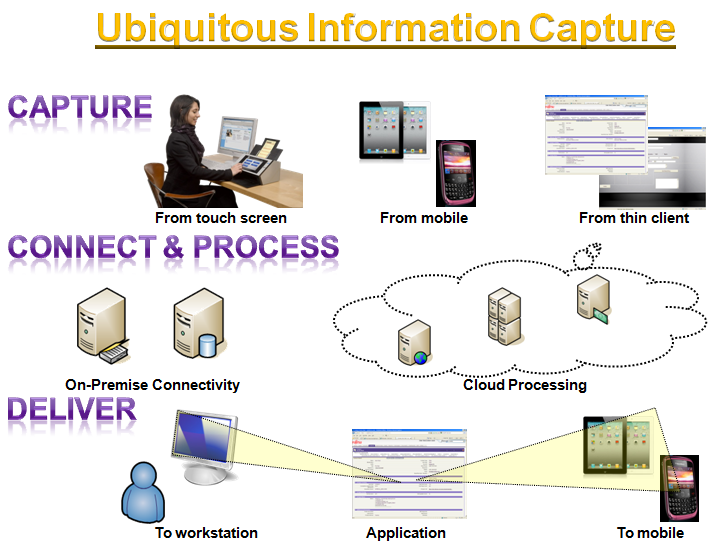
Eliminating Frankie’s frustration with Ubiquitous Information Capture
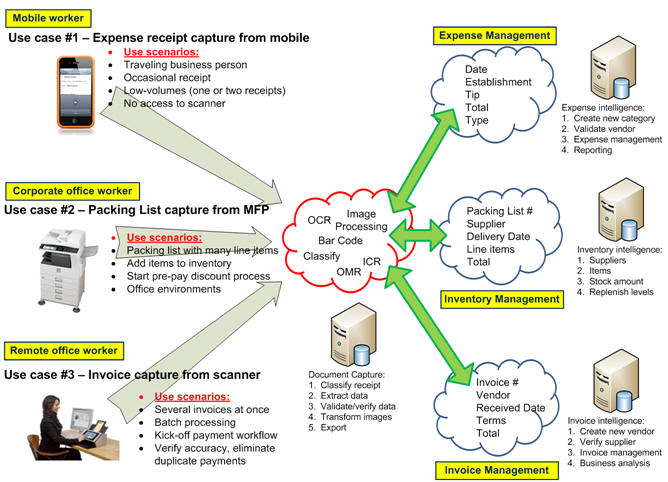
Realizing the dream of Ubiquitous Information Capture directly into applications is much easier than you might think but we must educate the market on current capabilities.  The idea is simple, yet highly effective.  Embed the ability to take photos with a smart phone and/or capture paper documents from a scanning device directly into your software application.  Note that all I’ve done in the screen prints below is add a small icon of a camera and scanner directly into my CloudConnectMashup software application.


8


Now, I can offer my users a truly great user experience because contributing information is nearly effortless and removes pain associated with manual data entry.  This translates directly into reduced operational costs, improved efficiencies and an overall better work environment.


9
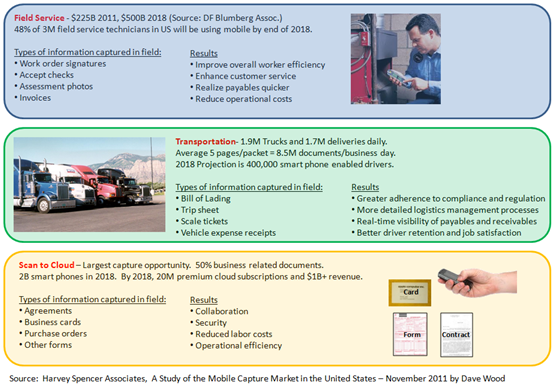
Think about all the lost opportunities to drastically reduce labor costs, most likely in the billions if not trillions of dollars, associated with manual data entry in just the use cases below:


1.  Transportation applications with Bills of Lading, Proof of Deliveries, Trip Sheet or Scale Tickets


2.  Field Service applications with Proof of Work delivered, Vehicle Identification Number, Work Orders or Assessment documentation


3.  Contracts Management applications with Amendments, Terms and Conditions or License Agreements


4.  Invoice Management applications with Invoices, corresponding Packing Lists or Proof of Performance


5.  Sales/Contact Relationship Management applications with Business Cards, Agreements or Correspondences


Do you know a Frankie in your organization?  Do you have a story, good or bad, to tell?  I’d love to hear your feedback.


Thanks,
Kevin

Crossing the ECM/Capture Chasm – ‘This is the Renaissance’

Marc Benioff, Salesforce.com CEO, has been famously quoted on his opinion of cloud computing in terms of saturation-point, as well as technology innovation, for a viable business model.

“This is the heyday of the Cloud. This is the Renaissance. We are in the Great Time. ”

…and he continues…

 “So we’re still at the very, very beginning.

We are in the first innings of Cloud Computing.

This is still the Renaissance. ”

While this is just one man’s opinion I personally happen to think he is absolutely correct.  We truly are in the first innings and, in particularly, as it relates to Capture and ECM moving to the cloud.  Future innings have yet to be played.  In this baseball analogy the convergence of old-school “traditional – behind the firewall” technology and new “innovative – cloud collaboration/mobile” technology are on a crash course of epic proportions.

Then on 9/6/2012 as Jeff Bezos, Amazon.com CEO, proudly introduced his companies’ new Kindle Fire tablet device he was quoted as saying the following:

“We want to make money when people use our devices, not when they buy our devices.”


Salesforce.com reinventing themselves

Let’s take a high-level look how Salesforce.com’s business has changed over the years since the company started business in 1999.  They started with their (1) core Customer Relationship Management (CRM) service and then they (2) offered a development platform.  Next, they (3) built an ecosystem of development partners, and then they created sales and marketing programs to (4) resell third-party as well as additional Salesforce.com branded-services.  All along, they have been strong in their advocacy of (5) using mobile devices so they have provided pre-built applications and also development tools for integrators to create mobile applications for Salesforce.com.


salesforce


Amazon.com reinventing themselves

Just like Salesfore.com reinventing themselves; Amazon.com has also done a great job on continually enhancing their business and the formula to success, at a high-level, is amazingly similar.  First, Amazon.com had their (1) core business of electronic commerce selling books and music items.  Next, they (2) built a platform and exposed their product information via Web Services.  Once they offered these Web Services, third-party web sites could integrate and (3) sell products directly from the Amazon.com online catalog with Amazon Affiliates.  Amazon realized their Web Services were world-class and their data center infrastructure could be additional sources of revenue so they started offering Amazon Web Services (AWS) for software developers to (4) create new applications other than just e-commerce.  And, of course, with the recent aggressive announcements with Kindle Fire, Amazon has made a huge investment in the future of (5) delivering content, over the long-term, to mobile devices as a financial business model, not when customers purchase the hardware itself.


amazon


Cloud Capture Convergence

This is not to say that this convergence of Traditional technology and Cloud technology is necessarily a bad thing and, in fact, can be quite good.  For example, ECM systems (or Systems of Record2) have a long history of positive results if implemented and governed properly.  There really is no question about this, however the truth of the matter is that with this legacy comes baggage which slows down technology innovation.  Baggage just means that there is an existing customer base that you must support and there is a feature improvement list gathered from customer feedback that is probably quite extensive.  Also, from a software architecture standpoint, the software was not engineered with modern capabilities such as mulitenancy, web services connectivity or thin client design.


willingness-to-innovate
However, on the complete other end of the technology spectrum you have a whole host of cloud-based, Software as a Service (SaaS) applications (or Systems of Engagement) which are highly collaborative with these modern capabilities, yet most of them lack the most basic capability in terms of enterprise-type features that have proven ROI over the years.  One of the most basic productivity-enhancing and cost-reducing capabilities missing, of course, is automatic Data Capture.  The cost of your investment is really easy to calculate just with the number of labor hours that can be recouped simply by eliminating manual data entry.  I admire these companies of being so forward-thinking that they overlook the obvious.


use-of-mobile-devices
 

The formula to success is rather obvious

So what’s the point of me pointing out these bold comments by these CEO’s from some of the more successful cloud companies?  The point is that both Amazon.com and Salesforce.com have quite similar business models now, yet they were born very different companies as their core business.  These companies are quickly transforming into “services” companies.  Both of these companies have fully-embraced cloud as a business model, not just a casual interest, or a fad that will fade away.  Both companies have built amazing technology and integration platforms for developers to quickly and easily create powerful applications like never before.  Each company has created two of the most thriving and robust ecosystems in computing history with partners gladly and enthusiastically promoting solutions built on these respective platforms.  Then one of the newest similarities of these two successful cloud companies is their absolute focus on using mobile devices as a delivery method for their content and services.


The application of the future

So now for my own bold prediction.  As these cloud applications evolve they, too, will start to incorporate core functionality such as automatic Data Capture themselves directly into their applications or mash-up software applications will be created that deliver the realization of best-of-breed solutions.  Let’s use two famous companies and describe the future of a best-of-breed business productivity software application, with specific details.  First, in the “traditional/behind-the firewall” ECM business let’s take Microsoft SharePoint Server.  Unquestionably one of the most popular ECM systems in the industry and very ‘disruptive’ since Microsoft starting sincerely promoting SharePoint as more of a true ECM solution instead of just a collaboration tool.  Secondly, in the “cloud/collaboration-mobile” business let’s take a look at Box.  Box is also a leader in their respective market space of cloud storage with high-security and easily accessable content via mobile devices.  (Admittedly, Box is a much smaller, newer start-up company but a leader none-the-less.)  ‘Where am I going with this vision?’ you might be asking yourself since you might be aware of Box’s infamous bashing of SharePoint as seen below in this billboard advertisement.  Well since these early days the rhetoric has been tempered quite a lot, in my opinion, and might I even dare to say that using each products respective strengths can help achieve the ultimate in business efficiency?

box-net

From a pure data capture and ECM standpoint, SharePoint has features that Box simply does not offer.  This includes a robust metadata framework, this also includes enterprise search and managed metadata just to name a few features that inhibit Box from serious contention if an organization requires these traditional ECM capabilities.  However, SharePoint has its own deficiencies and right now one of these areas is poor support for mobile devices.  Box absolutely excels in the area of mobile application development because their service was built with a “mobile first” mentality.  So what if we could blend the positive qualities into one to provide users with the functionality they desire on mobile, yet still adhere to traditional ECM policy and governance with metadata support?

The answer is “you can”.  Through the beauty of modern integration techniques users can now view, manage and edit documents stored in Microsoft SharePoint through the Box user interface on mobile devices.  Just imagine the enhanced productivity that can be achieved through a highly usable experience for the users themselves but also the piece-of-mind that your organization is not sacrificing critical features necessary to run an effective business.


convergence


This is the vision of the application of the future.  Remember, “we are in the first innings – This is the Renaissance.  We are in the Great Time.”


More information:

1Geoffrey Moore:  “Crossing the Chasm: Marketing and Selling High-Tech Products to Mainstream Customers” (amazon.com paperback)

2John Mancini:  “A future history of content management” (slideshare.net presentation)

12/12/12 (2012) – Movie Review

12_12_12_2012‘Holy Moly’ is all I can say!  This was truly one for the ages.  Brandee and I were Netflix’in for something to watch other than Columbo.  It wasn’t that we don’t like Columbo – if fact just the opposite but for whatever reason Netflix only has a total of 32 of these episodes to watch???  So since we only have one more unwatched Columbo we decided to save that one for another time and choose a different movie so we picked 12/12/12 and boy-o-boy are we sorry.

To be fair we knew that it only had a one-star rating in the first place so expectations were non-existent that we were about to see a masterpiece but this takes the cake (and the icing with candles and about 5 layers of it too!)

The movie starts with a rather gruesome scene of a lady giving birth.  Long-story short, the instant the kid is born he immediately starts going on a killing rampage.  Apparently this was not God passing-out “Brains” or “Trains” in the delivery room, but rather Satan passing out “Fangs”!  This little Satan’s-spawn murderous technique was consistent throughout this pile-of-dodo film by attacking the neck of his victims.

So the dodo begins to stink even more and more as this goes on and on without much rhyme or reason.  In fact, if this stinky poo had any rhythm at all is was like Carl Lewis butchering his rendition of our National Anthem.

Satan’s-spawn wasn’t even a good Chuckie type baby.  There were no special effects whatsoever to show the Spawn’s movement.  The makers of this excrement won and the joke was on me because I ended up watching to the end like a train-wreck that I couldn’t turn away from.  In fact this manure-filled train had like fifteen locomotives too!  And they all ran me over, then backed-up, then ran over me again and then dumped (literally) the dump on me!

Somehow this other dude was in cahoots with Spawn and some stuff happened that I didn’t care about and then, surprisingly enough, had a climatic ending and ended. What a shocker huh???  Actually, I shouldn’t be so quick to judge.  The only redeeming value in watching this potty-filled mud was that the ultimate flush was that this ended on the date of 12/21/12 when the ancient Mayans had predicted the end of the world.  FLUSH!  You see, as lame as that is, that is the only thing I can even imagine the writers of this dog-waste were thinking was to make the connection between the two dates of 12/12/12 and 12/21/12.  It’s giving me flashbacks to my binary computer programming days with all these 1’s and 0’s.  Are 1’s and 0’s really that spooky that you make a movie about them?

Anyhow, don’t ever watch this down-the-toilet turd.  I have wasted enough of my life watching, and then writing about 12/12/12 and it’s flush-ability-ness.  I can only hope that 13/13/13 will be better.