The most important and relevant data in the cloud is your organizations intellectual property and an effective document capture strategy can contribute greatly to providing quick and accurate access to information.
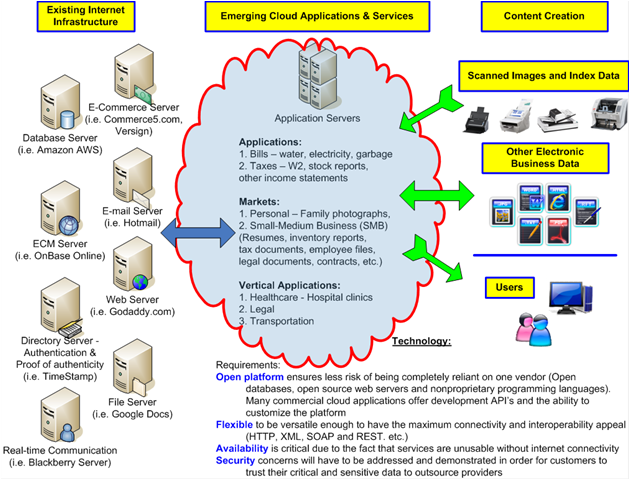
| Hearing a phrase such as “cloudy future” immediately conjures up bad thoughts and gloom-and-doom scenarios. However, in the case of document capture “cloud computing” is bringing extremely positive change. In this post I would like to break down the basic components of “cloud computing” and explain how document capture into “the cloud” is appealing for several reasons including scalability, interoperability and usability. Simply put, the “cloud” = Infrastructure + Content + Users. Using cloud computing is not magical or mysterious, yet it is a topic of great discussion and, might I say, confusing. Accessing data “in the cloud” is not too unusual from what most of us do every day; E-mail, accessing web sites or even contributing scanned images to an ECM system. While I don’t want to dive too deep into the general benefits and appeal of cloud computing, in each of the sections below I hope to describe a unique way in which utilizing the cloud as it relates to document capture and ECM can be beneficial for organizations of all sizes. |
 Existing Internet Infrastructure Existing Internet InfrastructureProbably the easiest understood component in “Cloud Computing” is the existing infrastructure that most of us are familiar using with whether we consciously know it or not. The fact of the matter is that data still needs to reside on a computer server somewhere. In other words, it’s not technically stored in some magical cloud. This data still needs to be hosted somewhere on high-powered servers. Typically in a data center with a climate controlled temperature, backup generators in case of power outage and high security. Ever use Hotmail.com for e-mail? Browse to www.KevinNeal.com/blog using your internet browser? Access e-mail messages on your smartphone device? These are all examples of hosted applications. What is somewhat unique about hosted “cloud” applications, as opposed to traditionally hosted applications, is that at their core most cloud applications offer industry standard communication protocols to enable a wide range of open interoperability. Basically it’s two completely different systems talking the same language. To illustrate my point let’s use the HTTP protocol as an example. What was probably the single most reason for the explosive growth of the internet over the past few decades? It most likely was the fact was that two systems (your computer) and a web site (hosted/server application) had a common language to communicate by the means of an internet browser such as Internet Explorer, Firefox, Safari or Chrome. Look at the top of this web page you are viewing now. See the “http://” prefix before the kevinneal.com address? This is an example of you accessing hosted information via the HTTP protocol and using advanced technology that was completely transparent to the you as the user.To over simply things, my point is that cloud computing is really nothing more than a collection of many hundreds of thousands, if not millions, of applications available on the internet. The truly powerful concept of cloud computing and what has peaked the interest among users and vendors alike is the opportunity to “mash-up” or bring together the best-of-breed technologies from various sources to build powerful applications. As it relates to document capture, many organizations are considering “cloud” for their Enterprise Resource Planning (ERP) systems, Customer Relation Management (CRM) portal or even their Enterprise Content Management (ECM) repositories. Scanning documents, with relevant metadata data extracted using document capture technology, into these various systems helps drastically improve efficiency. |
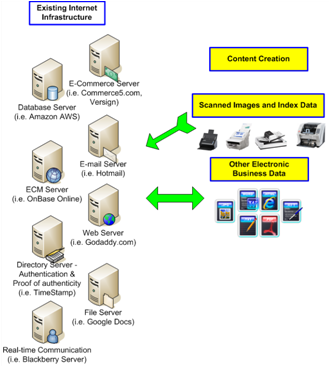 Content Creation Content CreationThere is an unbelievable amount of content available in the cloud. Believe it? Anything you can access over the internet whether it be public content or private content should be considered part of the available cloud-content. What information an organization chooses to include as their available content is certainly up to their specific requirements but do not underestimate the value of these resources.From a document capture and ECM perspective, the most valuable content to businesses and organizations, of course, is their intellectual properties and not just random data found doing an internet search. Specifically, this could be their internal customer contacts, an accounts receivable database or their inventory management system. All of this data is unique to the organization and the value of sharing among other employees and/or other departments helps to greatly improve process and the “cloud”, over the internet, represents a low-cost means to efficiently share this information.When organizations embark on a cloud strategy content is created in a wide variety of ways. The content could be electronic files such as spreadsheets, word processing documents, presentations, video or even e-mail. Additionally the content could consist of scanned images and metadata extracted from these scanned images. Regardless, the challenge is to make this content available via search in order to find exactly what a user is looking for as quickly as possible. This is the reason organizations should carefully consider a well thought-out taxonomy and metadata strategy for all of their content. After all, just dumping a bunch of scanned images and other content into the cloud is not an effective strategy when making it easily accessible to users is tremendously effective. |
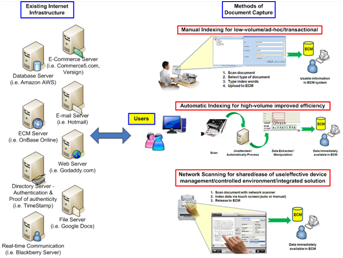 Users UsersUser interaction with data in the cloud can be a significant benefit for cloud applications. Anyone that has any level of computing experience can use a web browser and this is the means (user interface) that most cloud applications utilize to deliver content to users. Not having to install software, do any special configuration and the ability to have quick user adoption/acceptance of this new technology are all major benefits.For users that need to create content to be utilized within cloud applications there are several document capture methods including Manual Indexing, Automatic Indexing and Network Scanning which can be deployed depending on an organizations specific requirements.Cloud computing can offer extremely powerful and innovative applications to users and there is a lot of advanced technology behind the scenes. However, from the user perspective, whether they are consuming information within a web browser or whether they are contributing scanned documents and relevant metadata, this advanced technology should be completely transparent to the users themselves in order to be effective. |
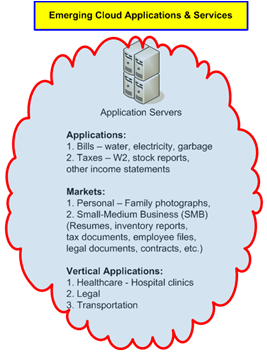 Emerging Cloud Applications & ServicesHopefully I’ve done a decent job of demystifying the “cloud” and broken it down into it’s core components in a easy to understand way in this quick cloud overview. Now I would like to briefly elaborate on the opportunity of document capture for Emerging Cloud Applications & Services. In essence, everything described above was logical, had structure and most people are familiar with how to use. Internet applications and services such as e-mail, browsers and social networking sites all make sense and are easily understood. What is not easily understood or defined by most is how to implement an effective a cloud strategy. I can appreciate this struggle because the cloud is new, emerging and dynamic. What a cloud application might be today can be drastically different in just weeks for sophisticated integration/functionality or literally minutes for simple expansion or additional functionality. This is because adding new functionality or capability to an open cloud platform is far easier than in the in the past using standard communication protocols as were described above in the HTTP example. Most cloud applications utilize HTTP, Web Services, XML, SOAP, REST and other common standards to reduce development time, decrease costs and eliminate unnecessary complication.Cloud applications and services are developing quickly and will become exponentially powerful as different technologies are collaborated. As more and more organizations rely on the cloud to reduce on-premise IT infrastructure there will still be a need for scanning hardware to digitize documents into the cloud. Therefore, the near term future for document capture and scanning into cloud applications is extremely bright.If I was vague about what a “cloud application” is and you are looking for a definition, well, I would suggest there are many opinions that can be found with a simple internet search. I, however, once read an article about how an industry expert was asked to define “the cloud”. After he pondered the question for a bit he finally came to the most appropriate definition he could think of and it was just one powerful word; Innovation. Emerging Cloud Applications & ServicesHopefully I’ve done a decent job of demystifying the “cloud” and broken it down into it’s core components in a easy to understand way in this quick cloud overview. Now I would like to briefly elaborate on the opportunity of document capture for Emerging Cloud Applications & Services. In essence, everything described above was logical, had structure and most people are familiar with how to use. Internet applications and services such as e-mail, browsers and social networking sites all make sense and are easily understood. What is not easily understood or defined by most is how to implement an effective a cloud strategy. I can appreciate this struggle because the cloud is new, emerging and dynamic. What a cloud application might be today can be drastically different in just weeks for sophisticated integration/functionality or literally minutes for simple expansion or additional functionality. This is because adding new functionality or capability to an open cloud platform is far easier than in the in the past using standard communication protocols as were described above in the HTTP example. Most cloud applications utilize HTTP, Web Services, XML, SOAP, REST and other common standards to reduce development time, decrease costs and eliminate unnecessary complication.Cloud applications and services are developing quickly and will become exponentially powerful as different technologies are collaborated. As more and more organizations rely on the cloud to reduce on-premise IT infrastructure there will still be a need for scanning hardware to digitize documents into the cloud. Therefore, the near term future for document capture and scanning into cloud applications is extremely bright.If I was vague about what a “cloud application” is and you are looking for a definition, well, I would suggest there are many opinions that can be found with a simple internet search. I, however, once read an article about how an industry expert was asked to define “the cloud”. After he pondered the question for a bit he finally came to the most appropriate definition he could think of and it was just one powerful word; Innovation. |
| Putting it all together
Cloud Computing presents a great opportunity for document capture. For organizations that are convinced a cloud approach is in their best interest, hopefully they can realize that in order to maximize their investment to the fullest all the important information still trapped on paper documents in file cabinets and desk drawers must be added to their cloud applications available content. The most important and relevant data in the cloud is your organizations intellectual property and an effective document capture strategy can contribute greatly to providing quick and accurate access to information.
|
| I’m predicting a “cloudy” forecast for document capture…..and this is a really good thing. As always, I encourage any constructive feedback or comments. |