Sometimes it is not the technology itself that dictates either the success or failure of a particular technology. I believe that the “user experience” helps drive adoption of a particular technology or ultimately will bring its demise. Let me give you a few examples. Microsoft Windows: Ask yourself this question; self: “Was Windows the most robust and feature-rich operating system when Microsoft introduced Windows in the early 1990’s?” Probably not, but what Microsoft clearly understood was that the Windows Graphical User Interface (GUI) and ease of use from the user perspective was going to be a key to their success. Microsoft Windows now dominates market share among operating system software available in the market today. The next example is the iPhone and iPad. Unquestionably two extremely successful products released by Apple in recent years. Most people will agree that the elegant User Interface and ease of use is one of the driving factors for the success of the iPhone and iPad. My point is Document Capture vendors, both hardware and software, as well as even system integrators, should carefully consider how the user themselves interact with scanning applications and Enterprise Content Management (ECM) systems. True adoption of a technology only happens with users fully embrace the technology wholeheartedly.
Businesses and organizations scan documents to capture information – not because it’s a fun activity like playing World’s of Warcraft on a Windows operating system; updating ones Facebook status on an iPhone or even watching a hi-def movie like Avatar on an iPad. Document Capture is implemented for several reasons including reduced operating costs, improved efficiencies or adherence to compliance. However, “fun” is clearly not near the top of the list. We must take this into account when presenting users with various methods of document capture. Therefore, I would like to share some of the common techniques that are used to scan documents into ECM/ERP/CRM/EMR systems. These three general methods (manual indexing, automatic indexing and network scanning) of capture are intended to illustrate various ways to accomplish capturing scanned documents to these systems however; the specific techniques utilized will vary depending on individual organizations requirements.
Three methods of document capture
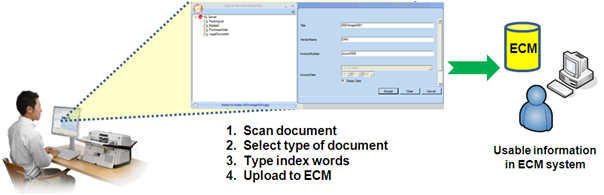
Manual Indexing offers a simple and cost effective way for scanned images and associated search words to be imported into document management systems or simply to make access to these scanned images easier. In order to provide ECM users with relevant search results instead of vague results, metadata must be associated with documents. Adding metadata to documents is a critical step in making an ECM system effective and not just simply an electronic replication of a previously paper-based system of disorganization. The general concept of Manual Indexing allows a user to scan a document, choose a destination directly within the ECM Library then manually (as opposed to computer-processing) type metadata for that particular document type and then release into a back-end system. This is drastically different than scanning to a folder, then importing. Scanning to a folder is not an integrated approach. This direct communication between an ECM back-end system (server) and scanning application software (workstation) allows for real-time changes within the ECM system to immediately be applied to the scanning application software. Once the destination/document type has been selected by the user any associated metadata or search terms, are dynamically presented to the user for indexing purposes. These index fields are specific to each document type and business rules to establish continuity in your document capture process can be transparently delivered to scanner users without any disruption whatsoever.. A manual indexing approach to document capture is best for ad-hoc use or low volume scanning requirements such as a knowledge worker scanning an occasional document where the amount of index fields is limited to under 50 total fields per day as a best practice. Anything more than 50 total fields per day becomes quite tedious and should dictate consideration for some level of automation within a document capture strategy.
Use scenario:
- Ad-hoc
- Low volume
- Desktop environments
|
Benefits of Manual Indexing:
- Easy to learn
- Simple to deploy
- Inexpensive
|
Scanner requirements:
- Paper handling
- Image enhancement
- Reliability
|
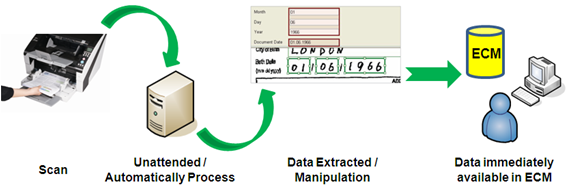
Automatic Indexing into ECM systems provides a way for organizations to gain additional productivity with the ability to scan large quantities of documents at a single time without interruption of the scanning process. With this approach the scanning, indexing and release into the ECM system is more automated and highly efficient which is ideal. However, it typically requires some level of technical expertise to install, configure and use these software packages.
In the case of automatic indexing, image quality is typically much more important than with the manual indexing approach. This is because often times the system utilizes advanced technology such as Intelligent Document Recognition (IDR), Optical Character Recognition (OCR), or Enhanced Bar Code (EBC) Recognition to allow a computer to make decisions based on the accuracy of a collection of dots, or pixels, on a scanned image. If you truly break-down document capture to its core an image is nothing more than a collection of dots. A collection of dots then compose characters and then characters formulate words. And then, eventually, you have a document containing many of these elements. The whole entire capture process is directly affected by the quality of the scanned image and, therefore, excellent image quality is essential to the success of an automatic indexing strategy for capturing scanned documents.
Use scenario:
- Centralized capture
- Moderate to high volumes of paper
- Process control
|
Benefits of Automatic Indexing:
- Enhance productivity
- Immediate access to information
- Reduce labor costs
|
Scanner requirements:
- Excellent image quality
- Rated speeds for OCR
- Hardware-based image processing
|
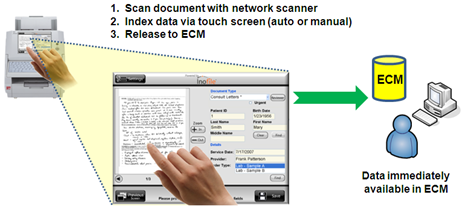
A Network Scanning approach to capturing scanned documents into ECM systems can use either the Manual Indexing or Automatic Indexing so the method itself is not necessarily the main appeal of a network scanning capture strategy. Some of the many appeal points of network scanning, in contrast to USB-attached scanners, includes the flexibility of integration options, effective device management and, of course, ease of use. Integration options using communication standards such as HTTP, Web Services and possibly even utilizing Cloud Computing infrascture can greatly benefit organizations by limiting their reliance on a proprietary vendor application or platform. With a well-constructed network scanning platform, organizations are presented with a nearly limitless list of integration options with complimentary or even drastically disjointed systems. All presented to the user through an ease to use, consistent touch screen interface. Does this sound too incredibly different than the iPhone interacting with different sorts of data??? As I mentioned earlier and would like to re-iterate, true adoption of technology happens when users have a comfortable and pleasant experience.
The flexibility of using a network scanning solution as a platform for each company/organization scanning requirement is a key appeal point for this method. Most network scanners offer many useful features including scan to e-mail, folder, ftp, network fax and network printers. Additionally, some network scanner platforms offer Software Developer’s Kits (SDKs) which enable third-party integration software to operate directly on the device which offers another level of tight integration possibilities to other complimentary systems and/or additional functionality. And probably one of the most appealing attributes of network scanners, are the large high resolution/color touch screen interfaces. This is truly innovative for users to interact with data directly in the ECM system via the touch of the screen. These devices offer users an easy to operate and highly functional scanning experience that allows workers to get their scanning done quickly and efficiently.
Use scenario:
- Shared environments
- Remote locations
- Multifunctional purpose
- Platform for emerging technology
|
Benefits of Network Scanning:
- Consistent process
- Limited learning curve
- Easy deployment
- Effective device management
|
Scanner requirements:
- Intelligent scanning
- Large touch screen
- Central Administration
- Third-Party integrations and connectivity
|
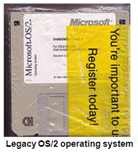
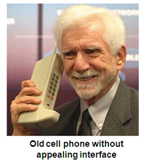
In summary, I hope that you can appreciate the value of carefully considering the importance of the user experience when developing your document capture strategy. The behind-the-scenes technology can be the best in the industry but when resistance among users exists then true adoption suffers causing terrible inefficiencies. Or, you might still be able to find a copy of the OS/2 operating system for those fancy cell phones…
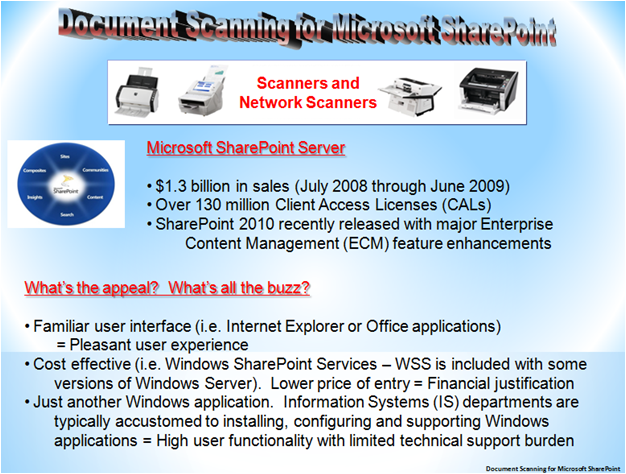
Below are two web links to animated presentations to illustrate these three methods of document capture for better understanding of each concept:
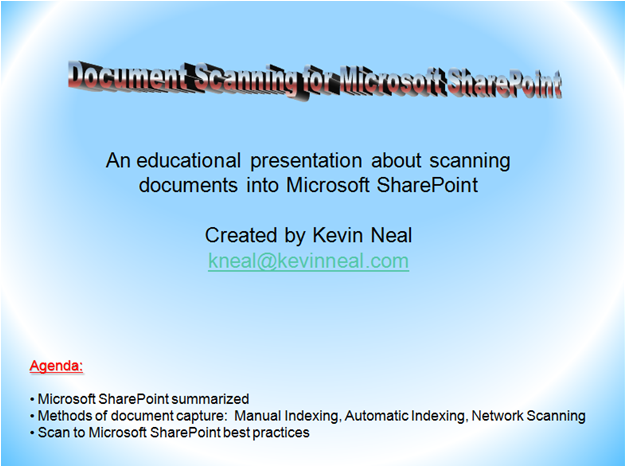
Document Scanning for Microsoft SharePoint (Flash animation)
Document Scanning for Microsoft SharePoint (PDF animation)
Sincerely,
Kevin

 We also got to spend some quality time with my mother watching coverage of the Olympics which was a lot of fun. We got to share a truly memorable moment when Oscar Pistorius of South Africa ran the 400-meter track and field event. Oscar was born with a birth defect that caused him to have both his legs amputated below the knee when he was 11-months old. He was fitted with special prosthetics that allowed him to not only walk normally, but he’s one of the fastest runners in the world! Although he didn’t end up winning a medal his courage was absolutely inspirational. His smile was so genuine that it was infectious. In general in our society, we need more great stories like the one that Oscar provided this past Saturday at the London Olympics.