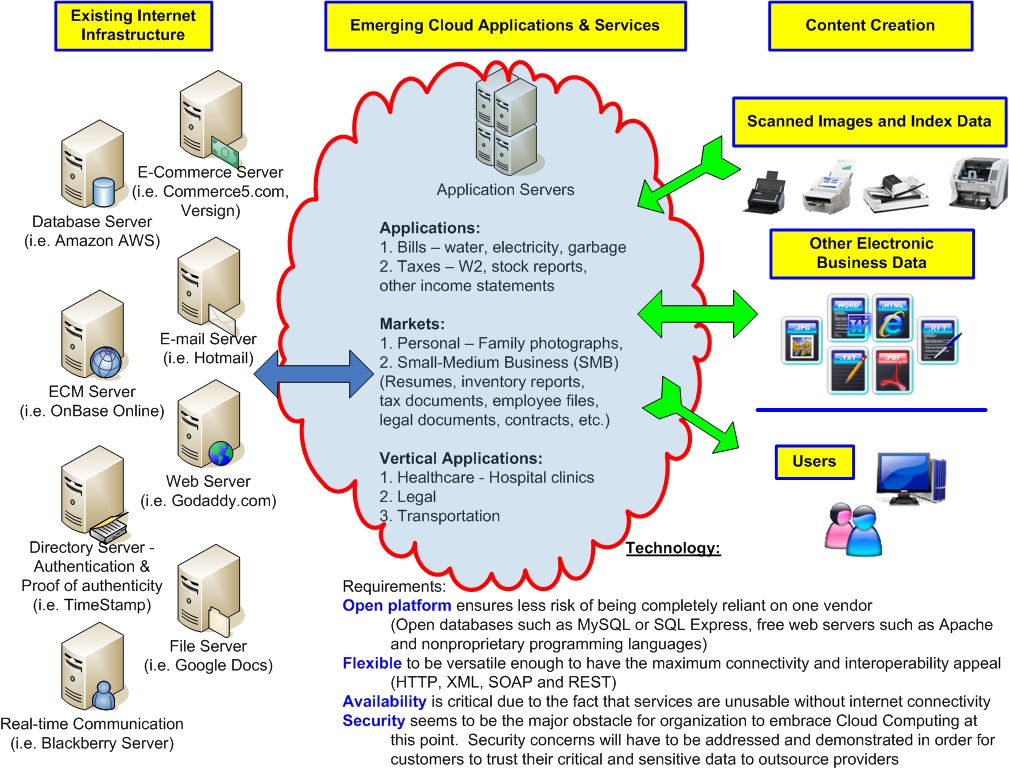
Just a quick visual on the emerging Cloud Computing market to create some discussion. Thoughts? Comments?

.
This weekend was fun. It’s the first signs of Spring coming and the weather is wonderful. Saturday was probably around the low-80’s at the high and Sunday was even better in the low-90’s is my best meteorological guess.
Saturday we went out to get some household essentials but also some plants and herbs. Although we picked up a few herb plants, some of the stuff we want is a bit more particular especially if you’ll be eating the stuff (al la..herbs). We thought it was best to call it a day on Saturday and then head down to a local plant and garden specialty place on Sunday. I don’t think the stuff at the specialty place was any better and way more expensive. I think if you want quality then you have to grow it yourself.
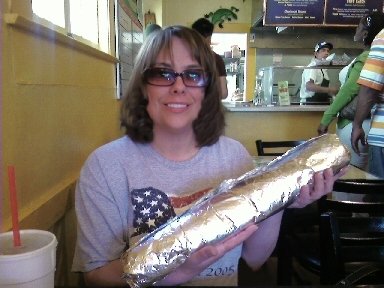
After the essentials shopping and plant/herb store we decided to head and get some lunch at this place we saw recently on the History Channel’s “Man vs. Food”. The place is called Iguanas and their gigantic burrito is called the “BurritoZilla”. It’s 18 inches and 5 pounds of Burrito gluttony! The atmosphere of the place was fun because it was tightly integrated into the college lifestyle and atmosphere. It’s on the San Jose State University campus. Brandee was observant to the fact that after ordering our food and taking our seat, nearly every patron in the place was staring (and very obviously so) at us while we tried to dine on this mammoth burrito. As much as we tried to inflict damage to this 18” BurritoZilla, we only managed to finish about 2 total inches and less than a half-pound, leaving 16” and 4.4 pounds of meat, beans and cheese to go. We brought the thing back and cut it into four full-size servings then froze them into bags as leftovers.
On Sunday we spent the day getting some additional planting supplies at Home Depot, went to Hooter’s for lunch, then came home to clean and open the pool for the season. Brandee loves to go to Hooter’s more than me. Before the place was open and still under construction last year I jokingly suggested that we go there as we drove by. She was quite open to the idea and ready to go. I wasn’t really shocked but I was surprised at her level of enthusiasm to go. Now nearly every time we are in the Campbell area on the weekend; yep, it’s the Hooter’s we go! We really enjoy “people watching” in the place and especially how the girl’s treat the male clientele versus the female customers. It’s comic relief.
Our pool isn’t anything fancy but it’s a great relief when the temperature gets hot and it’s nice to take a cool dip. The pool is an above ground type that is 18 feet around and four feet deep. It’s certainly enough to float around in and be lazy. Earlier this week it was getting into the low-90 degree temperatures so we got to enjoy the water.
Overall it was a great, enjoyable, relaxing weekend and a fantastic kick-off to Spring.
I often get asked this question so I decided to consolidate some of the compelling reasons organizations should consider dedicated network scanners:
Dedicated use device for scanning documents
• No need to wait for the copy machine to become free for use
• Versatile functionality without compromise of added complexity
• Advanced scanning functions performed transparent to user
• Ability to preview images before sending to destinations
• Simple operation easy to understand

A dedicated scanning device that seamlessly integrates within an organizations existing network infrastructure can be of tremendous value to enhance work processes. Network scanners benefit organizations by decreasing the complex nature, yet not comprising access to important functionality. From users of these devices to network administrators and business managers to basically an entire organization, businesses in a wide variety of markets are benefiting from network scanning.
Uptime/Reliability
• Access to scanning functionality is not hampered by other possible failures of a multifunction device
• Limited physical moving parts decreases likelihood of hardware malfunction
• Straight thru paper path design helps decrease possibility of document jams
• Network scanners inherit attributes designed for mission-critical document scanners
Organizations can only realize the true productivity enhancement of their IT investment when their systems are performing at peak performance. Disruption in the work process wastes time, costs money and causes frustration among employees and customers alike. Dedicated network scanners have been designed with the sole purpose of document scanning and, therefore contain the hardware and software attributes organizations expect which make them desirable in mission-critical business applications. Organizations of all sizes have sought the quality and reliability of single-function document scanners for years. For example, one of these intangible qualities which are sometimes hard to measure is lost productivity caused by a mechanical malfunction of a multifunction copier. Downtime for maintenance is simply not an option.
Ease of Use
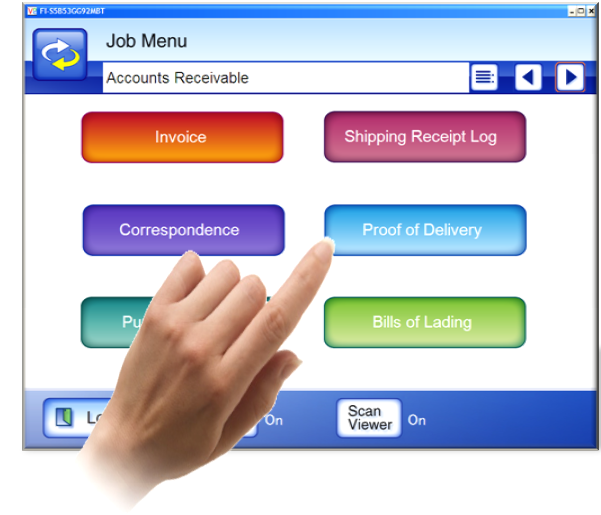
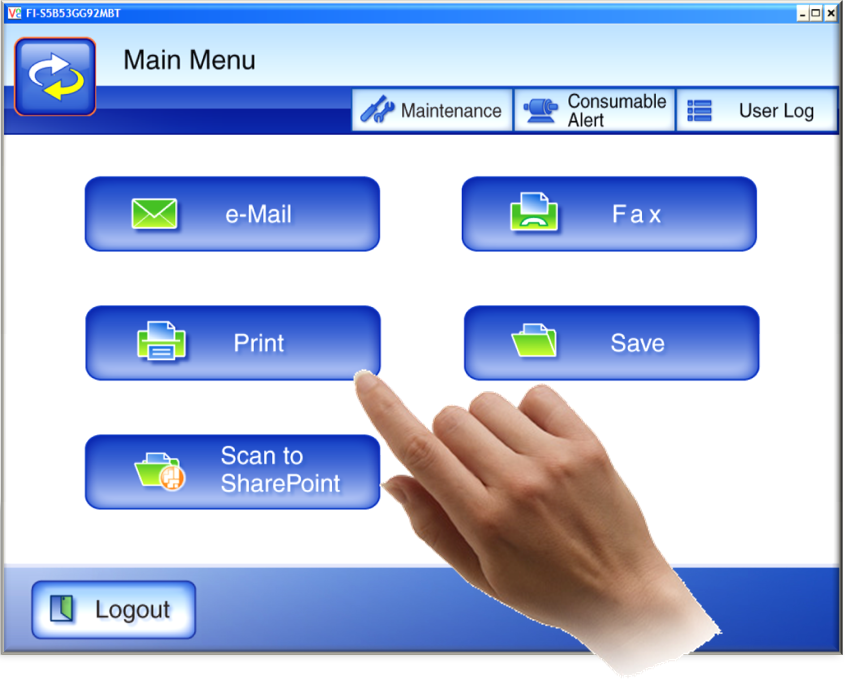
• Eliminate complexity and provide simply operation with large touch screen
• Simple touch screen driven scanning operation eliminates specialized training
• In the unlikely event of a document jam, easy jam recovery without damaging documents
• Multiple language support
• Programmable job function buttons can perform repetitive tasks with the touch of one button

Large touch screen displays and integrated keyboards are two physical attributes which make digitizing documents with a network scanner simple. Similar to your on computer desktop at home which you may have customized with a particular look and feel, business users get the most value out of technology when they are familiar with the presentation of interfaces and have the versatility to customize screens. Network scanners adhere to this principal as well. For example, user state migration among devices presents the user with the same, consistent user experience based on their logon information no matter which device they decide to use.
Quality
• Image quality built on experience focused on document capture technology
• Paper path designs are careful engineered to excel at document handling including some with the capability of scanning plastic cards
• Document scanning technology hardware and software integration with specialize content management application providers
The quality of IT products typically is not appreciated until there are operational disruptions caused by failure such as a paper jammed in the device. Experience in developing feeding technology to efficiently handle documents of different shapes, sizes and weights have helped set dedicated document scanner vendors apart from other technology. Network scanners have inherited many of the qualities of traditional document scanners used in mission-critical applications and are bringing the opportunities of network scanning to organizations of all sizes. This focus on the importance of mission-critical scanning is evident in network scanners with specifically design features such as a straight paper path to reduce potential document jams and the ability to scan plastic cards through the document feeder. Additionally, the ability to preview images after scanning and before committing them to a destination is an example of a quality found in some network scanners.
Secure
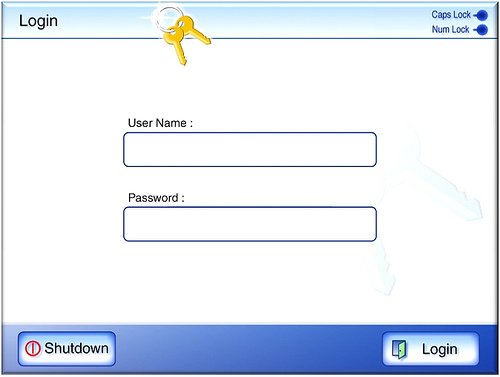
• Restrict access to only authorized users with secure authentication
• User data such as username/password or image data does not reside on the scanner
• Data is encrypted on device to provide additional level of security
• No external USB port to hijack sensitive information
• Highly secure login authentication and transmission protocols (SSL)
• Lock-down job profiles to adhere to organization established policies
Whether it is for regulation, compliance or other reasons, data security plays a major role for network scanners. As a device that is ‘always on’ and connected to corporate networks, the risk of a data compromise of information has to be careful considered. From access to the devices themselves, or the manner in which information is electronically communicated to which level of functionality should be provided to particular users or groups is all functionality that organizations need to be thought through thoroughly. Network scanners provide these security features to assist organizations utilize devices in a manner which adheres to their specific established policies. The threat of data compromise comes in many fashions; not only externally but maybe internally and sometimes inadvertently, not maliciously.
Total cost of ownership
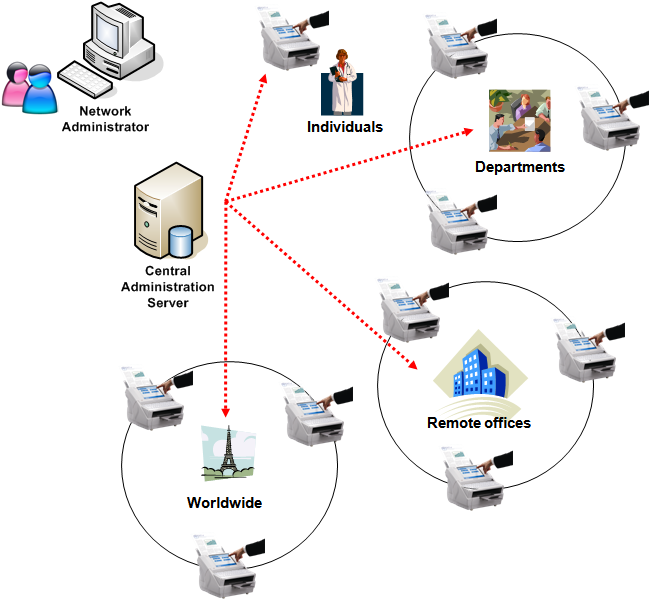
• Decrease deployment costs with remote administration tools
• Reduce ongoing maintenance costs with ability to push updates to devices from a centralized location
• Utilize existing network resources and systems to conserve budget
• Inexpensive and user replaceable consumables
Stretch your budget further using a dedicated network scanner through simple initial deployment of devices. Simply connect the scanner to the network then IT departments or network administrators can remotely configure and manage devices. No longer do organizations have to incur the expense or time consumed by having to send technicians on-site to setup devices. Additionally, on-going maintenance costs are drastically reduced by not having to replace expensive toner or fuser parts. Easily accessible user replaceable consumables provide a convenient way to keep the network scanner performing at optimal performance, yet decreasing the need for IT involvement.

Integrated for Business Process Improvement
• Direct connectivity to back-end systems
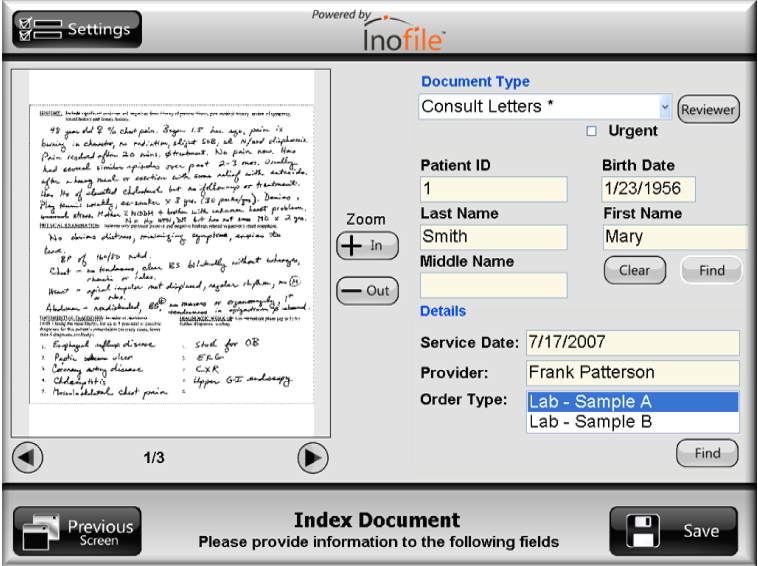
• Index values and metadata sent directly into Content Management repositories
• Database lookups for validation
• Image enable your Line of Business application with Software Developer’s Kit (SDK) development
Some network scanner vendors offer optional Software Developer Kit’s (SDK) where developers can create unique integration screens to be displayed on the touch panel. These integrations offer tight interoperability with business systems such as Enterprise Content Management (ECM) repositories, Line of Business (LOB) applications, Electronic Medical Records (EMR), Enterprise Resource Planning (ERP) and other third-party solutions. In addition, user interface screens can be created with a custom look and feel to fit corporate branding. An integrated approach to network scanning enables organizations of all sizes to image-enable their current software applications and offers the assurance of delivering images directly into back-end servers without the traditional high costs, aggravation and loss of productivity involved with other approaches.

“Whew!!!” is about all the energy I have to say right now. The last month has been extremely busy for me with a full load of business travel. It’s all good and each trip has been rewarding and been extremely productive however I am human, after-all, and it’s grueling to keep a schedule like this.
While some people might think this is glamorous to travel the country; I am simply not one of those people. With the current economic situation I feel it’s more important than ever to engage customers in tangible activities that can help move forward business opportunities. If this requires me to sacrifice a little and travel like a madman then so-be-it. I think it’s harder on my wife and children (cat, dog and fish) than me. I appreciate their understanding and sacrifice as well.
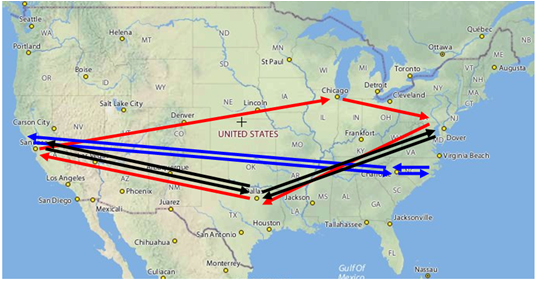
Having made three roundtrips back and forth from the West Coast to various destinations on the East Coast in the last four weeks has allowed me some much needed time to get some of my thoughts organized. I have created a lot of “to do” lists over the last month and I’m currently consolidating these activities and acting upon them. One of them was to add more information to my blog. I will be adding some original materials that I have created in the past which I find interesting. I hope others will too, or at the least solicit some constructive feedback. This will include some articles on ‘Trends Towards Higher Resolution Scanning’ , ‘Increase ECM Automation Processes with Higher Resolution Scanning’, ‘Why a Network Scanner’ and other original content. I assure you that this is not a shameless promotion of my company or products but this is a sincere interest in educating others. I am fortunate to be close to this technology and gather a lot of feedback and I simply want to assist others in cutting through some of the confusion. Personally I gain quite a bit of knowledge from reading other peoples blogs and I would like to give back a little to the online social society as well. As a brief recap of my travels I would like to provide you a visual map of the zany adventures:

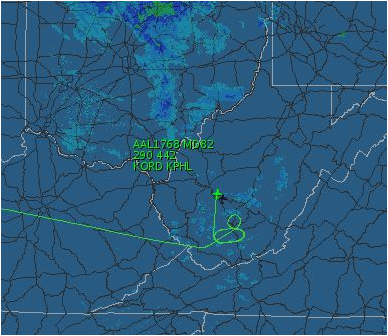
Also, with all this travel there is certainly bound to be some ‘incident’ of some sort. Well, sure enough, upon our approach into Philadelphia last Sunday night there were severe thunderstorms in the area. My wife was tracking the flights progress via the internet and snapped this screen print of the planes route. Notice the fun circling we ‘enjoyed’ after a full day of travel until the thunderstorms had subsided and we could finally land.

Anyhow, I just wanted to provide a brief update and explain the absence of blogs recently. I’ll try and be more consistent. Please feel free to drop me a note with any comments, suggestions or criticisms. I’m always open for a healthy debate.
Napster, MP3, YouTube, iPhone and MySpace. You may be asking yourself “what does this have to do with document scanning?” In reality, not much, other than large file sizes, however when we draw an analogy between large audio files like those found on Napster such as wav files or mp3’s, video files like those found on YouTube and MySpace which you can utilize on a mobile device like the new iPhone then we can get an appreciate of the challenges of sharing large files. And because viewing document images has become just as important, if not more important from a business perspective, we need to have a clear understanding of the general technological trends of information sharing and the Trends Towards Higher Resolution Scanning.
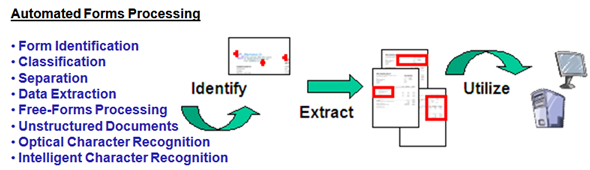
In the perfect world of scanning technology someone would drop a document into the scanners automatic document feeder, scan the page and “voila”, all the vital business data has been automatically extracted for immediate use by an Enterprise Content Management (ECM) system or for general retrieval via a keyword search. This is similar to using a search engine to find the information we are looking for. Sounds like magic? It nearly is but there are many underlining technologies that create this magic. Technically speaking advanced forms processing, or the ability to perform these sophisticated tasks automatically, is a reality that is available today and this ‘magic’ starts with high quality scanned images which most closely resemble the original document. In Automated Forms Processing applications there is a lot going on behind the scenes where a poor or good quality image dictates the success, or failure, among other related processes in the grand scheme of the document imaging system. These features need to be highly functional, extremely accurate and transparent to the users themselves.
In a recent study of scanner users Susan Moyse of Moyse Technology Consulting summed up the current trend quite well, “Scanner users need applications that do more automatically. This requires vendors to deliver sophisticated functionality almost invisibly. The less these users know of the underlying technologies the better. Business users just want their scanning solutions to solve their problems.”
Traditional Obstacles Addressed By Advanced Technology
Advanced features are great from the standpoint that custom systems can be designed by systems integrators, value-added resellers or a professional services organization to fit individual business needs. An effective document capture system is a system that operator’s don’t have to think about. Capturing more dots per inch at scan time gives your scanning solution the greatest chance of automation success. Most likely no solution will be absolutely perfect, nevertheless, giving your capture solution the greatest chance at success through good image quality, more dots per inch and great paper handling can dramatically increase your level of automatic document capture.
There are advanced techniques such as automatic document classification, document separation and free-form processing, all of which greatly depend on the computer being able to read the dots on scanned pages to make intelligent, and critical decisions about these images. After all, garbage-in is garbage-out and your document capture solution is the on-ramp to transform paper to usable electronic data. Most often you get one chance to capture these images before they are filed in a permanent archive or the physical paper is destroyed forever.
To understand these trends and to develop our hypothesis for the future of document scanning we must evaluate what inhibited the sharing of large files in the early days of file sharing. While the ability to share audio, video and document images has been around a long time, this sharing was limited due to some rather common factors. The cohesion between all file formats is they have historically been large file sizes and difficult, if not impossible, to use over computer networks. Let’s take a look back into the not-so-distant past and get a glimpse at what ultimately made the likes of YouTube, MySpace and Napster, successful and what will drive the trend of scanning higher resolutions for automation. One of the most obvious drawbacks to sharing large files was the lack of bandwidth. Whether it was a remote user on a dial-up connection or corporate networks that had not the foresight to plan ahead for the sharing of large files, customer dissatisfaction was high and people were reluctant to use these services due the impending frustration of waiting for large downloads to complete. Likewise, video sharing had been, until recently, slow to adopt for many of us, however times are changing on the increased bandwidth forefront and we need to refer to history understand what limited the adoption rate of these technologies.
Contributing Factors to the Trends Towards Higher Resolution Scanning
Most leading Automated Forms Processing software companies recommend scanning at a minimum resolution of 300 dots per inch for effective data extraction. In other words, for every square inch of paper the scanner is capturing 300 dots horizontally and 300 dots vertically or 90,000 total dots (300 x 300 = 90,000 dots per square inch). This automation reduces manual intervention tasks such as ‘key index values from images’ which in turn decreases costs and improves efficiency. Some techniques, which you might be familiar with, include Optical Character Recognition (OCR), Intelligent Character Recognition (ICR) or Optical Mark Recognition (OMR).
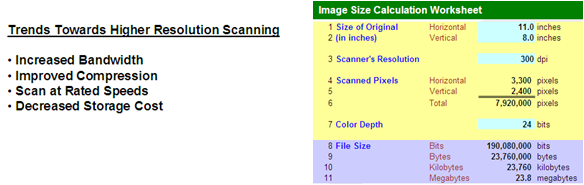
Presume we settled for scanning at 200 dpi resolution. We would have captured only 40,000 total dots per inch versus 90,000. Why is this important? Below is an illustration which demonstrates how incrementally larger file sizes due to scanning higher resolutions or utilizing color. Higher Resolution Scanning equals Improved Automated Accuracy.

“The accuracy of the OCR systems declined dramatically when the resolution of the images was reduced from 300 to 200 dpi…”
Source: The Fourth Annual Test of OCR Accuracy
“Scan resolution: The number of dots per inch can affect the clarity of the image and accuracy of OCR. Recent tests found that reducing from 300 dpi to 200 dpi increased the OCR error rate for a complex document by 75%…”
Source: http://epe.lac-bac.gc.ca/100/202/301/netnotes/netnotes-h/notes37.htm
So the question is “why wouldn’t everyone simply scan documents at 300 dots per inch?” Traditionally there have been several legitimate concerns that made higher resolution scanning unattractive to users and systems operators. This includes limited bandwidth, (as in the audio and video file size scenarios), lossy image compression technology or the physical scanners themselves might slow to two-thirds or less of their rated speed at 200 dpi scan resolutions. Lastly, the larger file sizes created by scanning at higher resolutions. Now, through advanced technologies and innovation, the document capture industry is addressing all of these obstacles, which should truly enhance the adoption rate of higher resolution scanning. Let me be specific about each:
• Increased Bandwidth for Remote Users and Corporate Networks –
For those of you that have tried sending a large file via your e-mail client, you can certainly relate to the ‘pain’ involved with sending even one file using a low bandwidth connection. Now, just imagine a customer service operator who has to retrieve hundreds of images per day during the normal course of their work day. Decreased costs and better availability to higher bandwidth networking components affords network administrators, or even remote users, to upgrade to high speed networks such as T1 internet lines, DSL, Cable Modem, Gigabit routers/cabling or even fiber optic networks. All of which bodes well for the future of sharing large size files types including audio, video and scanned images.
• Improved Image Compression Techniques of Scanned Images –
Many new image compression techniques have been introduced recently which drastically decrease file sizes of both color and black & white images while still retaining great image quality. Previously some compression techniques caused poor image quality that would drastically decrease automatic forms processing accuracy. In addition to better images and highly compressed images, technology such as Automatic Color Detection can determine whether to save the scanned images in a black & white or a color format at scan-time, thus eliminating the need to separate documents into stacks of bi-tonal and color pages. It’s much more desirable to compress a bi-tonal image than color which is an ideal example of combining emerging technologies for the benefits of users and systems administrators.
• Scanning Higher Resolutions at Rated Speed –
Just as your car’s engine is designed to perform at a maximum speed based on the combination of aggregate parts, your document scanner is only as good as its weakest link. Certain document scanners these days have been highly engineered specifically to perform at rated speeds while scanning in higher resolution modes, thus excelling at Automated Forms Processing tasks eliminating the need to sacrifice accuracy for throughput.
• Decreased Storage Costs –
When the expense per megabyte of storage cost dollars, or several dollars, per megabyte, businesses had to make a serious decision about their choice of a data storage medium. At the time, it could have been in the form of low-capacity/high-availability hard disk drives, which were expensive, optical disks for moderate-capacity/moderate-availability at a mid-range price, or tape drives which were typically high-capacity/slow-availability although the most affordable. Times have changed quickly with the evolution of CD-ROMs, DVDs and extremely high-capacity hard disk drives. The storage industry has reached the ‘critical mass’ stage where vendors are creating great technology but competing for market share which drives costs to users down. Businesses and individuals are consuming data storage devices at a greater rate and the end of this trend seems to be nowhere in sight. Increased storage capacities, smaller forms factors and decreased costs are a clear trend and portend well for storage of large file sizes.
Benefits of Higher Resolution Scanning to Automation
Consider that Automated Forms Processing involves computer-based intelligence to make crucial decisions concerning your scanned images. For example: Classification- What type of document? Separation- How many pages is the form? Anchor Points or Free-Form- Where is the information on the page? Quality Control- Are these characters meeting my defined accuracy criteria? Essentially, scanning hardware and software technologies have progressed to a level of automation that allows for sophisticated document capture, advanced forms processing and mission critical data extraction, all of which could be completely transparent or invisible to the user. However, this high level of automation beings with high resolution scanning. The ability to drop a document into the scanners automatic document feeder and perform these advanced tasks has become a reality without the traditional sacrifices inherent to Higher Resolution Scanning.
The trend towards more and more distributed scanning is obvious. As more document scanners find their way into the workplace, the demand for more invisible sophistication to the user must continue. Appreciate the technology; yet allow the user to be experts in their respective professions instead of having to become scanning experts as well. Capture more dots per inch with higher scanning resolutions and give your document capture system the greatest chance for success.