Document Capture from the user’s perspective

Sometimes it is not the technology itself that dictates either the success or failure of a particular technology.  I believe that the “user experience” helps drive adoption of a particular technology or ultimately will bring its demise.  Let me give you a few examples. Microsoft Windows:  Ask yourself this question; self: Was Windows the most robust and feature-rich operating system when Microsoft introduced Windows in the early 1990’s? Probably not, but what Microsoft clearly understood was that the Windows Graphical User Interface (GUI) and ease of use from the user perspective was going to be a key to their success.  Microsoft Windows now dominates market share among operating system software available in the market today.  The next example is the iPhone and iPad.  Unquestionably two extremely successful products released by Apple in recent years.  Most people will agree that the elegant User Interface and ease of use is one of the driving factors for the success of the iPhone and iPad.  My point is Document Capture vendors, both hardware and software, as well as even system integrators, should carefully consider how the user themselves interact with scanning applications and Enterprise Content Management (ECM) systems.  True adoption of a technology only happens with users fully embrace the technology wholeheartedly. 


Businesses and organizations scan documents to capture information – not because it’s a fun activity like playing World’s of Warcraft on a Windows operating system; updating ones Facebook status on an iPhone or even watching a hi-def movie like Avatar on an iPad.  Document Capture is implemented for several reasons including reduced operating costs, improved efficiencies or adherence to compliance. However, “fun” is clearly not near the top of the list.  We must take this into account when presenting users with various methods of document capture. Therefore, I would like to share some of the common techniques that are used to scan documents into ECM/ERP/CRM/EMR systems.  These three general methods (manual indexing, automatic indexing and network scanning) of capture are intended to illustrate various ways to accomplish capturing scanned documents to these systems however; the specific techniques utilized will vary depending on individual organizations requirements.  


Three methods of document capture 
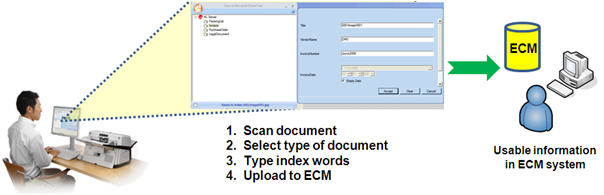
 

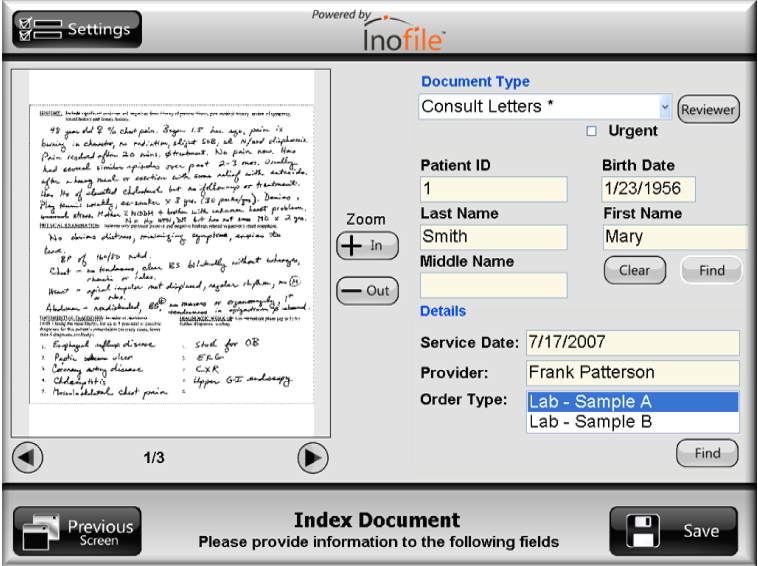
Manual Indexing offers a simple and cost effective way for scanned images and associated search words to be imported into document management systems or simply to make access to these scanned images easier.  In order to provide ECM users with relevant search results instead of vague results, metadata must be associated with documents.   Adding metadata to documents is a critical step in making an ECM system effective and not just simply an electronic replication of a previously paper-based system of disorganization.  The general concept of Manual Indexing allows a user to scan a document, choose a destination directly within the ECM Library then manually (as opposed to computer-processing) type metadata for that particular document type and then release into a back-end system.  This is drastically different than scanning to a folder, then importing.  Scanning to a folder is not an integrated approach.  This direct communication between an ECM back-end system (server) and scanning application software (workstation) allows for real-time changes within the ECM system to immediately be applied to the scanning application software.  Once the destination/document type has been selected by the user any associated metadata or search terms, are dynamically presented to the user for indexing purposes.  These index fields are specific to each document type and business rules to establish continuity in your document capture process can be transparently delivered to scanner users without any disruption whatsoever..  A manual indexing approach to document capture is best for ad-hoc use or low volume scanning requirements such as a knowledge worker scanning an occasional document where the amount of index fields is limited to under 50 total fields per day as a best practice.  Anything more than 50 total fields per day becomes quite tedious and should dictate consideration for some level of automation within a document capture strategy. 

Use scenario: 

  • Ad-hoc
  • Low volume
  • Desktop environments


Benefits of Manual Indexing: 

  • Easy to learn
  • Simple to deploy
  • Inexpensive

Scanner requirements: 

  • Paper handling
  • Image enhancement
  • Reliability


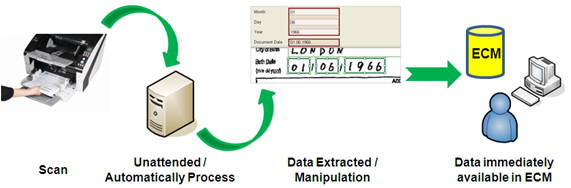
Automatic Indexing into ECM systems provides a way for organizations to gain additional productivity with the ability to scan large quantities of documents at a single time without interruption of the scanning process.  With this approach the scanning, indexing and release into the ECM system is more automated and highly efficient which is ideal. However, it typically requires some level of technical expertise to install, configure and use these software packages. 


In the case of automatic indexing, image quality is typically much more important than with the manual indexing approach.  This is because often times the system utilizes advanced technology such as Intelligent Document Recognition (IDR), Optical Character Recognition (OCR), or Enhanced Bar Code (EBC) Recognition to allow a computer to make decisions based on the accuracy of a collection of dots, or pixels, on a scanned image.  If you truly break-down document capture to its core an image is nothing more than a collection of dots.  A collection of dots then compose characters and then characters formulate words.  And then, eventually, you have a document containing many of these elements.  The whole entire capture process is directly affected by the quality of the scanned image and, therefore, excellent image quality is essential to the success of an automatic indexing strategy for capturing scanned documents. 

Use scenario: 

  • Centralized capture
  • Moderate to high volumes of paper
  • Process control

Benefits of Automatic Indexing: 

  • Enhance productivity
  • Immediate access to information
  • Reduce labor costs

Scanner requirements: 

  • Excellent image quality
  • Rated speeds for OCR
  • Hardware-based image processing


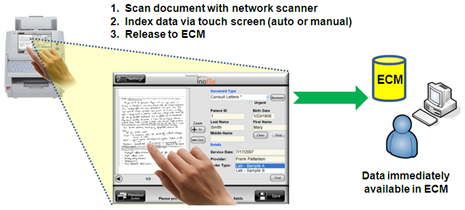
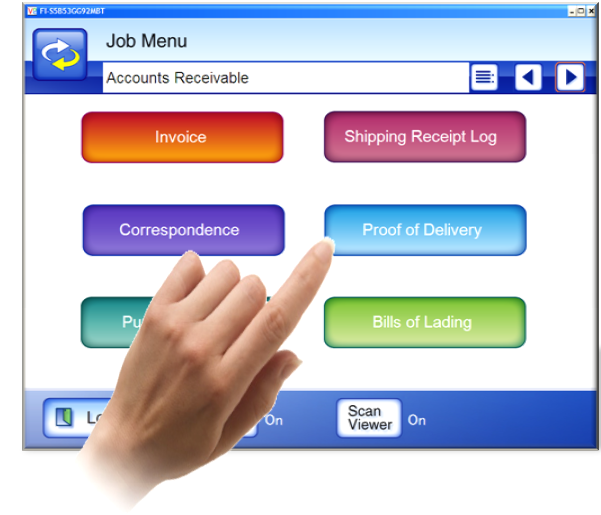
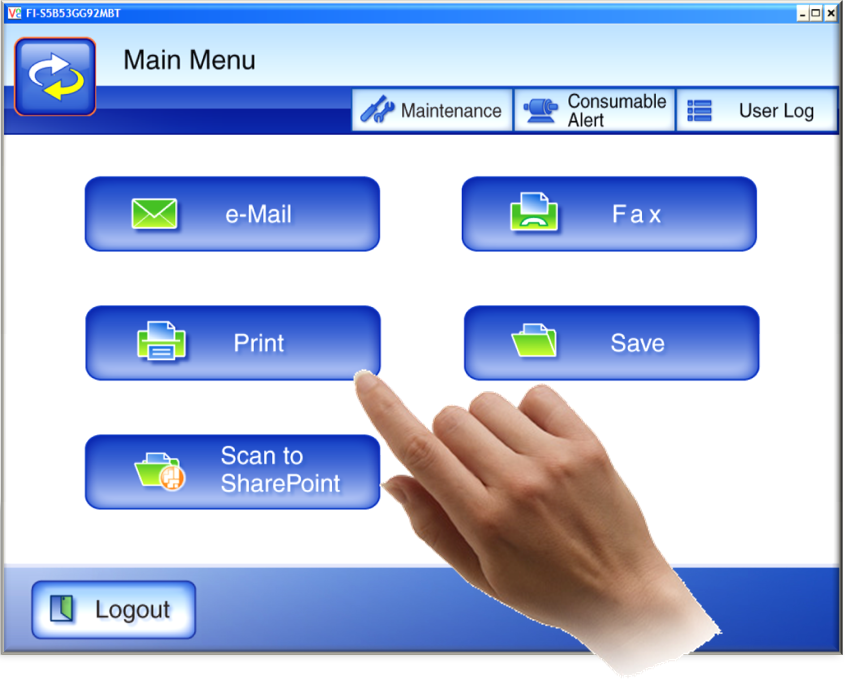
A Network Scanning approach to capturing scanned documents into ECM systems can use either the Manual Indexing or Automatic Indexing so the method itself is not necessarily the main appeal of a network scanning capture strategy.  Some of the many appeal points of network scanning, in contrast to USB-attached scanners, includes the flexibility of integration options, effective device management and, of course, ease of use.  Integration options using communication standards such as HTTP, Web Services and possibly even utilizing Cloud Computing infrascture can greatly benefit organizations by limiting their reliance on a proprietary vendor application or platform.  With a well-constructed network scanning platform, organizations are presented with a nearly limitless list of integration options with complimentary or even drastically disjointed systems.  All presented to the user through an ease to use, consistent touch screen interface.  Does this sound too incredibly different than the iPhone interacting with different sorts of data???  As I mentioned earlier and would like to re-iterate, true adoption of technology happens when users have a comfortable and pleasant experience. 


The flexibility of using a network scanning solution as a platform for each company/organization scanning requirement is a key appeal point for this method.  Most network scanners offer many useful features including scan to e-mail, folder, ftp, network fax and network printers.  Additionally, some network scanner platforms offer Software Developer’s Kits (SDKs) which enable third-party integration software to operate directly on the device which offers another level of tight integration possibilities to other complimentary systems and/or additional functionality.   And probably one of the most appealing attributes of network scanners, are the large high resolution/color touch screen interfaces.   This is truly innovative for users to interact with data directly in the ECM system via the touch of the screen.  These devices offer users an easy to operate and highly functional scanning experience that allows workers to get their scanning done quickly and efficiently. 

Use scenario: 

  • Shared environments
  • Remote locations
  • Multifunctional purpose
  • Platform for emerging technology

Benefits of Network Scanning: 

  • Consistent process
  • Limited learning curve
  • Easy deployment
  • Effective device management

Scanner requirements: 

  • Intelligent scanning
  • Large touch screen
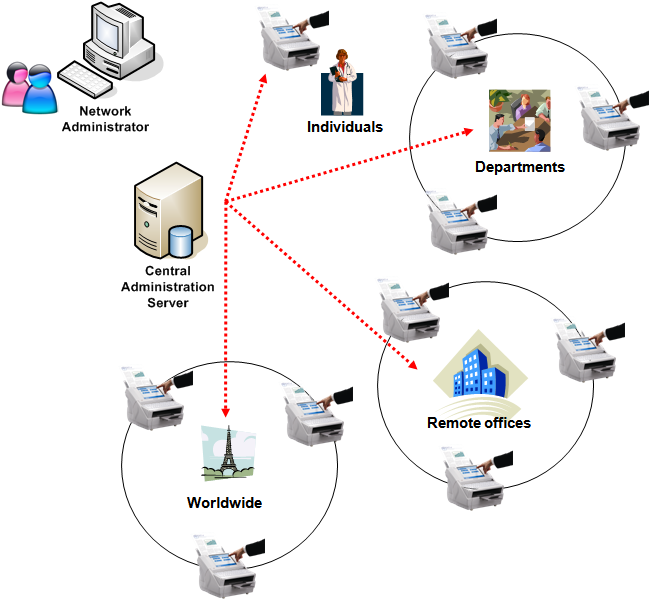
  • Central Administration
  • Third-Party integrations and connectivity

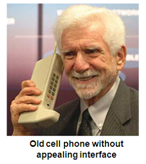
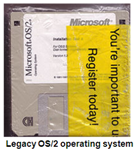
In summary, I hope that you can appreciate the value of carefully considering the importance of the user experience when developing your document capture strategy.  The behind-the-scenes technology can be the best in the industry but when resistance among users exists then true adoption suffers causing terrible inefficiencies.  Or, you might still be able to find a copy of the OS/2 operating system for those fancy cell phones… 
 

Sincerely, 

Kevin 
私の日本語を体験 – My Japanese Experience

This week I made my fifth trip to Japan for business.  It had been two years since my last visit and each time I come I gain a greater admiration of the Japanese people.

While I do enjoy seeing the sites and touring various areas of the country what I enjoy most is the interaction with everyday Japanese citizens in hotels, on trains or in restaurants.  They go out of their way to make everyone feel comfortable and welcome. I think they are especially considerate to western travelers and out-of-country visitors in general.  I stick out like a sore thumb with my blond/reddish hair color and goatee so it’s fairly obvious that I am a foreigner.

This particular trip was to the Tokyo area so the travel wasn’t nearly as brutal as most of my other visits but it still took a 10 hour flight, 1 ½ hour bus ride and 40 minute train ride to arrive at the hotel.  I hardly sleep when I come on these trips to intentionally avoid fatigue by trying to adjust to the time change. I just sincerely enjoy the time here so I manage to get by pretty much on pure adrenaline and get through all the meetings then I’m worthless for the next week after I get home.

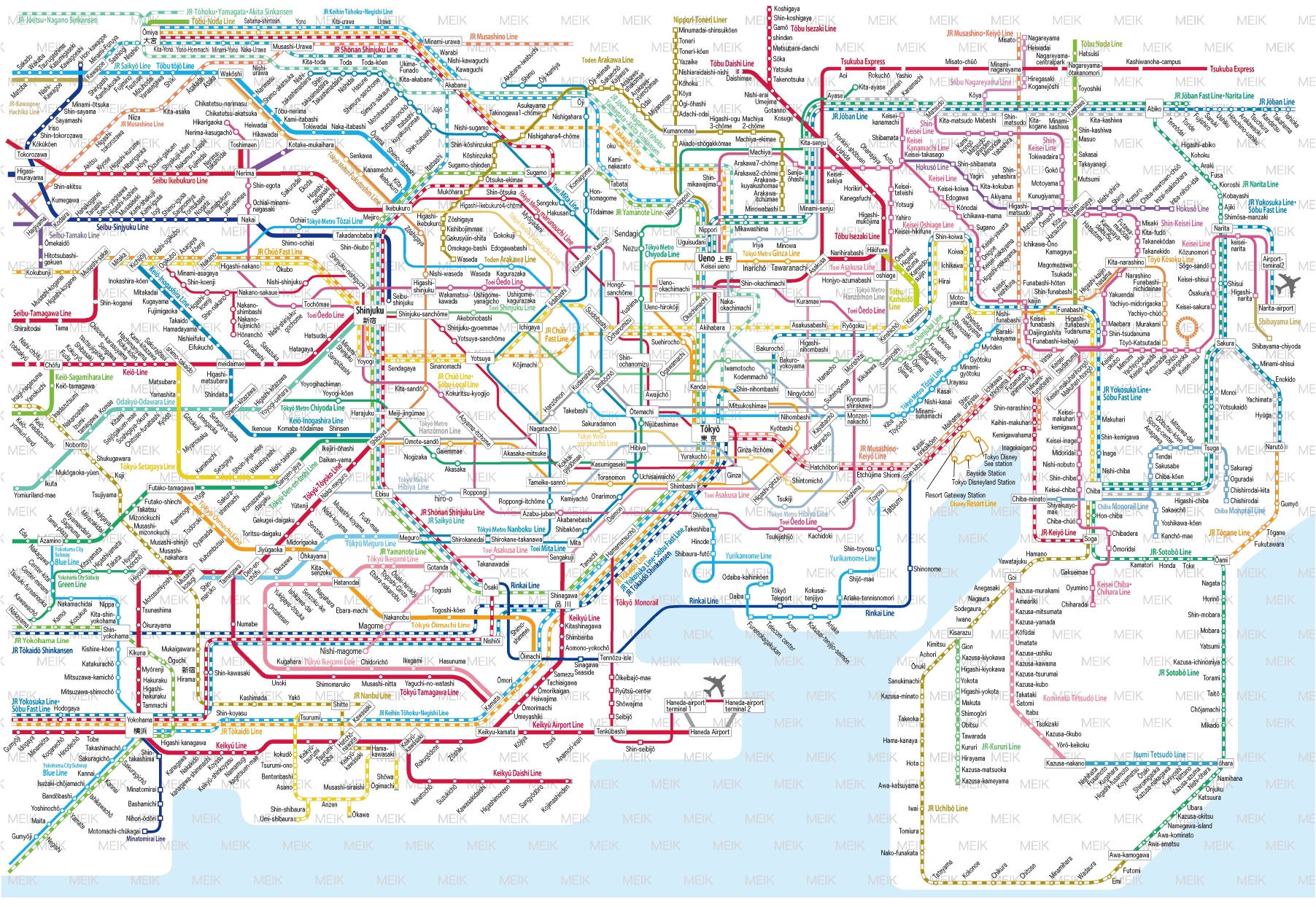
Tokyo Train Rail System

This was the first trip alone.  Typically I have traveled with other co-workers and they had been familiar with the train and bus schedules.  This time I had to figure out myself.  Surprisingly enough I didn’t get lost once!  Everything here is small compared to the United States.  Cars are smaller. Hotel rooms are MUCH smaller.  Although there is a large population throughout the Tokyo area I am always so impressed by the Japanese efficiency.  Trains absolutely arrive and leave on time, all the time.  If the train is to be there at 10:11 then it’s always there like clock-work so don’t be late!  Things just simply happen quicker and there is no room for wasted energy.

It’s always refreshing to visit and be part of this society even if it’s only for a few days.  Of course there are some negative things such as most people don’t own vehicles so you must rely on public transportation. Or the fact that everything is small could throw someone with claustrophobia into an episode.  But aside from a few inconveniences and adjustments that would take some getting-used-to much of the Japanese experience is what people should aspire to do.  Be kind and considerate.  Work hard and be respectful.  And, above all else, don’t miss the last train home at night or you are stuck!

Sayonara!

Hey you, yeah you – get into my Cloud

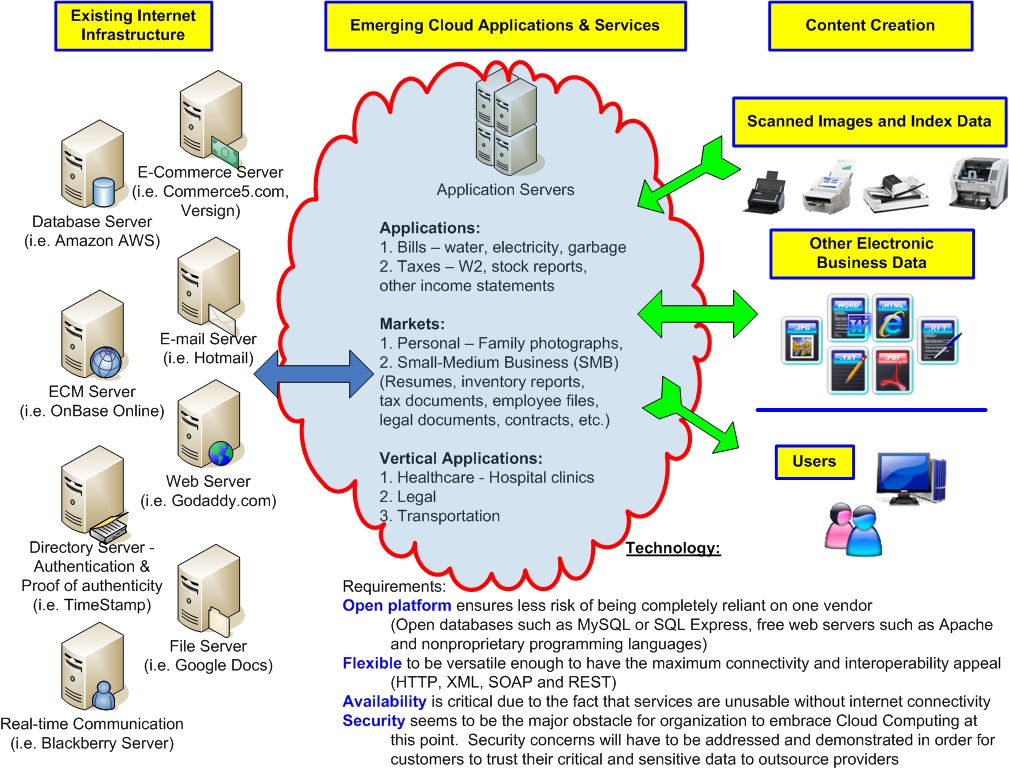
Just a quick visual on the emerging Cloud Computing market to create some discussion. Thoughts? Comments?

A quick visual on the emerging Cloud Computing market to create some discussion.  Any thoughts, commentary or discussion on this topic are welcome.
.
Click image to view full size diagram.

.

Fun in the Sun & The “BurritoZilla”!

This weekend was fun. It’s the first signs of Spring coming and the weather is wonderful. Saturday was probably around the low-80’s at the high and Sunday was even better in the low-90’s is my best meteorological guess.

Saturday we went out to get some household essentials but also some plants and herbs. Although we picked up a few herb plants, some of the stuff we want is a bit more particular especially if you’ll be eating the stuff (al la..herbs). We thought it was best to call it a day on Saturday and then head down to a local plant and garden specialty place on Sunday. I don’t think the stuff at the specialty place was any better and way more expensive. I think if you want quality then you have to grow it yourself.

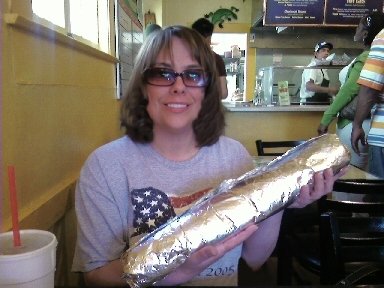
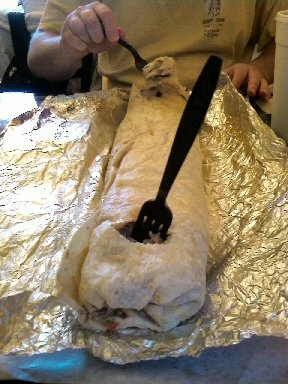
After the essentials shopping and plant/herb store we decided to head and get some lunch at this place we saw recently on the History Channel’s “Man vs. Food”. The place is called Iguanas and their gigantic burrito is called the “BurritoZilla”. It’s 18 inches and 5 pounds of Burrito gluttony! The atmosphere of the place was fun because it was tightly integrated into the college lifestyle and atmosphere. It’s on the San Jose State University campus. Brandee was observant to the fact that after ordering our food and taking our seat, nearly every patron in the place was staring (and very obviously so) at us while we tried to dine on this mammoth burrito. As much as we tried to inflict damage to this 18” BurritoZilla, we only managed to finish about 2 total inches and less than a half-pound, leaving 16” and 4.4 pounds of meat, beans and cheese to go. We brought the thing back and cut it into four full-size servings then froze them into bags as leftovers.

On Sunday we spent the day getting some additional planting supplies at Home Depot, went to Hooter’s for lunch, then came home to clean and open the pool for the season. Brandee loves to go to Hooter’s more than me. Before the place was open and still under construction last year I jokingly suggested that we go there as we drove by. She was quite open to the idea and ready to go. I wasn’t really shocked but I was surprised at her level of enthusiasm to go. Now nearly every time we are in the Campbell area on the weekend; yep, it’s the Hooter’s we go! We really enjoy “people watching” in the place and especially how the girl’s treat the male clientele versus the female customers. It’s comic relief.

Our pool isn’t anything fancy but it’s a great relief when the temperature gets hot and it’s nice to take a cool dip. The pool is an above ground type that is 18 feet around and four feet deep. It’s certainly enough to float around in and be lazy. Earlier this week it was getting into the low-90 degree temperatures so we got to enjoy the water.

Overall it was a great, enjoyable, relaxing weekend and a fantastic kick-off to Spring.

Why a network scanner?

I often get asked this question so I decided to consolidate some of the compelling reasons organizations should consider dedicated network scanners:

Dedicated use device for scanning documents
• No need to wait for the copy machine to become free for use
• Versatile functionality without compromise of added complexity
• Advanced scanning functions performed transparent to user
• Ability to preview images before sending to destinations
• Simple operation easy to understand

General Office - Ease of Use
General Office Functionality

A dedicated scanning device that seamlessly integrates within an organizations existing network infrastructure can be of tremendous value to enhance work processes. Network scanners benefit organizations by decreasing the complex nature, yet not comprising access to important functionality. From users of these devices to network administrators and business managers to basically an entire organization, businesses in a wide variety of markets are benefiting from network scanning.

Uptime/Reliability
• Access to scanning functionality is not hampered by other possible failures of a multifunction device
• Limited physical moving parts decreases likelihood of hardware malfunction
• Straight thru paper path design helps decrease possibility of document jams
• Network scanners inherit attributes designed for mission-critical document scanners

Organizations can only realize the true productivity enhancement of their IT investment when their systems are performing at peak performance. Disruption in the work process wastes time, costs money and causes frustration among employees and customers alike. Dedicated network scanners have been designed with the sole purpose of document scanning and, therefore contain the hardware and software attributes organizations expect which make them desirable in mission-critical business applications. Organizations of all sizes have sought the quality and reliability of single-function document scanners for years. For example, one of these intangible qualities which are sometimes hard to measure is lost productivity caused by a mechanical malfunction of a multifunction copier. Downtime for maintenance is simply not an option.

Ease of Use
• Eliminate complexity and provide simply operation with large touch screen
• Simple touch screen driven scanning operation eliminates specialized training
• In the unlikely event of a document jam, easy jam recovery without damaging documents
• Multiple language support
• Programmable job function buttons can perform repetitive tasks with the touch of one button

Customization and Control
Customization and familiar user experience

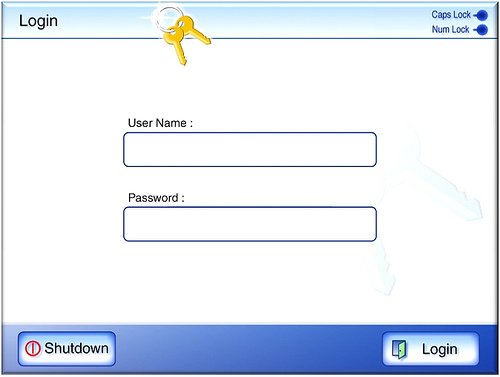
Large touch screen displays and integrated keyboards are two physical attributes which make digitizing documents with a network scanner simple. Similar to your on computer desktop at home which you may have customized with a particular look and feel, business users get the most value out of technology when they are familiar with the presentation of interfaces and have the versatility to customize screens. Network scanners adhere to this principal as well. For example, user state migration among devices presents the user with the same, consistent user experience based on their logon information no matter which device they decide to use.

Quality
• Image quality built on experience focused on document capture technology
• Paper path designs are careful engineered to excel at document handling including some with the capability of scanning plastic cards
• Document scanning technology hardware and software integration with specialize content management application providers

The quality of IT products typically is not appreciated until there are operational disruptions caused by failure such as a paper jammed in the device. Experience in developing feeding technology to efficiently handle documents of different shapes, sizes and weights have helped set dedicated document scanner vendors apart from other technology. Network scanners have inherited many of the qualities of traditional document scanners used in mission-critical applications and are bringing the opportunities of network scanning to organizations of all sizes. This focus on the importance of mission-critical scanning is evident in network scanners with specifically design features such as a straight paper path to reduce potential document jams and the ability to scan plastic cards through the document feeder. Additionally, the ability to preview images after scanning and before committing them to a destination is an example of a quality found in some network scanners.

Secure
• Restrict access to only authorized users with secure authentication
• User data such as username/password or image data does not reside on the scanner
• Data is encrypted on device to provide additional level of security
• No external USB port to hijack sensitive information
• Highly secure login authentication and transmission protocols (SSL)
• Lock-down job profiles to adhere to organization established policies

Whether it is for regulation, compliance or other reasons, data security plays a major role for network scanners. As a device that is ‘always on’ and connected to corporate networks, the risk of a data compromise of information has to be careful considered. From access to the devices themselves, or the manner in which information is electronically communicated to which level of functionality should be provided to particular users or groups is all functionality that organizations need to be thought through thoroughly. Network scanners provide these security features to assist organizations utilize devices in a manner which adheres to their specific established policies. The threat of data compromise comes in many fashions; not only externally but maybe internally and sometimes inadvertently, not maliciously.

Total cost of ownership
• Decrease deployment costs with remote administration tools
• Reduce ongoing maintenance costs with ability to push updates to devices from a centralized location
• Utilize existing network resources and systems to conserve budget
• Inexpensive and user replaceable consumables

Stretch your budget further using a dedicated network scanner through simple initial deployment of devices. Simply connect the scanner to the network then IT departments or network administrators can remotely configure and manage devices. No longer do organizations have to incur the expense or time consumed by having to send technicians on-site to setup devices. Additionally, on-going maintenance costs are drastically reduced by not having to replace expensive toner or fuser parts. Easily accessible user replaceable consumables provide a convenient way to keep the network scanner performing at optimal performance, yet decreasing the need for IT involvement.

Simple Deployment and Effective Device Management
Central Administration Server software

Integrated for Business Process Improvement
• Direct connectivity to back-end systems
• Index values and metadata sent directly into Content Management repositories
• Database lookups for validation
• Image enable your Line of Business application with Software Developer’s Kit (SDK) development

Some network scanner vendors offer optional Software Developer Kit’s (SDK) where developers can create unique integration screens to be displayed on the touch panel. These integrations offer tight interoperability with business systems such as Enterprise Content Management (ECM) repositories, Line of Business (LOB) applications, Electronic Medical Records (EMR), Enterprise Resource Planning (ERP) and other third-party solutions. In addition, user interface screens can be created with a custom look and feel to fit corporate branding. An integrated approach to network scanning enables organizations of all sizes to image-enable their current software applications and offers the assurance of delivering images directly into back-end servers without the traditional high costs, aggravation and loss of productivity involved with other approaches.

Integrated Software Applications to Improve Business Efficiency
Third-Party Software Solutions - Integrated